The Rapid Elearning Blog

Archive for the ‘Series’ Category


drag and drop interaction essentials

There are three main ways to interact with the course: click, mouseover, and drag. While click-based interactions are the most prominent, a good drag and drop interaction is usually more engaging. In fact, anytime I feature a drag-based interaction in a blog post, I’m always asked how it was created.

Drag and drops are engaging, they let the user “touch the screen” or lean into the course a bit, and they’re novel because they’re not used as often as the other types. With that said, here is everything you need to know about drag & drop interactions from previous posts:

essentials of drag and drop interaction

So there you have it, everything you need to know to get started building effective and engaging drag and drop interactions for e-learning. And if you want to learn to build them, check out these tutorials and take part in these drag and drop challenge activities: challenge #16 and challenge #21.

Is there anything you’d suggest when building drag and drop interactions?

Events

Free E-Learning Resources

Want to learn more? Check out these articles and free resources in the community.

Here’s a great job board for e-learning, instructional design, and training jobs

Participate in the weekly e-learning challenges to sharpen your skills

Get your free PowerPoint templates and free graphics & stock images.

Lots of cool e-learning examples to check out and find inspiration.

Getting Started? This e-learning 101 series and the free e-books will help.


subject matter expert e-learning

Subject matter experts play a key role in the success of our courses. This is part three of the series on how to work with subject matter experts based on tips shared by your peers.

First, we discussed how to set expectations and then we looked at how to manage the relationship with your subject matter experts. Today we’ll explore how to get them to help you build great e-learning courses.

Working with Their Subject Matter

  • Ask the subject matter experts to explain things to you in layman terms, as if you have no knowledge about the subject.
  • During the information gathering phase – everything is in. Never say “no” at this stage.
  • Listen and gather as much information as you can before stating what you can or cannot do in the course. You don’t want them to self-edit and possibly neglect critical information.
  • Keep content within the confines of the training objectives.
  • Don’t enter into design, theme, look-and-feel discussions until the raw content is decided upon as it distracts subject matter expert from giving you the information you require.
  • Don’t rely on your subject matter experts giving you the information you need – ask the right questions. Later compose answers and then let them review and make edits.
  • Separate “need to know” versus “nice to know” information and performance-based tasks.
  • If you work with several subject matter expert on the same subject, but with different expertise, let them review and structure each other’s work. That way, they look from a distance at the content, and the overlap between their comments will highlight the most important content.
  • Ask subject matter expert to separate what’s essentials from stuff that can be found elsewhere via other resources. Those can be referenced in the course.
  • If you’re the subject matter expert and the developer, be prepared to be creative, start afresh and don’t be too protective of your course material.
  • If the list of content requirements from your subject matter expert is unwieldy, ask them for the top 3 or 4 things they want the learner to take away from the course. It can help focus on the most important stuff.
  • Don’t expect them to change their content the first time you see it. Take it. Go away. Read it and make notes. Then come back with questions that help them think about the learning experience.

convert PowerPoint into e-elearning subject matter experts

Help Them Think Like an Instructional Designer

  • Help the subject matter expert understand the basics of instructional design. There’s no need to share a firehose of info when all they need is a small sip. Share a few e-learning examples and perhaps a few simple articles on how to build good e-learning.
  • New learners don’t need to know everything that the subject matter expert knows.  A subject matter expert expertise comes from years of industry experience, but the average 20-minute e-learning course is not intended to provide an encyclopedic knowledge of the subject.
  • Offer ideas to show how to transform their knowledge into great interactive content.
  • Help the “expert” to identify the key intentions of the learning activity with the goal of getting them to strip their material down to the bare essentials. And then build up.
  • Keep the end learner in mind. If you don’t understand it, they won’t.
  • Get them to focus on performance goals and not course information. What are people supposed to do?  Use their knowledge to discover work-based scenarios to bring the key learning points to life.
  • Bounce off the information you get from your subject matter expert with your potential learner group.
  • Ask subject matter expert to put themselves in the learner’s shoes (to help them recognize that you might not need to cram all that detail into the course).
  • Remind the subject matter expert to focus on actions – instead of telling us what new learners should know, tell us what actions they should be able to take.

How do you work with your subject matter experts to make sure you get the right content? Share your comments here.

Storyline 0

David Charney does a great job showing his original copy of Storyline 0 from the early 80’s which is great to compare to the newly released Storyline 3.

Events

Free E-Learning Resources

Want to learn more? Check out these articles and free resources in the community.

Here’s a great job board for e-learning, instructional design, and training jobs

Participate in the weekly e-learning challenges to sharpen your skills

Get your free PowerPoint templates and free graphics & stock images.

Lots of cool e-learning examples to check out and find inspiration.

Getting Started? This e-learning 101 series and the free e-books will help.


subject matter experts relationship

This is part two of the series on working with subject matter experts when building e-learning courses. In the previous post, we looked at how to set expectations and some simple project management tips. I also shared a link to the free e-book, Essential Guide to Working with Subject Matter Experts.

Today, we’ll look at what it takes to build a good working relationship with your subject matter experts. I always take a short term and long term view. In the short term, I want to make sure that the project moves forward successfully. And the subject matter expert plays a critical role.

In the long term, it’s all about networking and building relationship within the organization. The more you know and the more people you know, the more valuable you’ll be to the organization. And you never know when you’ll need that person’s help on future projects. A good relationship proves valuable.

subject matter experts are your friends

When asked about working with subject matter experts, here’s what your fellow e-learning developers shared:

  • They are called subject matter expert for a reason – don’t be patronizing because without them we wouldn’t be doing this.
  • Be respectful of their time, especially if they’re not working on the project and only providing assistance.
  • Help them save time. You can do this by reducing their workload. Do some research and pre-work that helps them not have to provide all of the content.
  • Show that you care. They won’t care what you know until they know that you care.
  • Be nice. If that doesn’t work, then bribe with chocolate!
  • Make them feel important. They tend to have big egos. [Tom’s note: not all of them suffer from big egos unless you’re working with doctors and lawyers. 🙂 ]
  • The subject matter experts have a lot of knowledge to impart. They will be keen to ensure that the students have access to that.
  • Keep a poker face when you hear things you do not like or cannot do. Just listen and record. You can fix things later.
  • We may use the same words but they don’t always mean the same things. Make sure that terminology is understood by both developer and subject matter expert.
  • Define your role to them in concise, clear terms so it is less threatening for them (especially when it is time to cut out “nice to know info”).
  • Be ready for them not to recognize your skill set.
  • Praise, praise and more praise for their cooperation, input, and feedback.
  • Get their buy-in at every stage of the process (if they’re involved in that level of detail).
  • Face to face is better than an email sometimes.
  •  This is a different style of learning.
  • Let their managers know how much they’re contributing.

What do you do to manage the relationship with your subject matter experts?

Events

Free E-Learning Resources

Want to learn more? Check out these articles and free resources in the community.

Here’s a great job board for e-learning, instructional design, and training jobs

Participate in the weekly e-learning challenges to sharpen your skills

Get your free PowerPoint templates and free graphics & stock images.

Lots of cool e-learning examples to check out and find inspiration.

Getting Started? This e-learning 101 series and the free e-books will help.


Best E-Learning Posts of 2015

December 29th, 2015

best e-learning posts 2015

2015 was another great year in an industry that’s still really hot. I hope you had a great year, too. Here’s a rundown of some of this year’s rapid elearning goodness.

Things You Need to Know

Before we review the best elearning posts for 2015, here are some important things related to this blog and the community.

Best E-Learning Posts for 2015

Here is a solid collection of blog posts for those getting started with elearning and who want to learn more.

best e-learning posts for instructional design

Best E-Learning Posts with Free Downloads

We all love free stuff so here’s a list of all the 2015 blog posts with free assets, applications, and templates.

best e-learning posts with free templates, free stock images, and free downloads

I’m excited about 2016 and hope you are, too. Have a great one!

Events

Free E-Learning Resources

Want to learn more? Check out these articles and free resources in the community.

Here’s a great job board for e-learning, instructional design, and training jobs

Participate in the weekly e-learning challenges to sharpen your skills

Get your free PowerPoint templates and free graphics & stock images.

Lots of cool e-learning examples to check out and find inspiration.

Getting Started? This e-learning 101 series and the free e-books will help.


myths about rapid e-learning mistakes

Go to a learning conference today; use the words PowerPoint and e-learning in the same sentence and, typically, you’ll get lots of eyes rolling. In minutes, you’ll hear clothes tear and see clouds of ash being flung about as the experts lament the destruction of human civilization. Why all the fuss?

In this 5-part series, we’ll explore common misconceptions about rapid e-learning development and discuss ways that rapid e-learning can help you do a great job and get the results you want.

Look over the posts and tell me what you think. Are there any other myths that need busting?

Events

Free E-Learning Resources

Want to learn more? Check out these articles and free resources in the community.

Here’s a great job board for e-learning, instructional design, and training jobs

Participate in the weekly e-learning challenges to sharpen your skills

Get your free PowerPoint templates and free graphics & stock images.

Lots of cool e-learning examples to check out and find inspiration.

Getting Started? This e-learning 101 series and the free e-books will help.


The Rapid E-Learning Blog - rapid elearning basics

This 7-part series brings you up-to-speed with some basic ideas about rapid elearning and how to get your project off the ground.

  1. So You Want To Be An E-Learning Hero?
  2. 5 Ways To Jump Start Your Next E-Learning Project.
  3. What Everyone Ought To Know About Designing An E-Learning Course.
  4. Build A Simple E-Learning Project Plan.
  5. How To Get The Most Out Of Your Subject Matter Expert.
  6. Understanding Multimedia For Rapid E-Learning Design.
  7. I Just Finished My Rapid E-Learning Course. Now, What Do I Do?

A lot of people ask me about good books to read. There are more books than I can list. However, I did a recent post where I discussed a few that offer a good starting point if you want to get started.

What else do you think beginning rapid elearning developers need to know?

Events

Free E-Learning Resources

Want to learn more? Check out these articles and free resources in the community.

Here’s a great job board for e-learning, instructional design, and training jobs

Participate in the weekly e-learning challenges to sharpen your skills

Get your free PowerPoint templates and free graphics & stock images.

Lots of cool e-learning examples to check out and find inspiration.

Getting Started? This e-learning 101 series and the free e-books will help.


fishing.gif

There are a lot of assumptions about rapid e-learning . However, many of them are not accurate. This is our last post in the series, 5 Myths About Rapid E-Learning.

There is a lot of concern about the automated nature of the rapid e-learning tools—that they’ll take creativity out of the process and everything will look the same. This might be true for some; however, the reality is that the only thing that hinders your creativity is you.

One of the things that I find most exciting about rapid e-learning is that I have the tools in my own hands and am not dependent on others to build the training. One of the most frustrating parts of the e-learning development process is working with the programmers. Because they are expensive and have many time constraints, even if you have a good idea, a lot of times you cannot implement it because you’re already committed to a specific direction. This is not the case with rapid e-learning tools.

With rapid development tools you have a lot of latitude and flexibility in changing your project design. If you have solid end-to-end skills you can leverage them to create very good and engaging training courses.

Here are some tips on leveraging the creative opportunities available with the tools.

  • Use all of the multimedia capability. PowerPoint and Storyline have nice animations that are underutilized. With some practice it is easy to replicate sophisticated animations.
  • Create engaging and interactive courses. Engagement can mean that the courses are visually appealing and have interactive learning elements. Look at what people are doing in more traditional e-learning courses. Try to mimic their styles and see what features you can build in your courses. If you step away from the bullet point look, you can create visually interesting training. In addition, there is no reason why you cannot build more interactivity in the courses. Two great books to help you learn to do this are: e-Learning by Design and Guide to E-Learning. Here are some other book recommendations.
  • Win an award. If you want to be creative in the work you do, then find industry awards and create projects that you can submit. If you do this as a habit, you’ll find that you are pushing yourself to build the best training out there.

The e-learning world is rapidly changing. The tools are easier to use and quickly bring knowledge and skills to your learners. While there are some challenges, it is an exciting time to be in the industry. Remember, for every complaint about rapid e-learning there’s probably an opportunity to demonstrate your value. Take advantage of those opportunities and you’ll successfully change with the world.

Events

Free E-Learning Resources

Want to learn more? Check out these articles and free resources in the community.

Here’s a great job board for e-learning, instructional design, and training jobs

Participate in the weekly e-learning challenges to sharpen your skills

Get your free PowerPoint templates and free graphics & stock images.

Lots of cool e-learning examples to check out and find inspiration.

Getting Started? This e-learning 101 series and the free e-books will help.


e-learning tips

Have you been following our series, 5 Myths About Rapid E-learning? We’ve already covered a lot of ground.

  1. Myth 1: Rapid E-learning is Crapid E-learning!
  2. Myth 2: A Rapid E-learning is a Second-Class Product!
  3. Myth 3: A Rapid E-learning Tool in the Hands of a Subject Matter Expert is Not Good!

Let’s keep moving!

The world is changing and that’s not going to stop anytime soon. To remain competitive you need to change with the world around you. The trend with e-learning is towards rapid development because it meets a legitimate business need.

As more subject matter experts (SME) develop e-learning courses, they’ll look to your expertise. You might see your job shift from one of course developer to that of SME coach.

Although years ago when I was building PowerPoint slides for a living, I was worried that one day someone would realize how easy it was and I’d be out of work. This never happened. It’s possible that you’ll actually get more e-learning work than less.

I figure that as the tools are easier to use, that will spark more desire to build and deliver training information. Thus, the content owners like the SME will be pressed to share even more information, which might mean a greater need for rapid e-learning developers to lift the burden from the SME.

As the tools evolve, there will be less need for specialized skills like flash programming and more demand for people who can do end-to-end development. That means that if you are an instructional designer, you’ll need to broaden your skill set. You’ll need to know a little of everything: project management, performance consulting, marketing, communications, web technology, audio, video, graphics design, and so on.

The secret is to develop the skills now.

Quit complaining about the SME. Instead take the opportunity to broaden your skill set and become more valuable to your organization.

  1. Change the focus of what you do. Stay on top the training industry and become a resource to your organization. If you have subject matter experts who use rapid development tools help them do a better job using them. Look for ways to introduce people to the rapid development tools. Find the “go-to” experts in the organization. Help them save time and you’ll be a hero. The key is to use your expertise to empower others to do their jobs well. If you do this, you’ll always have a job.
  2. Leverage your community of users. One of the best resources for learning and enhancing your skills is to participate in community forums. There are forums for software users, as well as any of the other skills you need to develop. It is a great way to develop new skills, get help on projects, and network with your peers.
  3. Continue to learn. Make a list of the end-to-end skills you’ll need and then develop a plan to learn them. I like to look at what others do and see if I can replicate that. For example, when I want inspiration for the look of my course, I’ll go to a site like Template Monster. Reviewing their flash templates gives me ideas about interface design and color schemes. As a routine, I review award winning courses and find ways to incorporate what they did in my own work.

You cannot control this world, but you can control what you do. Become an expert who brings value to the organization or customers and you’ll always have a job.

In our final post, we’ll discuss the myth that your creativity is hindered by rapid elearning tools.

Events

Free E-Learning Resources

Want to learn more? Check out these articles and free resources in the community.

Here’s a great job board for e-learning, instructional design, and training jobs

Participate in the weekly e-learning challenges to sharpen your skills

Get your free PowerPoint templates and free graphics & stock images.

Lots of cool e-learning examples to check out and find inspiration.

Getting Started? This e-learning 101 series and the free e-books will help.


subject matter experts build e-learning SME

We’ve been busy busting myths about rapid e-learning in our 5-part series, 5 Myths about Rapid E-Learning. So far, we’ve learned that rapid development doesn’t make the e-learning course bad. We’ve also demonstrated that rapid e-learning is a first class approach to online training. Today, we’ll explore whether or not it’s good for subject matter experts to use rapid e-learning tools.

Many people are concerned that subject matter experts (SME) are not equipped to develop effective training courses. In some cases, this might be true. However, it doesn’t change the fact that many of them are already delivering some sort of training. They might be answering calls, presenting at meetings, or sharing at the water cooler. Whatever the case, those who design training do so because the need exists. It only makes sense that the rapid development technologies become part of what they do.

There are many benefits to equipping your SME with rapid authoring tools. The training can be developed just in time. Since it is web-based, it can be made available to others in the organization. This saves the SME time of presenting the same information over and over again, and it allows the information to be shared with those who need it, but might not have access to the SME.

The concern about the quality of training is legitimate. Here are some tips to help you.

  • Help Your SME. Here’s a list of this blog’s resources to help your subject matter experts build better e-learning.
  • Free Help & Resources. Take advantage of the free e-learning 101 series and the free e-books.
  • Become a coach. Accept the fact that the SME will continue to build e-learning. The tools are only going to become better and easier to use. In addition, most people who are in training, started as a SME. Instead of trying to keep the tools from the SME, be proactive in getting the tools to them and then become a coach or mentor to help them do a better job teaching what they know.
  • Become a SME. It’s a lot easier to train a SME to use a tool like the Articulate suite than it is to train you to replace the SME. The reality is that your job is going to change. If it bothers you that the SME are empowered to build their own e-learning content, now might be the time to consider a change.

The World is Changing

More and more of our interaction online is based on our ability to create and manage our content. Why shouldn’t we expect this to transfer to our work environment?

Be proactive by supporting this change and the people who are using the rapid e-learning tools. In our next post, we’ll look at how rapid e-learning will affect your job.

Events

Free E-Learning Resources

Want to learn more? Check out these articles and free resources in the community.

Here’s a great job board for e-learning, instructional design, and training jobs

Participate in the weekly e-learning challenges to sharpen your skills

Get your free PowerPoint templates and free graphics & stock images.

Lots of cool e-learning examples to check out and find inspiration.

Getting Started? This e-learning 101 series and the free e-books will help.


rapid e-learning tools make it easy to create good courses

In the first part of this series, we busted the myth that Rapid E-Learning Is Crapid E-Learning. Today, we’ll explore whether or not it’s the Cinderella of e-learning.

Even as many of the pundits acknowledge the value of rapid e-learning, they will assign a second class status to it as a training vehicle. They usually say that its value is limited to quick, just-in-time content that is more information-based than learning-focused. Since most organizations need training delivered in just a few weeks versus months, there’s some truth to that. However, it’s not a complete picture.

There’s always a need to do the quick, “down and dirty” training and rapid e-learning tools are great for that. However, the tools have changed and are empowering people in new ways. The tools are still easy to use, yet now are packed with features that empower non-multimedia developers to create engaging and interactive training courses.

At one point, the goal might have been to quickly convert a PowerPoint file and put it online, but today the tools allow you to build training courses that have a standard user interface and include the ability to add audio, video, and custom animations. This matches a lot of what you get when you buy vendor developed training. On top of that, you can create all sorts of interactive content. Just look at some of the weekly challenge modules to see what people are building.

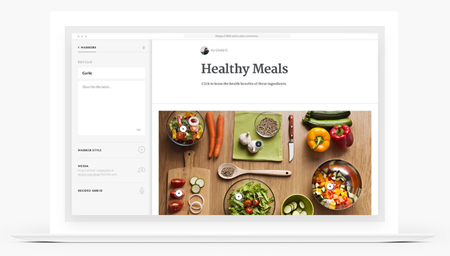
On top of increased functionality, the output of the tools has become impressive. A great example is Rise. It is easy to use, and has a very polished and sophisticated feel. Imagine trying to custom build a similar product. It would cost thousands and take months to develop. It definitely would be outside the scope of most training courses. Not today. Rapid e-learning tools are making the trainers look like stars.

rise e-learning example

Next Generation Tools

Tools like Rise are just the first step. The next generation tools like Articulate 360 will give more power to the content owners and instructional designers to quickly build interactive training courses that not only meet the time needs of the organization, they’ll also have advanced interactions to create a more productive e-learning environment. Eventually, anyone who wants to design training will have the power to do so without the need for a flash programmer; and this training will rival the best of what you see today.

Leveraging the Tools to Make Your Courses First-Class

  • Rapid development is already first class. Organization’s want performance that gets results. Training is one piece of that puzzle. Considering the cost of training and whether or not it really brings value, rapid development tools are very attractive. Their courses are built at a fraction of the cost, and traditional training methods are challenged to show that their more expensive approach brings greater return on the investment.
  • Develop a coursel mindset. I like to think of coursels as “course morsels.” They are bite-sized chunks of information and learning. Instead of building large training programs, make your strategy to build a series of coursels that address very specific topics. With the coursels you can develop just-in-time material to address immediate needs. In addition, you can tie your coursels together to create whole courses. You can also use the coursels to blend with and augment other training in the organization.
  • Look at the internet. The internet is changing the way we interact with information. The workplace is being filled with a whole generation of workers that expect to create and share content. Everyone in the organization is an expert in some capacity. In addition, there is greater demand for collaboration and knowledge transfer. Rapid development tools allow people to share what they know at the point of demand. There is an opportunity to use these tools as you explore effective informal learning strategies and the development of personal learning environments. This is an important consideration moving forward.

Rapid e-learning is a first class approach to training because is saves you time and money. Be creative. Learn to leverage the tools to build engaging and interactive training.

Next, we’ll explore the myth that empowering your subject matter experts with rapid e-learning tools is bad.

Events

Free E-Learning Resources

Want to learn more? Check out these articles and free resources in the community.

Here’s a great job board for e-learning, instructional design, and training jobs

Participate in the weekly e-learning challenges to sharpen your skills

Get your free PowerPoint templates and free graphics & stock images.

Lots of cool e-learning examples to check out and find inspiration.

Getting Started? This e-learning 101 series and the free e-books will help.


e-learning value and myths of e-learning

In this series, we’ll look at some popular myths about rapid e-learning.

Because the tools are easy to use and just about anyone can create “e-learning” with them, some assert that the tools create bad e-learning. It’s the same argument you hear about PowerPoint. While this might be true about some of the e-learning courses developed with rapid e-learning tools, noted elearning archaeologist, Werner Oppelbaumer, is quick to point out that crappy e-learning existed years before the rapid development tools came on the scene. In fact, he goes on to say that crappy training existed before e-learning was even a form of training.

This isn’t just a recent phenomenon either. Apparently, thousands of years ago, men in bed sheets would pull productive farmers from their fields and bore them with lectures on the nature of justice and the ideal republic.

Look, I’ll admit there’s a lot of bad e-learning out there. I’ve even created some. However, it doesn’t exist because of the tools. It exists because the training isn’t designed well. You cannot blame the tools for poor learning design. The secret is learning to use the tools appropriately. The reality is that having rapid e-learning tools and a strategy to use them is important in today’s business climate.

To get the most out of the tools you need to include sound instructional design and use the tool’s multimedia capabilities to create engaging and interactive training.

  • Use a template. One problem with poor e-learning modules is that you have users who aren’t trained instructional designers. It’s important to help them learn some basic instructional design principles. If you cannot spend a lot of time with them, at least create a simple template to help them organize the information. You might not get the most dynamic training course, but it will help move it in the right direction. In addition, don’t underestimate the abilities of your subject matter experts. Most want to do a good job; they just might need a little help.
  • Look at what others are doing. You’ll get a better idea of what’s good and bad if you look at what others are doing. There are a lot of examples of e-learning courses and modules. In addition, look at industry award winners.
  • Burgers and fries. If I’m in a hurry, I’m more apt to stop at McDonald’s than at a fine French restaurant for a seven-course meal. I wouldn’t make a regular meal of fast food, but many times it’s just what I need….or all I want to invest in. The same can be said for training. Maybe there’s a time where simple click & read training is all you need.

Rapid doesn’t mean crapid! You are in control and can determine the quality of what you produce.

Next, we’ll expose the myth that rapid e-learning is a second class approach to training.

Events

Free E-Learning Resources

Want to learn more? Check out these articles and free resources in the community.

Here’s a great job board for e-learning, instructional design, and training jobs

Participate in the weekly e-learning challenges to sharpen your skills

Get your free PowerPoint templates and free graphics & stock images.

Lots of cool e-learning examples to check out and find inspiration.

Getting Started? This e-learning 101 series and the free e-books will help.


project management for e-learning

In previous posts, we looked at everything from customer service to understanding multimedia. In this series, we discussed how to jump start your next project, how to build a project plan, working with your subject matter experts, and what you need to know about rapid e-learning.

What Do You Do When Your Project Is Complete
This question takes us back to a previous post where we looked at jump starting your next project. As I mentioned earlier, we’re all in the same boat. With each e-learning project, we become a little better at doing the next one.

The secret is to keep learning. Here are some post project tips that should help you going forward.

Let Everyone Know How Brilliant You Are

Quite a few years back, I was telling my boss about the good work I was doing. With a wink, she told me that “my actions spoke so loud, she could hardly hear me. ” While I appreciate her insight, over the years I’ve come to realize that sometimes your boss can’t hear your actions, so you might want to let her know anyway.

It’s important to collect and report the metrics from the e-learning course. Your customer and manager needs to see the comparison between the project goals and outcomes.

Sometimes you have no control over the course’s success, or whether it actually makes a measurable improvement. In that case, I recommend pulling together some information about the cost and how it compares to having it outsourced.

Service is Job #1

Look at your courses from a customer service perspective. Who are your customers? Client? Subject matter experts? Learners? Peers? You might find that you have multiple customers. What do you need to do to make sure all of their needs have been met?

As a routine, I do two things.

  • I like to get feedback from my customers. I have a simple survey that I send to ask how things went and what they’d recommend for the next project.
  • I send quick thank you notes to all who helped on the projects. I also like to CC: their managers. It’s a good way to maintain the relationship.

Who’s the Custodian

Put a reminder on your calendar to follow up with the person or group that commissioned the e-learning course. I recommend a 30-day follow up, just to see how things are going. I would also schedule at least an annual review of the project to see where it stands and if it requires any updates. There’s no reason why you can’t schedule that now instead of waiting a few months and possibly forgetting this step.

Do a Post Project Review

It’s important to capture lessons learned. Once the project is complete, you might find some value in sitting down with your peers and looking at the e-learning course together. Compare what you intended to do with the outcome. There’s always something that could be tweaked or done better the next time. Apply the lessons learned to your next project. You might even get some traction by sharing that with others in the industry via published articles or case studies.

Get Ready for the Next Project

There are many things you can do to prepare for your next project. Incorporate the feedback from this project into the next. Design your templates and questions. Take time to look at what others are doing. Follow the tips from the jump start your next project post.

I hope this information helps you learn and grow as a rapid e-learning developer. Feel free to drop a line or share some tips that you think add value.

Events

Free E-Learning Resources

Want to learn more? Check out these articles and free resources in the community.

Here’s a great job board for e-learning, instructional design, and training jobs

Participate in the weekly e-learning challenges to sharpen your skills

Get your free PowerPoint templates and free graphics & stock images.

Lots of cool e-learning examples to check out and find inspiration.

Getting Started? This e-learning 101 series and the free e-books will help.