The Rapid Elearning Blog

Archive for the ‘Instructional Design’ Category


online communication process header

Years ago, I was enrolled in a course on video production. Each week we were given assignments to do. At the end of the week, the whole class would sit down and we’d review our projects.

One of the objectives was to have the other students share what they got out of the video before they knew what I intended to communicate. It was always eye opening to see how others perceived what I produced. Often what the audience got from the video was not what I had intended.

Through that process, I learned that it’s not enough to just put information together and assume that somehow the viewer would understand what I meant. Instead, it was my job to design my video in a way that allowed me to communicate my message to the viewer. The same principle holds true for elearning.

Online Communication Starts with Understanding the Communication Process

Clear communication is critical when you design your elearning course because what you present isn’t always received by the learner the way you intend it. If your learners aren’t getting what you intend for them to get, then most likely you won’t meet your learning objectives.

Here’s a simple illustration of what happens as learners go through an elearning course.

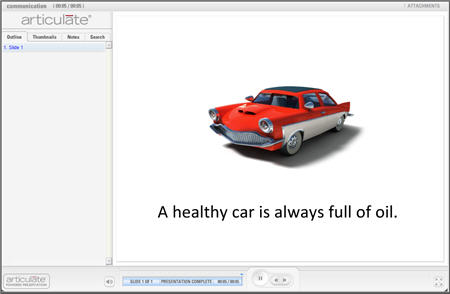
The first image below represents a screen from an elearning course on auto maintenance.
online communication example image

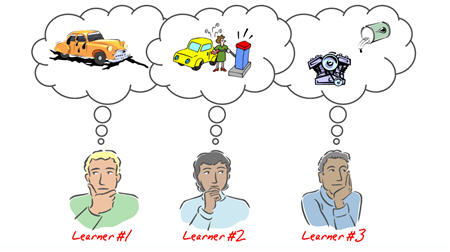
The second image shows how three different learners process the information. Notice that while they all get the same information, they each perceive it in a different way.
online communication example image 2

There are a number of reasons why the learners perceive information in different ways. Some come into the course with various levels of experience and expertise. There can be cultural or environmental differences. It also depends on the learner’s level of commitment to the course.

While you cannot control all of the perception issues, there are ways that you can remedy some of the confusion. Much of it is based on understanding the communication process and how that impacts learning. To get started, let’s look at what happens when we communicate.

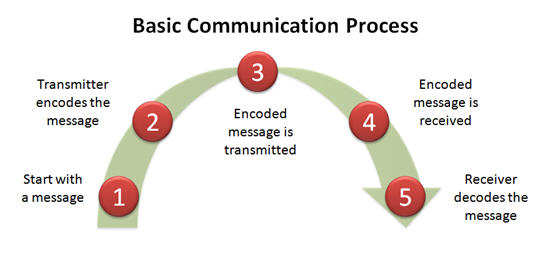
The image below represents a basic communication process.
basic online communication process

  1. It all starts with a message. The message has to go from one person to the next.
  2. The first person (transmitter) encodes the message into a signal that can be transmitted and received by the second person (receiver).
  3. The message is transmitted.
  4. Once the message is received, it is decoded.
  5. Then the receiver responds to the message. This process repeats itself, back and forth.

To make it less technical, think of how we communicate in various languages. Suppose you have two people. One speaks German, the other Spanish. In order for them to communicate, they need to find a common language. A common language allows them to use words that they can communicate and understand (encoding and decoding).

How Does This Relate to the E-Learning & Online Communication?

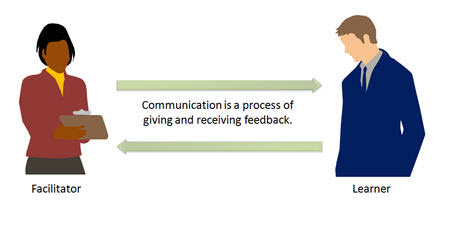
Before we look at the elearning process, let’s see how this relates to traditional learning. In a classroom environment, you are actively communicating. That means the facilitator is continually giving and receiving information. This happens during conversation and by reading body language and other communication cues. Because of this you can assess the learner’s understanding and your ability to communicate the lesson and then make any adjustments on the fly.

The communication process is a open where you are in a constant state of give and take.
open online communication

The elearning process is a little different because you do not have a way to alter the course content to enable better communication of your content. It is closed process. In an elearning environment you deliver content and the learner is dependent on processing it. Since the learner has no way to communicate with you, you do not know if the learner is “getting it.” Because of this, you have to build a way to assess the learner’s understanding and provide meaningful feedback.
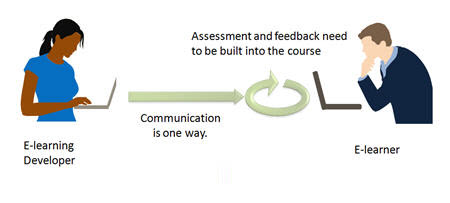
closed online communication

From my experience, this is where many elearning courses fall down. Typically, they are focused on content delivery and have limited opportunities to assess the learner’s understanding and provide the right type of feedback.

Looking at the communication process model above and applying it to elearning development, we see three opportunities.
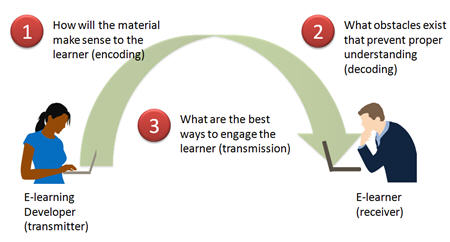
challenges to online communication

  • Determine how you will prepare the material so that the learner can make sense of it (encoding). In a figurative sense, you are “trying to speak” to the learner. The course needs to be in a “language that the learner speaks.” In the “healthy car” example above, an assessment could easily clear up the confusion. If the next screen had the learner simulate changing the engine oil, the first two learners would have altered their understanding.
  • Determine what obstacles exist that might prevent proper understanding (decoding). The better you know the learner, the better your course can be designed. A large part of effective communication in elearning is through establishing context. Going back to the “healthy car” example, if the screen had an image of the engine rather than the car, most likely the initial perception would have been correct because you are building a context for the information with the visual cue.
  • Determine the best ways to engage the learner (transmission). People learn best when the content is relevant to the learner. I see the transmission process as one of engagement. How are you engaging the learners and creating a conduit for them to receive the information? The course needs to be motivating, effective, and interesting. A lot of this comes as a result of it being relevant. Relevance is one of the best motivators.

Effective communication is important for success. The more active you are in considering the communication challenges in your course, the better you can design the learning experience. In the following posts, we’ll look at how to create effective courses.

I’m interested in hearing of some of the communication challenges you’ve had and what you’ve done to overcome them.

Events

Free E-Learning Resources

Want to learn more? Check out these articles and free resources in the community.

Here’s a great job board for e-learning, instructional design, and training jobs

Participate in the weekly e-learning challenges to sharpen your skills

Get your free PowerPoint templates and free graphics & stock images.

Lots of cool e-learning examples to check out and find inspiration.

Getting Started? This e-learning 101 series and the free e-books will help.


volunteer.gif

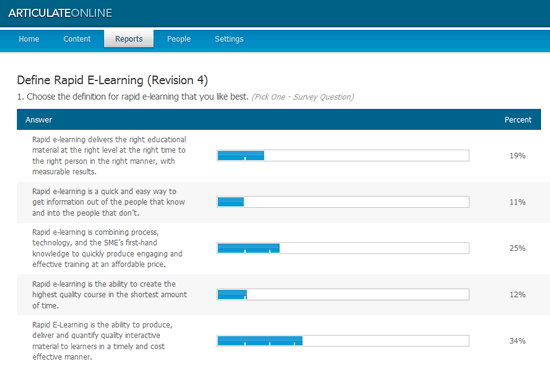
One of my first goals upon launching The Rapid E-Learning Blog was to understand how you define rapid elearning. You responded and we ended up with over 200 definitions.

I sealed the definitions in a tamper-proof envelope and took them to our crack team of etymologists. We ran an exhaustive battery of tests to determine the best definitions. From those tests, I was able to present five from which to choose.

final_survey

350×20_white.gif

After 3 weeks, the votes are in and the winning definition is from Bradley Mersereau.

Rapid E-Learning is the ability to produce, deliver and quantify quality interactive material to learners in a timely and cost effective manner.

Congratulations, Bradley! You receive a complimentary copy of Articulate Engage. Thank you to all who participated and voted.

Clear Communication is Critical to Effective Learning

The contest revealed that while we use the same words, we don’t necessarily say the same thing. There’s a context to our understanding that is buried beneath the words we use, and this context is not always evident. This is only magnified as we cross borders and train people from various countries and cultures.

It’s important that we don’t assume that our learners understand what we mean.

  • Build context for your e-learning course. Avoid presenting content without context. You’ll have more success if your learners are starting on the same page. Lay a foundation for understanding and then build on it.
  • Design the course to test the learner’s assumptions. You can build context if you can determine what the learner already knows. Do this by starting with some decision-making interactions.
  • Create clarity with a glossary. Sometimes it’s just good to have a glossary or some sort of resource where you can define specific terms or acronyms. It’s a lot easier than trying to explain everything. You can easily create one with a tool like Engage and then drop it into your course. Perhaps Bradley will lend a hand.

Learning is a Complex Process

The learning process is a lot like the diversity of the definitions. Things are not always black or white. Often there’s not a right or wrong answer, and sometimes people just have personal preferences that influence how they learn.

Many times, we approach training as a list of policies, procedures and metrics. Because of this, we design screen after screen of content as a “one size fits all” approach to learning. Unfortunately, rapid authoring can contribute to this.

Rapid e-learning tools are great because you can create and modify content quickly. The tools are also getting better at allowing you to create interactive content. The challenge is knowing how to leverage the rapid authoring technology so that the e-learning course you build is part of the real learning process and not just a required task.

  • Understand your learner. This is needs analysis 101. Don’t just create content in a vacuum. Find out how your learner uses the information in the course. Then build a course that works in that context.
  • E-learning can be more that individual learning. There’s no reason why you can’t leverage the technology to create a different e-learning environment. Why does it have to be one person behind one computer? Let’s get creative!
  • Combine the e-learning course with real world practice. There are many ways to build a learning process where the learner gets content online and practices using it in the real world.

There’s a Whole Community Waiting to Help You

I have enjoyed the emails and new blogs that I’ve received these past few weeks from e-learning developers all over the world.

Most of what we know comes from others and that’s why it’s important to be connected. There’s power in community. And as we engage each other we become better at what we do.

  • Take advantage of the great resources that are available to you at no cost. The Internet has opened the doors to all types of information that wasn’t readily available just a few years ago. There’s information and help for almost everything.
  • Connect with others in our industry. There are a lot of good e-learning blogs. You can connect with people from all over the world and tap into work experience, knowledge, and resources that are not always available to you in your work environment, especially if you work in a small organization.
  • Let your voice be heard. Create a blog or wiki. Share your thoughts and actively contribute to our industry.

We never stop learning. It’s just part of who we are.

Events

Free E-Learning Resources

Want to learn more? Check out these articles and free resources in the community.

Here’s a great job board for e-learning, instructional design, and training jobs

Participate in the weekly e-learning challenges to sharpen your skills

Get your free PowerPoint templates and free graphics & stock images.

Lots of cool e-learning examples to check out and find inspiration.

Getting Started? This e-learning 101 series and the free e-books will help.


relevant e-learning courses

Earlier today, I got an email about a baby moose that was born in someone’s front yard. As I looked over the email, I noticed that the ads on the side were pushing baby showers and buying cute baby outfits.

By design these ads create relevant links based on the text of the email. In this case the links were not relevant and completely out of the context of the email I was reading. I don’t need cute baby outfits. So I just ignored the ads. That’s what happens when you just create ads oblivious to the needs of a real person.

There’s a lesson in here for those of us who design e-learning. Want your learners to learn? Then create relevant content. If not they’ll ignore what they see in the course. It all goes back to a point I was making in the last post about understanding the learner’s needs. To have the most impact, the course needs to be relevant to the learner. 

Don’t get caught trying to sell baby gifts to someone reading about a moose.

Three Ways to Make Your E-Learning Content Relevant

1. Spend time with the learners in their environment.

A while back, I worked on a course for machine operators in a production environment. Much of the job was loading and unloading a high-speed machine. After spending a few days on the floor talking to the machine operators, I found that the machine intimidated many of the new users. It was extremely large, fast, and noisy. On top of that, the new users were continually reminded of how expensive it was and to not mess up anything. This affected their performance.

I learned a lot talking to and observing the machine operators. Because of the time spent with them, we built the core part of the training around preventive maintenance on the machine. Before they learned to operate the machine, they learned to take it apart, clean it, and put it back together. By the time they started working on the machine, they were no longer intimidated. As a result we ended up cutting a 90-day training process down to less than 2 weeks.

2. Be a bridge between the content owner and the learner.

Typically, courses are built around the needs of the organization or content owner. Many times this happens oblivious to the learner’s needs. Part of your role is to blend the organization’s needs with the learner’s needs.

It’s important to get the learners involved in the development and design of the user training. Learners are able to build a context for the information. New learners are especially valuable because they can share recent experiences and insights while they are still fresh.

3. Put the content in context.

In face-to-face sessions, you can get a lot of mileage when you step away from a lecture format and allow people to work through scenario-based challenges. It keeps the information meaningful and the learners are motivated to learn.

You can do something similar with e-learning. Page after page of content is equal to an online lecture. Change things up. Create branched scenarios and real-world interactions where the learner gets to practice using the information in a way that is relevant to the real-world environment.

You don’t want your learners to tune out and discount the important courses that you build. If you get them involved and keep the content relevant, you’ll have engaged learners.

What are some things you do to keep your elearning courses relevant?

By the way, here’s that moose. Although, I opted not to throw a baby shower or buy it a new outfit.

does a moose need e-learning

Events

Free E-Learning Resources

Want to learn more? Check out these articles and free resources in the community.

Here’s a great job board for e-learning, instructional design, and training jobs

Participate in the weekly e-learning challenges to sharpen your skills

Get your free PowerPoint templates and free graphics & stock images.

Lots of cool e-learning examples to check out and find inspiration.

Getting Started? This e-learning 101 series and the free e-books will help.


how to build good e-learning courses

Meet Customer Needs: A Tale of Two Cookies

I recently heard a story of two girls and their cookies. The first girl bakes a few dozen chocolate chip cookies and goes door-to-door to sell them. She finds selling the cookies difficult. Not everyone likes or wants chocolate chip. Some like oatmeal raisin. Some like peanut butter. On top of that, a dozen is a lot. Some only want six.

The other girl decides to go door-to-door and asks the neighbors what they want, taking orders specific to their needs. She then buys the ingredients she needs for each order, bakes the cookies, and delivers them to satisfied customers.

The first girl committed all of her resources to a product that many didn’t need or want. The second was able to manage her resources by committing them to a product that customers did want.

Build E-learning Courses People Want

There’s a lesson here for e-learning.

Training needs to be designed with the end-user in mind. Typically, we’re like the first girl. We build the training courses based on what we think and then try to sell them. In addition the course is built based on the curriculum rather than user’s needs. And then we commit all of our resources to building the course.

We should be like the second girl and learn to make cookies people need and want. Instead of building the course around information, we should build it around how the learner will use the information.

Today, with rapid development tools, like Articulate 360, we have the flexibility to bake the type of cookies that meets our users’ needs. In the past, it took months to design and build curriculum. Today, training can be built within days.

Since we can build and modify our training so quickly, we are in a better position to build it and get it to the users as they need it. If we find that the information doesn’t work for them or needs to be modified, we can do so on the fly. This saves time and money…and helps to satisfy the users.

“C is for Cookie…That’s Good Enough for Me.”

Here’s a simple cookie-inspired acronym to help you create learning based on the user’s need: OREO.

  • Order taking. Keep the cookie story in mind. Don’t just bake chocolate chip cookies. Understand the learner’s needs. Use your rapid e-learning tools to quickly pull together the online courses that people want to consume.
  • Results. Organizations spend money on training because they expect results. Design your training courses to meet real needs. As a rapid e-learning developer, you’re in a win-win situation. You can respond quickly to training needs at an attractive price.
  • Engaged learners. Build the learning experience in a manner that engages the learner. Engagement means that the course has to look nice and embrace proven techniques on how to present information visually. It also means that we need to engage the user’s learning process and make the course truly interactive. Get them to make decisions that mimic those in the real world.
  • Objectives. Make a promise to your learners: This training will not waste your time. Be clear on the objectives and build your training to meet them.

In future posts, we will pull our OREO apart and look at these steps in greater detail.

What type of cookies do you bake?

Events

Free E-Learning Resources

Want to learn more? Check out these articles and free resources in the community.

Here’s a great job board for e-learning, instructional design, and training jobs

Participate in the weekly e-learning challenges to sharpen your skills

Get your free PowerPoint templates and free graphics & stock images.

Lots of cool e-learning examples to check out and find inspiration.

Getting Started? This e-learning 101 series and the free e-books will help.


e-learning tips

Have you been following our series, 5 Myths About Rapid E-learning? We’ve already covered a lot of ground.

  1. Myth 1: Rapid E-learning is Crapid E-learning!
  2. Myth 2: A Rapid E-learning is a Second-Class Product!
  3. Myth 3: A Rapid E-learning Tool in the Hands of a Subject Matter Expert is Not Good!

Let’s keep moving!

The world is changing and that’s not going to stop anytime soon. To remain competitive you need to change with the world around you. The trend with e-learning is towards rapid development because it meets a legitimate business need.

As more subject matter experts (SME) develop e-learning courses, they’ll look to your expertise. You might see your job shift from one of course developer to that of SME coach.

Although years ago when I was building PowerPoint slides for a living, I was worried that one day someone would realize how easy it was and I’d be out of work. This never happened. It’s possible that you’ll actually get more e-learning work than less.

I figure that as the tools are easier to use, that will spark more desire to build and deliver training information. Thus, the content owners like the SME will be pressed to share even more information, which might mean a greater need for rapid e-learning developers to lift the burden from the SME.

As the tools evolve, there will be less need for specialized skills like flash programming and more demand for people who can do end-to-end development. That means that if you are an instructional designer, you’ll need to broaden your skill set. You’ll need to know a little of everything: project management, performance consulting, marketing, communications, web technology, audio, video, graphics design, and so on.

The secret is to develop the skills now.

Quit complaining about the SME. Instead take the opportunity to broaden your skill set and become more valuable to your organization.

  1. Change the focus of what you do. Stay on top the training industry and become a resource to your organization. If you have subject matter experts who use rapid development tools help them do a better job using them. Look for ways to introduce people to the rapid development tools. Find the “go-to” experts in the organization. Help them save time and you’ll be a hero. The key is to use your expertise to empower others to do their jobs well. If you do this, you’ll always have a job.
  2. Leverage your community of users. One of the best resources for learning and enhancing your skills is to participate in community forums. There are forums for software users, as well as any of the other skills you need to develop. It is a great way to develop new skills, get help on projects, and network with your peers.
  3. Continue to learn. Make a list of the end-to-end skills you’ll need and then develop a plan to learn them. I like to look at what others do and see if I can replicate that. For example, when I want inspiration for the look of my course, I’ll go to a site like Template Monster. Reviewing their flash templates gives me ideas about interface design and color schemes. As a routine, I review award winning courses and find ways to incorporate what they did in my own work.

You cannot control this world, but you can control what you do. Become an expert who brings value to the organization or customers and you’ll always have a job.

In our final post, we’ll discuss the myth that your creativity is hindered by rapid elearning tools.

Events

Free E-Learning Resources

Want to learn more? Check out these articles and free resources in the community.

Here’s a great job board for e-learning, instructional design, and training jobs

Participate in the weekly e-learning challenges to sharpen your skills

Get your free PowerPoint templates and free graphics & stock images.

Lots of cool e-learning examples to check out and find inspiration.

Getting Started? This e-learning 101 series and the free e-books will help.


subject matter experts build e-learning SME

We’ve been busy busting myths about rapid e-learning in our 5-part series, 5 Myths about Rapid E-Learning. So far, we’ve learned that rapid development doesn’t make the e-learning course bad. We’ve also demonstrated that rapid e-learning is a first class approach to online training. Today, we’ll explore whether or not it’s good for subject matter experts to use rapid e-learning tools.

Many people are concerned that subject matter experts (SME) are not equipped to develop effective training courses. In some cases, this might be true. However, it doesn’t change the fact that many of them are already delivering some sort of training. They might be answering calls, presenting at meetings, or sharing at the water cooler. Whatever the case, those who design training do so because the need exists. It only makes sense that the rapid development technologies become part of what they do.

There are many benefits to equipping your SME with rapid authoring tools. The training can be developed just in time. Since it is web-based, it can be made available to others in the organization. This saves the SME time of presenting the same information over and over again, and it allows the information to be shared with those who need it, but might not have access to the SME.

The concern about the quality of training is legitimate. Here are some tips to help you.

  • Help Your SME. Here’s a list of this blog’s resources to help your subject matter experts build better e-learning.
  • Free Help & Resources. Take advantage of the free e-learning 101 series and the free e-books.
  • Become a coach. Accept the fact that the SME will continue to build e-learning. The tools are only going to become better and easier to use. In addition, most people who are in training, started as a SME. Instead of trying to keep the tools from the SME, be proactive in getting the tools to them and then become a coach or mentor to help them do a better job teaching what they know.
  • Become a SME. It’s a lot easier to train a SME to use a tool like the Articulate suite than it is to train you to replace the SME. The reality is that your job is going to change. If it bothers you that the SME are empowered to build their own e-learning content, now might be the time to consider a change.

The World is Changing

More and more of our interaction online is based on our ability to create and manage our content. Why shouldn’t we expect this to transfer to our work environment?

Be proactive by supporting this change and the people who are using the rapid e-learning tools. In our next post, we’ll look at how rapid e-learning will affect your job.

Events

Free E-Learning Resources

Want to learn more? Check out these articles and free resources in the community.

Here’s a great job board for e-learning, instructional design, and training jobs

Participate in the weekly e-learning challenges to sharpen your skills

Get your free PowerPoint templates and free graphics & stock images.

Lots of cool e-learning examples to check out and find inspiration.

Getting Started? This e-learning 101 series and the free e-books will help.