The Rapid Elearning Blog

Archive for the ‘Series’ Category


multimedia for e-learning

We’ve looked at understanding the customer’s perspective, how to jump start you project, what you should know about designing a course, how to build a project plan, and working with your subject matter experts.

Today’s rapid e-learning tools make creating e-learning courses so much easier. It’s possible to build good e-learning courses with a limited understanding of the technology. However, you can really leverage the rapid e-learning tool’s capabilities and make more engaging content if you have a basic understanding of the multimedia technology.

In this post, we’ll take a quick peek at graphic, audio, and video technology. I’ve also included some additional resources and links to free software.

What Should I Know About Graphics

When using images in your rapid e-learning courses you want to maintain the best quality possible. A lot of this has to do with the image formats. The challenge is to understand the various formats and what’s best for your project.

This article from Wikipedia does a great job explaining image formats and their differences.
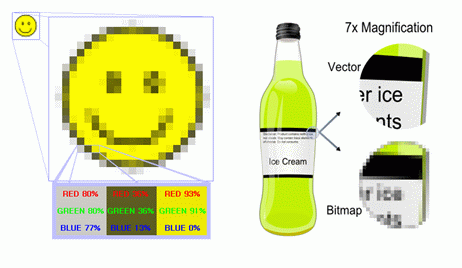
 

vector versus bitmap and raster images

Typically, you’ll find the best success if you can stick with vector-based images because they scale better. Here’s a good post that explains more about images in e-learning.

In addition to understanding how the formats work, it is worth having a good graphics editing program to help you with your rapid e-learning development. It allows you to manipulate and customize images, as well as convert and save to various formats.

What Should I Know About Audio?

Good audio quality is a combination of equipment, location, and talent. You need to begin with the best audio quality because you cannot increase it over the original.

wav2.gif

The microphone you use affects the quality of your audio. There are many resources online to teach you about microphones. The main thing to understand is that microphones are not the same and how they record audio is different. Take some time to learn the basics of microphone technology. It’ll help you get the best results when you record narration. I also recommend visiting a community forum to ask others what mics they use and how they record their narration.

Ideally, you get to record your audio in a controlled environment like a studio. However, this is usually not the case. Many times you’re forced to record the narration in a conference room with limited control over the ambient sound like office chatter, copying machines, and air conditioning. In this case, make do with what you can. Turn off the air conditioner. Unplug office machines. Ask people to be quiet. Before I record, I like to stick my head out the door and tell everyone to “shut your stinkin’ traps.” This way they know something serious is going on.

The quality of your narration is important to your e-learning course. If you choose to go with non-professional talent, expect that you’ll get what I like to call “presentation quality” audio. The advantage to this approach is that you can produce it quickly and at a good cost. For many projects, this is fine. However, you get what you pay for.

If you find that you want a polished sound, you might want to budget for professional narration. While it appears to cost more than going with non-professional narrators, you can save a lot by avoiding time-consuming edits and audio retakes.

What Should I Know About Video

Rapid e-learning’s popularity means that there is an increase in the demand for video. It is important to have a basic understanding of the different video formats, frame rates, streaming, and how to get the best quality for web delivery.
video1.gif

PC Magazine has a good article on using video in PowerPoint. A lot of the information is relevant to rapid e-learning.

Video quality is like audio. You are not going to get better video than the video you start with. It’s important to learn some basics about creating good quality video. Videomaker magazine is a good resource for non-expert video making. They have good tips and techniques and they write to those of us who don’t create videos for a living. It’s a great place to start.

As the rapid e-learning tools evolve, you’ll need to have good end-to-end skills. You don’t need to to be an expert at everything; however you do need to understand the basics. Learn more about multimedia and built a good network of resources to help you when you need it.

Additional resources

Here is a list of some additional resources.

Our last post answers the question of what to do when you’re through.

Events

Free E-Learning Resources

Want to learn more? Check out these articles and free resources in the community.

Here’s a great job board for e-learning, instructional design, and training jobs

Participate in the weekly e-learning challenges to sharpen your skills

Get your free PowerPoint templates and free graphics & stock images.

Lots of cool e-learning examples to check out and find inspiration.

Getting Started? This e-learning 101 series and the free e-books will help.


subject matter expert e-learning

In previous posts, we explored understanding the customer’s perspective, how to jump start you project, what you should know about designing a course, and how to build a project plan. Today, we’ll take a look at working with subject matter experts.

Subject matter experts (SME) play a key role in the development of your e-learning courses. They help you craft the learning objectives, create content, review it for accuracy, and provide valuable feedback.

At a recent e-learning conference I attended, the participants were asked what some of the biggest challenges were to developing their courses. Well over half said that working with SME was a challenge and many times interfered with getting the projects done on time.

Today, we’ll look at some tips to help you manage the relationship with your project’s subject matter experts.

On a Clear Day You Can See Forever

Clear communication is central to your project success. What we say and what we mean are not always the same. To complicate matters, what people hear us say, is not always what we want them to hear.

It is important to establish clear objectives and expectations when working with others, especially SME who are rarely trained instructional designers.

Bring them in on the projects early. Stay on top of project milestones and make sure you are proactive in communicating with the SME. Be sensitive to their workloads. If you expect some feedback from the SME, make sure you explain what you need and when you need it.

The “S” Stands for Subject…Not Slave

Everyone is busy. Do not abuse the time you have with the SME. Prepare for your meetings and information gathering. Collect as much information as you can prior to meeting with your SME. This helps you build a context for the e-learning course. It also helps you understand the subject matter expert’s world. And it shows the SME that you are interested in the subject and what he has to offer.

Provide a Quick Overview of How People Learn

People have preconceived ideas about training and learning. Don’t assume that when you start talking about e-learning that the SME understands what you mean. It is a good idea to develop a quick elevator pitch about learning and how you’d like to see the course work.

This gives the SME some additional information and context for the project goals. It also allows them to brainstorm ideas on how to create a meaningful learning environment using what they know.

The key is to do this quickly. Don’t bore them with long lectures on learning theory. The idea is to help them know what you need to do with their expertise to create a good learning environment.

There’s a Reason You Have Two Ears & One Mouth

Be a good listener and learn from your SME. Active listening is a sign of respect. If your SME knows that you are genuinely interested in her input, you’ll win an ally.

Ask good questions. After using your two ears, make sure you use your one mouth to ask the right questions. The SME time is valuable. Thinking through the right questions will help you make the most of it. Come prepared with a list of questions. You cannot go wrong with the standard “Who, what, where, when, and why?”

Keep the Subject Matter Expert in the Real World

You want to capture the SME experience and balance it with the world of the novice. SME are experts and typically model the course outcome. However, their expertise can hinder designing the best e-learning environment since it can be complicated for new learners.

Sometimes less is more. Try to keep the SME in the real world. To help drill down to the essential information, give them strict parameters. For example, “if you only had three screens to share your expertise, what would those three screens contain?”

Another way to keep the SME in the real world is to balance their expertise with the input of a recent or new learner.

Use a Simple Template to Help the Subject Matter Expert

If you find that you have limited access to the SME, then it’s a good idea to create a template for them. Use a basic training outline that covers the core objectives and asks questions that helps them share their expertise. Also ask how a new learner can practice using the information in the course and in the real work environment.

Show Them Love

People like to be encouraged and affirmed. Here’s a tip that has always worked for me. As a habit, I try to give good feedback to the people I work with. In addition, I will drop a quick email to their managers extolling the value of the SME input and how it is greatly appreciated and a service to the organization.

This not only serves you well on the project, it will pay dividends later if you need more of their time.
Subject matter experts have valuable insight and you need it.

A large part of your e-learning course’s success depends on the relationship you have with your subject matter experts. The actions you take show them that you value them and what they have to offer. The better relationship you have with them, the better success you’ll have.

What are some of the things you do to get the most of out of your subject matter experts?

Our next post will look at multimedia and what you need to know.

Events

Free E-Learning Resources

Want to learn more? Check out these articles and free resources in the community.

Here’s a great job board for e-learning, instructional design, and training jobs

Participate in the weekly e-learning challenges to sharpen your skills

Get your free PowerPoint templates and free graphics & stock images.

Lots of cool e-learning examples to check out and find inspiration.

Getting Started? This e-learning 101 series and the free e-books will help.


e-learning project planning

A successful e-learning project requires good planning!

Years ago, I designed a simple generic project plan in Microsoft Project. It had all of the basic steps required to manage e-learning projects. The plan showed that an e-learning course could be built in about 45 days assuming none of the steps took more than one day.

I would start with this generic plan and then plug in the data specific to the current project. This gave me a ballpark idea as to when the project could be completed. Then I could go to the client and show them how long it would take to complete the project and we’d be able to establish a workable timeline.

Sounds good, huh? Guess what? It’s all half true.

I did have a generic project plan. I’ve had it for about 30 years. I’ve modified it a few times. However, I have never really used it; at least not to manage a project. I tell you this, because as I was starting this post, I was going to pull out the old project plan and ramble on about how to manage your project.

Then it struck me that I don’t really follow those steps, at least, not in a formal way. I find that while I have a formal plan, I don’t really reference it. The reality is that the idea of the plan makes more sense than actually using it. A lot of that is because the projects move so fast, I don’t ever get to go back and update the plan.

Instead of giving you a structure for a project plan, I’m going to give you some things you need to consider while you’re working on a project. They need to be part of the plan and you’ll need to figure out where they fit. Don’t view these topics as a linear progression of one step to the next. Instead, see them as activities that need to happen to get your project done.

E-Learning Project Initiation

Meet with the client to discuss project goals. Come prepared with a list of questions so that you can begin to establish the course objectives, timelines, resources, etc.

You also need to know who is signing off on your work and the decisions that need to be made. You don’t want to spend a lot of time and money on your course only to find out later that it needs to go through a final review by someone who has not been involved in the project or provided any guidance or feedback. Find out who the final authority is and find out what that person’s expectations are.

This is the key point: leave your meetings with some action items or next step activities.

Build a Network of E-Learning Project Contributors & Resources

Basically you want to assemble a group of people who will either work on the project or provide the valuable feedback you need to make the training viable to both the customer and the learner. Ideally this resource consists of your client, subject matter experts, learners, IT support, programmers, and multimedia developers.

Develop Course Content

The organization (or customer) has specific needs. The learner has specific needs. Your analysis is about marrying these two needs. What does the organization want to do and what to the learners need to do? Use your contributors to help you build your content. You want to keep it in the real world and begin to plan on the types of scenarios and interactions that can teach this content.

Develop a Learning Strategy

There are many ways to present the content. What approach do you take? The e-learning course can be very linear where it’s information-specific. On the other hand, you can make it learner-specific and build a course that mimics real-world interaction. As you collect the content and talk to the learning audience you’ll get a sense of what works best.

A key thing to remember is that typically the learners want what they need to do their jobs better. They don’t want to spend their valuable time playing silly games or doing extra activities for the sake of making the course slick or “fun.” You want the course to be useful and engaging but in a real way.

Develop a Look & Feel for the E-Learning Project

In the past, a lot of time was spent trying to determine the navigation and interface. That’s not the case now. You’ll save time if you use rapid e-learning tools. The players that come with the tools are standard and generally intuitive.

Part of what makes a course engaging is that it looks good and professional. At the same time, it doesn’t need to have a sophistication that goes beyond the subject matter. Find the right balance. Make time to pick templates, colors, images, and fonts.

If you want custom art or images, make that decision as soon as possible. Looking for the right images is time-consuming.

Consider the E-Learning Project Multimedia Needs

Today’s rapid e-learning tools allow you to record audio, insert video, and use additional flash resources. You need to determine how all of that will be pulled together. Who is going to create the audio-visual resources? What needs to happen to get them into the project?

Recording audio is easy and straightforward in many of the rapid e-learning tools. However, you get what you pay for. If you plan on using non-professional talent to do the audio then plan on getting, what I like to call, presentation quality audio. It’s inexpensive, gets the job done, yet isn’t going to be perfect.

From my experience, using non-professional audio is one the biggest issues in getting the projects done on time. Many customers want to do their own narration or don’t want to spend the money. However when they hear the presentation quality audio they request a lot of additional edits or retakes. This is time consuming. If possible, use an inexpensive service like Voice123. You get competitive rates and outstanding results; and you might find you actually save time by avoiding edits.

Think Through the Technical Issues of the E-Learning Project

Since you are designing an e-learning course, you need to consider where the training will be hosted and how the learner will access it. Do the users have access to computers? Audio? Video? Who has access to do upgrades or maintenance on the training? Will it be on an LMS? Does it need to be AICC or SCORM compliant? How is it tracked? How will reports be generated? Are there any disability concerns?

There are a lot of questions and potential issues. That’s why it’s important to bring an IT person in on the project at the forefront. They’ll be able to tell you if there are any technical issues that could impact the training.

Training Roll Out & Evaluation

Once the e-learning course is complete, it’s ready to be rolled out. How will this happen? How will the learner’s know that the course is available? How are managers able to discern if their staff needs to take the training or not? When will you collect feedback on the training effectiveness and determine if you need to make adjustments? What are the ongoing maintenance plans for the e-learning course?

If you want the course to be successful, think through the project roll out and how users will know the training’s available.

These basic activities make up your e-learning project. Instead of building a big project plan, break the project into specific sections and then make a list of things that need to happen. Assign a person and a due date. It’s a lot easier to manage this in a spreadsheet or even simple table than it is in a complex tool like MS Project. That will help you cover your bases and get you moving in the right direction.

In our next post, we’ll look at ways to get the most out of your subject matter experts.

Events

Free E-Learning Resources

Want to learn more? Check out these articles and free resources in the community.

Here’s a great job board for e-learning, instructional design, and training jobs

Participate in the weekly e-learning challenges to sharpen your skills

Get your free PowerPoint templates and free graphics & stock images.

Lots of cool e-learning examples to check out and find inspiration.

Getting Started? This e-learning 101 series and the free e-books will help.


e-learning design

Earlier we looked at understanding the customer’s perspective, and how to jump start your next project. Today, we’ll look at some key considerations when building your e-learning courses.

When building your e-learning it’s important to understand what type of course you are developing. This helps you make the right decisions about what to do and how to use your resources. Not all e-learning is created equal. There are different types of e-learning courses. Some are information-based and some are performance-based.

  • Information-based courses are typically driven by regulations or compliance needs. It’s mostly content that is explained.
  • Performance-based courses are focused on changes in behavior and real, measurable improvements.

E-Learning Design: Bring Value to Your Organization

You are a steward of your organization’s e-learning resources. It’s important to make the decisions that positively impact the bottom line. A first priority is to make sure that the e-learning courses you build are aligned to the organization’s performance goals. Generally, you’ll always be aligned if you are focused on cost and time improvements. But ultimately, you want to focus on specific performance improvements.

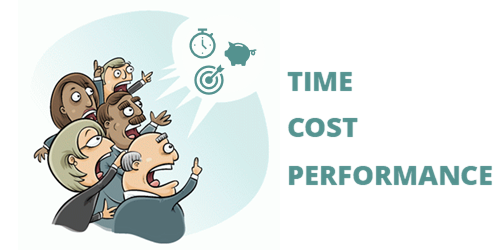
Three ways that you can bring value to your organization:

  1. Cost: Focus on managing the cost of projects and development time. You can also focus on the value you bring in comparison to outsourcing.
  2. Time: How fast can you deliver the training? Time is money.
  3. Performance: Increased performance has a direct impact on the bottom line.

E-Learning Design: Help Your Customers Find the Right Solution

Many times your customers determine that an e-learning course is the right solution to meet their goals. Before investing the organization’s resources in e-learning courses, it’s important to understand if the customer’s assumptions are correct and an e-learning course is the right solution.

Ask good questions and identify clear objectives.

You serve your customers, the organization, and yourself when you help identify the best solution to their goals. There are times when training isn’t the way to get the results the customer really wants. In this case, it’s possible to save the organization money if you can help them see that an e-learning course is not the right solution. You might not get the work, but you’ll be seen as a valuable contributor.

E-Learning Design: Determine What Type of Training Course You Need to Create

When you develop e-learning courses, you have two options. You can use a rapid e-learning tool like the ones in Articulate 360 or you can pay for custom development. Because of this, it’s important to have a process in place to determine when to go with in-house resources and when to go with custom development.

If you do outsource, it’s a good idea to dictate that you want the course developed in an authoring tool like Storyline and then request the source files. This will save you money when you need to make tweaks and edits. You can do them yourself.

Many e-learning courses have no real performance goals tied to them. Their purpose is to convey information or comply with regulations. This doesn’t mean that the information’s not important. It just means the purpose of the course is to disseminate the information, and not necessarily see a performance improvement.

Authoring tools like Rise 360 are perfect for these types of e-learning courses. You can build them quickly. They look great and work on mobile devices. And you meet your customer’s goals with minimal investment. Personally, my default position is that we use the easiest authoring tools unless we can justify spending more time and money building something more complex.

Let me explain.

The rapid e-learning tools are more than adequate to handle most e-learning needs. Why not go with what costs less and is easy to implement? Unless you need custom interactions or more complex design, the easier, the better.

Custom development can be costly. The only way I would go past the rapid e-learning tool set is if the project requires more complex interactivity tied to performance expectations. My belief is that if the customer cannot show a clear link to performance improvements, then it is my responsibility to meet their training needs with minimal cost and time commitment.

This doesn’t mean that the projects are subpar, it just means that I don’t commit expensive resources to a project that doesn’t show a return on investment. Courses that show a clear connection to changes in performance are the ones to which you want to commit the bulk of your resources.

Rapid e-learning tools can help you build most of what you see in the e-learning industry. Development costs are low, the tools are easy to learn, and you can deliver a quality project rapidly.

Whichever approach you take, it’s important to think through the objectives of your e-learning course. There’s a time to use a rapid e-learning tool and there’s a time to commit more resources to custom work. Develop a process to determine when that is. You’ll be able to help your customers get a quality product with the right investment.

Next in the series, we’ll learn to build a simple project plan.

Events

Free E-Learning Resources

Want to learn more? Check out these articles and free resources in the community.

Here’s a great job board for e-learning, instructional design, and training jobs

Participate in the weekly e-learning challenges to sharpen your skills

Get your free PowerPoint templates and free graphics & stock images.

Lots of cool e-learning examples to check out and find inspiration.

Getting Started? This e-learning 101 series and the free e-books will help.


e-learning project

Earlier, we looked at how to be an e-learning hero. Today, we’ll look at ways to jump-start your e-learning projects.

You’re asked to pull an e-learning course together within a couple of weeks. What do you do?

In the past, you may have told your customers that there isn’t enough time to build the training. Today, that’s not the case. E-learning allows you to say “yes” to your customer’s hurried requests.

While the tools do give you a head start, you’re still going to be pressed for time. Here are 5 simple tips to help you prepare for your next e-learning project.

E-Learning Project Tip: Create a Generic Training Template

If you have limited time to develop your e-learning course, you don’t want to spend days trying to determine an approach. With the right template, you can stay ahead of the game. It should include learning objectives, a structure to present the information, and a means to evaluate the learner’s understanding.

You might want to design two or more templates that consider various types of training. One could deal with presenting information in a linear manner. Another could address performance-based training where the user has to learn and apply skills. Regardless of how you structure your template, the main point is to have a design template ready to go.

Of course, with Articulate 360 and the included content library, you have more than enough templates to get started.

E-Learning Project Tip: Create Models for Learner Interactivity

It’s important to engage the learners from the real-world perspective. They want to know why the training is important to them. Interactive e-learning is one way to do that. Interactivity goes beyond just drag-and-drop features. It’s more about getting the learner to connect with (and think through) the information presented in the e-learning course. This could include case studies and problem-solving questions. There is a lot that can be done with interactions. They don’t need to be overly complicated to be successful.

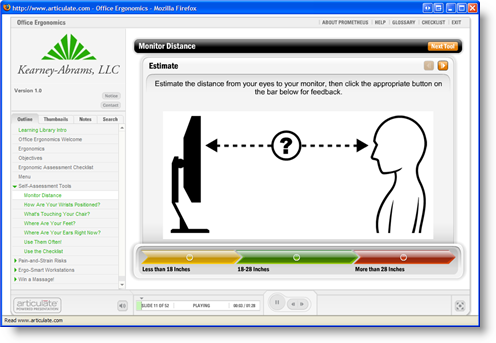
I like this ergonomics example from Prometheus created with a simple labeled graphic interaction. The users are engaged and need to make decisions based on the information presented. They also get immediate feedback after the decision is made. It’s a perfect example of an interaction that is effective and easy to design.

interactive e-learning

Look at what other people are doing (the weekly challenges are great for this) and make a list of interactions that work and that you could apply to your projects. Then when you start to look at your course content, you can pull from a list of proven interaction ideas. You won’t have to spend time trying to invent some.

E-Learning Project Tip: Create Some Style Themes and Templates

No matter what type of course you build, you’ll still need to have a specific look to it. The nice thing about using Articulate’s e-learning tools is that the player design is complete. You don’t have to spend a lot of time designing navigation features.

Even though the player is ready-to-go, there’s still a need to think through the overall look and feel of the training course. You can gain some ground if you pre-design templates with various layouts and color schemes, as mentioned above. There are a number of times where I’ve pulled one of my templates out of the drawer (so to speak) and the customer was happy with it and ready to go.

Even if you’re using a PowerPoint, you still have a lot of latitude in what you can do. The slides do not need to look like PowerPoint slides. Step away from the bullet points and treat the slide as a blank area and see what you can do.

The key is to have a few design ideas ready-to-go. This way you can put together a quick prototype without a lot of thought about the design.

E-Learning Project Tip: Collect Media Assets

It’s important to have the right images and visuals for your training courses. There are a few things you can do to get ready for your next project. If you’re using Articulate 360, you have access to templates, pictures, illustrations, videos, and icons. Take advantage of them. There are also all sorts of free stock images and resources to be had online.

Build a collection of images that fit the same style and look. You can group images together to create your own visual metaphors. In addition, you can change the colors of the images to match your template color theme.

It’s also a good idea to collect pictures of characters. Again, with Articulate 360, you get thousands of characters and avatars.

If you work in a production environment, you might want to go around and take pictures of the equipment and people working on it.

You can also use a photo editor to create your own graphics. Create boxes and arrows. Apply some effects to add a bit of pop to your screen. You can even build your own graphics in PowerPoint.

Having the right images is important. It’s also a time-consuming process. Start early and build your collection. When you need the image or ideas, you’ll have a great resource at your disposal.

E-Learning Project Tip: Create a list of questions to ask?

The better you are at asking questions and listening, the better you can design your e-learning course. When you’re in a rush, it’s easy to ask the wrong questions, or even to forget the right questions. Having a pre-determined list of questions you want to ask is important to getting the right e-learning course built.

Determine what you need to know about projects and create some questions. It’s also a good idea to condense the list to five key questions and forward that to the client before the meeting. This gives them a heads up on what you need to cover and might save some time.

Final Thoughts

You’re under a lot of pressure to meet deadlines and deliver results. Using Articulate’s e-learning tools plays a large role in getting your work done. The five tips above are some ways to help you speed up your e-learning project development.

This list isn’t exhaustive. What would you do?

In our next post, we’ll review what you should know about designing e-learning courses.

Events

Free E-Learning Resources

Want to learn more? Check out these articles and free resources in the community.

Here’s a great job board for e-learning, instructional design, and training jobs

Participate in the weekly e-learning challenges to sharpen your skills

Get your free PowerPoint templates and free graphics & stock images.

Lots of cool e-learning examples to check out and find inspiration.

Getting Started? This e-learning 101 series and the free e-books will help.


e-learning hero

Being an e-learning hero is all about perspective. You’d think it was about creating the best e-learning courses, but that’s not always the case. Let me explain.

I used to wake up worried that one day someone would realize that I didn’t know anything and I’d be out of a job. A while back I read a blog post where the writer expressed the same concern. After some discussion with others, he came to the conclusion that no one else knows anything either.

I say this because in your search to figure out how to do this thing we call rapid e-learning, I want you to feel comfortable knowing that what the pros tell you and what you need to do to be successful isn’t always the same. Instead of fretting over it, take what works and discard what doesn’t.

In this industry, there are many who complain about PowerPoint, yet most likely you’re using PowerPoint to build some of your training. In addition, you’re challenged to create engaging and interactive e-learning, yet you find that your organization is focused less on engagement and more on just getting information out. It’s not always easy balancing what the pundits tell you with what you actually have to do at work. The key is to maintain perspective and understand your needs.

Despite what people may say, there is no right or wrong way to build your e-learning courses. Of course, some of them will be more be more effective than others. However, effectiveness can be measured in different ways. For example, you might have one course that is a very engaging and interactive for the learners. Yet the customer could care less, or just wants a click and read course. In this case, the more effective course is the one that meets the customer’s goals and not the one that is a better learning environment. I know! I know! This is sacrilegious to some.

An E-Learning Hero Understands the Level of Effectiveness

If you want to be an e-learning hero, you need to learn what the level of effectiveness is for your projects. Your success depends on who says you’re effective and how they choose to evaluate that.

When you first get started, here are some things to keep in mind.

  1. Please your customer. The main goal is that you please your customer. Pleasing your customer has little to do with whether or not the training is effective. You can create great training but if the customer is not happy, your good job will go unnoticed.
  2. What are some ways to please your customer? Establish clear expectations and then meet or exceed them. Make your customer look good. Control your costs. Finish ahead of schedule. Be proactive and take care of details before they come to the attention of the customer.
  3. Serve the business. It’s important to align your work with the organization’s goals. Do your best to get your customer and courses focused on performance results. Set clear and measurable training objectives. Sometimes this is hard with training projects, especially if their goals are out of your hands. Make sure that your projects are cost effective and save time.
  4. Report the performance results. Believe it or not, many training developers fail to report their results. This is a lost opportunity, especially if you use rapid e-learning tools since they save so much time and money. The best way to get results is to link the training to real performance. Establish clear objectives and measure the results. Track improvements in performance. Report the difference the training makes.
  5. Focus on saving time & money. It’s not always possible to link your training to real performance results. In that case, your best bet is to focus on time and costs. Compare what it costs to outsource the training to what it cost for you to develop it. Then report the value you brought to the organization by not outsourcing. You can also report savings in time. For example, “instead of delivering the project in 3 months, you delivered it in 2 weeks!”

Shhhh….a Secret!

From my experience, customers are more apt to report the value by cost rather than performance improvements. It just looks better and is easier to explain. For example, I get more traction if I say that I delivered 100 e-learning courses that were valued at $1 million, then if I say my training improved performance by 30%. Even if the 100 modules are irrelevant to the performance goals, I have found that people are quick to use those cost numbers. That’s why a lot of your success is less about real numbers and more about perspective.

Ideally, what defines your success is that you are able to create great e-learning courses that are effective and engaging. However, you’re only great if your customer thinks you’re great. If you want to be an e-learning hero you have to manage the relationship you have with your customers. Help them focus on real results and do a good job reporting your success.

If your customer is happy, then you’re an e-learning hero.

In the next post, we’ll look at 5 Ways to Jumpstart Your Next Project. In the meantime, feel free to share how you manage your customer relationships.

Events

Free E-Learning Resources

Want to learn more? Check out these articles and free resources in the community.

Here’s a great job board for e-learning, instructional design, and training jobs

Participate in the weekly e-learning challenges to sharpen your skills

Get your free PowerPoint templates and free graphics & stock images.

Lots of cool e-learning examples to check out and find inspiration.

Getting Started? This e-learning 101 series and the free e-books will help.