The Rapid Elearning Blog

Archive for the ‘Professional Development’ Category


e-learning portfolio

You want to build an e-learning portfolio, but not sure where to start?

At its core, the work portfolio represents your skills and expertise. For some people, the portfolio is their resume, and they build it to share what they know. And for others, the portfolio shows their projects as part of the journey that needs to be documented.

During the initial planning, decide if you want the portfolio to be static where you only do occasional maintenance and updates. Or if you want a site that’s more dynamic and continually updating?

Build a Static E-Learning Portfolio

For a static portfolio, the main goal is to show off the best of what you can do. It’s your business card. You build the portfolio and it’s not constantly being updated. It’s not something you spend a lot of time on. You only update it once or twice a year.

Here are a few considerations when building a static portfolio.

  • Represent diverse skills. Identify a few common course types such as interactive scenarios, compliance training, software simulations, etc.
  • Present the projects in a consistent framework: What was the goal? What role did you play? What did you build? What was the outcome?
  • Keep is simple. No need to show the entire course. Either show screenshots or small chunks of the module (like just the interactive parts). You could do a quick 30-second video trailer of the module. That’s also an effective way to get around uploading a real course when it is proprietary and you can’t share it.

Build a Dynamic E-Learning Portfolio

For a dynamic portfolio, the main goal is to show what you can do as an ongoing pursuit. It highlights your evolving skills. Many people show projects, share files, and discuss things they learned on the projects.

  • Determine a manageable schedule. Most people start aggressively and then peter out and the portfolio goes nowhere. You’re not a news site where you need to post every day. Start slow and be consistent.
  • Commit to a production process. What tends to be the most difficult is producing new ideas. That’s why I like the weekly challenges as a way to manage the portfolio. Commit to one per month. This gives you something to build and show as a routine.
  • Share your learning. Show what you built and then write about things you learned. They don’t need to be big thoughts or exhaustive. For example, you could say, “in this example, I wanted to play around with animation ideas…”
  • Be the expert. Share your source files and do quick tutorials. Read an industry book or blog posts and write your thoughts.

Whether you build a portfolio as an active job seeker or to document your learning, it’s a good practice to develop. Do you have a portfolio? If so, feel free to share a link and share your thoughts.

Events

Free E-Learning Resources

Want to learn more? Check out these articles and free resources in the community.

Here’s a great job board for e-learning, instructional design, and training jobs

Participate in the weekly e-learning challenges to sharpen your skills

Get your free PowerPoint templates and free graphics & stock images.

Lots of cool e-learning examples to check out and find inspiration.

Getting Started? This e-learning 101 series and the free e-books will help.


e-learning portfolio

At one point, I was hiring an e-learning course developer. I received hundreds of qualified applications; however I couldn’t screen them all, so I created a first filter based on their work portfolios. Most of the applicants tended to fall into one of two camps: they didn’t have an e-learning portfolio or the projects they worked on were proprietary so they couldn’t share them.

I know that many of you are in the same boat. And based on the tons of emails I get about finding work in this industry, I’d like to share some thoughts about why you need a portfolio and how it can help you get better at e-learning (even if you’re not looking for work).

Be at the Crossroads When Opportunity and Preparation Meet

Opportunities exist. However, when you’re not prepared, you don’t see them or bother looking. And if you do look, you don’t always know what to look for. If you have a portfolio ready-to-go, when you do hear of a potential job (or other opportunity), you can quickly jump on it. However, not having a portfolio might dissuade you from even attempting to pursue the opportunity.

In addition, because you maintain a portfolio of your skills, you’re more apt to think about the skills you need for the portfolio. It then becomes a motivator to learn more which will always help in your career.

Concerning my hiring experience, most of the people told me that they didn’t have portfolios and it would take them a week or so to pull them together.  Most opportunities have a limited shelf-life and a week (or sometimes a few days) might be too long. As an opportunity presents itself you need to be able to take advantage of it.

Control Your Own Destiny & How Your Skills Are Defined

Many e-learning developers face two common problems: all the work done is proprietary and can’t be shared with outsiders. And worst, the organization’s course expectations are lower than your skills.

A lot of people tell me they can’t share what they were working on. This makes sense for the organization, but not for you. Don’t allow their content to make your skills proprietary, as well. In the same sense, don’t let their lower expectations define your skills. This is not about being anti organization. Instead, it’s about being pro you.

Years ago, I worked for a small community healthcare organization. It was a wonderful place to work. However, they had no money, and I was forced to be creative with my projects.

This was a double-edged sword. On one hand, a lot of the tips and tricks I share today come from having to work with no money or resources. On the other hand, while I got points for creativity, the projects I produced weren’t the types of projects I could use to get a job elsewhere. I had to build and maintain a separate portfolio of skills that wasn’t defined by the organization’s constraints and limited expectations.

Here’s something that happens all the time and an important consideration: if you lose your job, you could be flushing a lot of your work down the drain. One day you’re happy at work and the next you’re out on the street with no access to your projects or the tools used to build them. For these reasons, it’s important to maintain a portfolio to document your skills and experience and maintain an archive of projects.

What Should Be in Your E-Learning Portfolio?

E-learning is a truly diverse industry. Some people work in one-person shops where they need to know a little of everything and others can focus on one thing like instructional design or course development. Personally, I think e-learning skills should be like a liberal arts education where you touch a little of everything.

Here is a list of skills you need and can highlight in your portfolio (and be able to speak to them in an interview):

  • Instructional design: Do you have examples of different approaches to learning and course design? I look at a lot of courses and most of them are usually linear and kind of all the same. Have some examples of how to engage your learners and how they can interact with the content.
  • Graphic design: While everyone talks about instructional design, an equal consideration is the visual design. In fact, what separated many of the candidates that I considered were their visual design skills. If all things are equal, I’ll take someone with a keen sense of visual design because it crosses into other areas like engagement, communication, and usability.
  • Present diverse projects: Don’t show twenty courses that all look the same. If that’s all you get to work on, then spend some time on your own and build out other examples. They don’t need to be complete courses. Build out an interaction or a scenario. Take one topic and try it three different ways. Do the weekly challenges for easy modules that work great for portfolio content.
  • Project management: You don’t need to be a project manager, but you should understand how to manage a project from start to finish. What is the production process for an e-learning course? How many hours does it take to build a course? What resources are required? What does it cost to produce a course? What types of assets are required? How will they be produced or procured?
  • Writing: I like to keep things simple. I look for two types of writing examples: technical and conversational. How well can you write to document procedures and provide the right level of guidance? On the other hand, some projects are not technical and require a more conversational tone.
  • Technology: You don’t need to be a software engineer, but you should know the essence of the technologies and how they work. In addition, the more tools you’re familiar with the better. The reality is that the more proficient you are with software, the more likely you’ll be a top candidate versus someone in the middle. And learn about building accessible e-learning. It’s no longer an excuse to not know.

How to Get Started with an E-Learning Portfolio

Here a few tips to help you get started:

  1. Build a simple case study for each project. It doesn’t need to be overly fancy. Describe the project objectives, what you did, and the results. If you have examples add them. If not, at least try to add some screenshots. Focus on a professional and interesting visual presentation of those projects.
  2. Start a blog to document your learning. Use it to capture what you’re doing and thoughts you have during the production process. If you need ideas to get started, do a weekly challenge, and then share what you did and write about your process. Share your files.
  3. Network with others. Experience is no good if you have no place to show it (portfolio) or share it (your network). The good thing with blogging and other social tools like Facebook, LinkedIn, and Twitter and the e-learning community is that you connect with others in the industry. You’ll learn a lot and others will get to know you and your skills. It’s a wonderful way to prepare for opportunities. In fact, many e-learning developers I know got their jobs through their portfolios and sharing their work with others.

If you want to stay in this industry and keep up with your skills, then having a portfolio is critical. You can’t always control your circumstances, but you can control how you prepare for them.

What do you think is missing from the list?  What would you add?

Events

Free E-Learning Resources

Want to learn more? Check out these articles and free resources in the community.

Here’s a great job board for e-learning, instructional design, and training jobs

Participate in the weekly e-learning challenges to sharpen your skills

Get your free PowerPoint templates and free graphics & stock images.

Lots of cool e-learning examples to check out and find inspiration.

Getting Started? This e-learning 101 series and the free e-books will help.


free portfolio

A guest post by Elizabeth Pawlicki, Training Program Manager, Articulate.

You need a portfolio! Even if you’re not currently looking for a new job, maintaining a portfolio is important as an archive to highlight your work and experience.

In previous posts, we covered what should be in your portfolio and how to build one (with links to some potential sites).

However, I continue to get questions on how to host and manage a portfolio.  That’s what I’ll cover today.

Free Portfolio Site

Recently I came across a free tool called SpreadSimple, which is really cool because it builds websites out of Google Sheets (something many of us already know how to use). You create columns of information, and it takes a single line on a Google Sheet and turns it into a “card” on the site.

free portfolio demo

Demo Portfolio

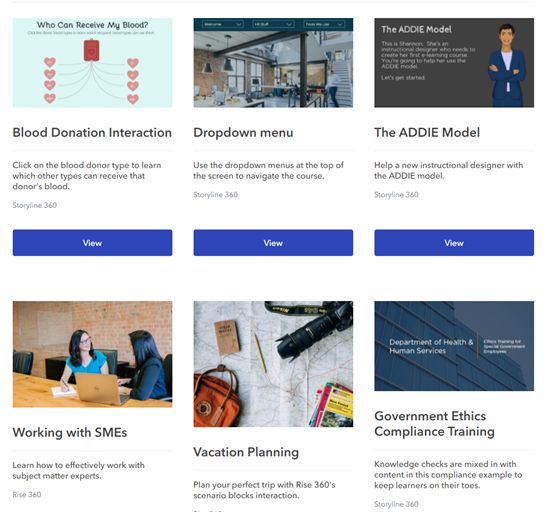
I really liked that I didn’t need to do any programming and by adding content to Google Sheets I was able to create a simple website. So, I created a portfolio to test how easy it is to use. You can see it below.

free portfolio

Click here to view the portfolio.

How to Build the Portfolio

Keep in mind, the SpreadSimple site uses Google Sheets to pull in the data for the site. However, it doesn’t host your media. So, you’ll need a place to host your courses and images. There are a number of options here, but I used Amazon S3.

I added the portfolio content to my Google Sheet, added links to courses on Amazon S3, and in no time at all, I had a modern, professional looking web-based portfolio.

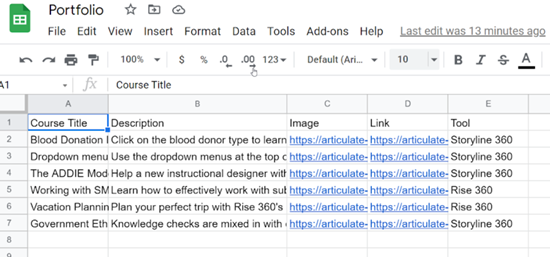
I really didn’t need much on my sheet, so I started with my course title, a description, the link to where the course was being hosted in S3, and the link to the course thumbnail, also in S3.

Later, I realized that SpreadSimple allowed for filtering when viewing the completed site, so I added a “Tools” column to my Google Sheet and organized my courses by whether they were built in Storyline 360 or Rise 360.

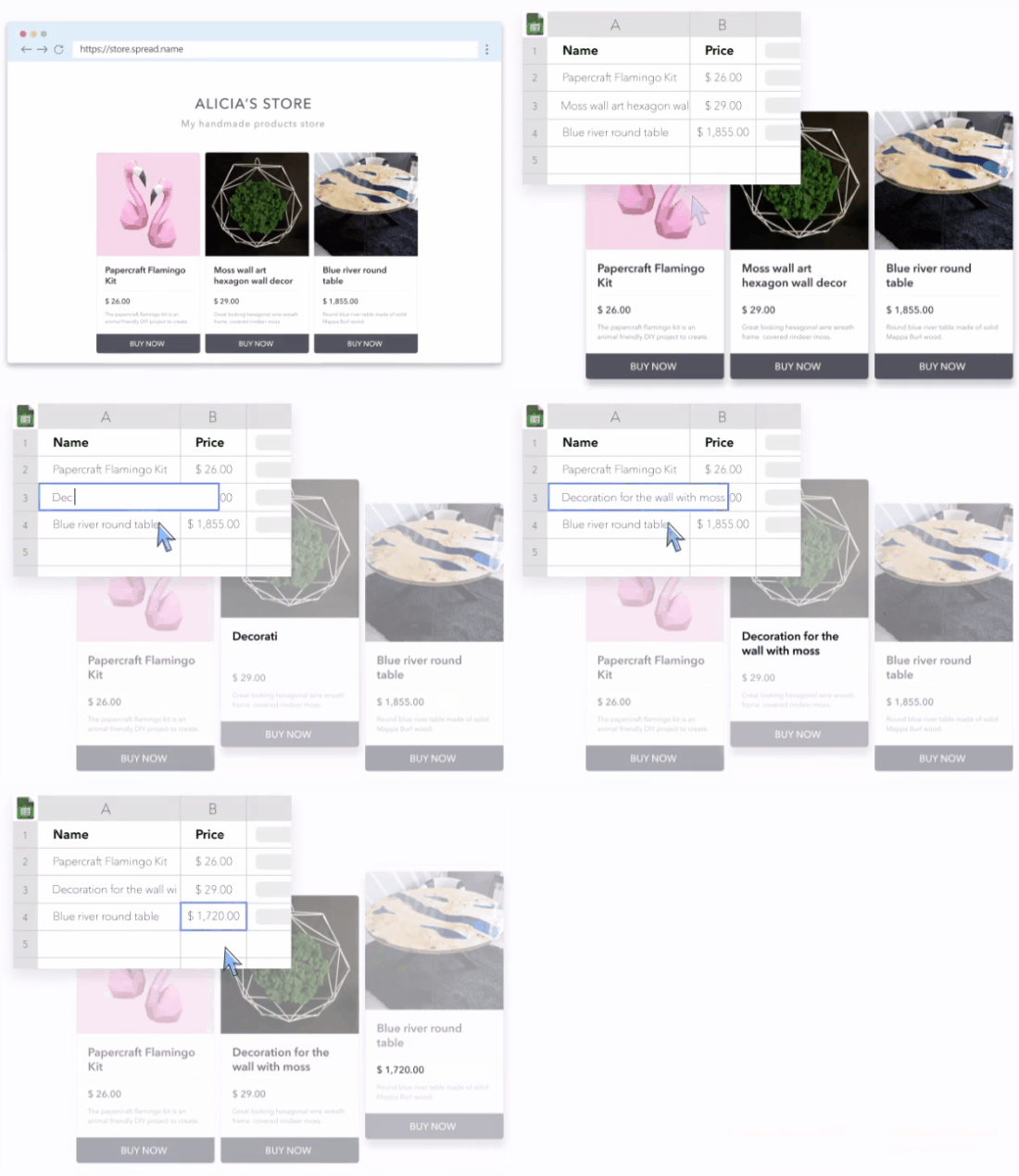
To give you an idea of just how little you really need to build a site, here’s a behind the scenes look at my Google Sheet.

free portfolio google sheet

It’s really easy to build and manage a portfolio this way. Here’s a quick tutorial where you can watch me add a new course to my portfolio just by adding a new line to Google Sheets, filling in the cells, and refreshing the SpreadSimple page.

Click here to view the tutorial.

If you don’t already have a portfolio, give SpreadSimple a try. The service is free if you don’t need to use any of the integrations or set up a custom domain. I found it quick and intuitive.

What do you think?


Elizabeth Pawlicki

Events

Free E-Learning Resources

Want to learn more? Check out these articles and free resources in the community.

Here’s a great job board for e-learning, instructional design, and training jobs

Participate in the weekly e-learning challenges to sharpen your skills

Get your free PowerPoint templates and free graphics & stock images.

Lots of cool e-learning examples to check out and find inspiration.

Getting Started? This e-learning 101 series and the free e-books will help.


e-learning portfolio tips

In recent posts, we discussed why you need a portfolio for personal development and to manage your professional career. The obvious next question is what tools and resources should I use to build a portfolio?

What Goes in the E-Learning Portfolio?

The portfolio represents your skills and expertise. You need to decide if you want the portfolio to be static where you only do occasional maintenance and updates. Or do you want a site that’s more dynamic and continually updating?

Things worth adding to your portfolio:

  • Small, bite-sized interaction and activities
  • How you assess your learners
  • Novel learning experiences
  • Snippets of interesting instructional design (not the whole course)
  • Diverse training content: scenarios, softskills, compliance, and technical training

Where is the E-Learning Portfolio Hosted?

This sort of depends on your technical skills and how much time you have. There are a lot of easy-to-use sites like Wix or Squarespace. Or you can build and manage your own site. There are also some portfolio sites designed to showcase projects.

Easy to Use & Professional Portfolio Sites

You can find dozens of portfolio sites on the Internet. Most of them are designed for people who have images or videos. They don’t seem to have any that cater to interactive content, especially e-learning courses. These sites are good for static portfolios that aren’t updated a lot. You’ll need images, screenshots, and maybe videos of your project.

Free Accounts

Popular Paid Accounts

Whether you use one of the portfolio sites or a no-programming site like Wix, you need to recognize that there are some limitations and you can’t host your courses on those sites. You’ll need something like Articulate Review (part of your subscription) or Amazon S3 to host the course and provide a URL link you can insert in the portfolio. Here’s a post on how to host a course on Amazon S3.

Custom Portfolio Sites

The other option is to create a site that you manage and update. Some people go with a traditional website. This gives you the most freedom, but also requires a bit more work. Some people go with a WordPress blog (not the free one).

The cost for these sites is nominal. Personally, I think considering the freedom and custom options, it’s a better choice to own your site and control how to add media and content.

Purchase Your Own Domain

If you want to maintain your personal brand, it’s a good idea to purchase your own domain. It looks more professional and you get an email account to go with it. Having a custom email always looks better than using one of those ones from a public email service.

e-learning portfolio domain

Here are a few portfolios to review and see how they approached the custom domain. You’ll notice that some went with their names and some created a business name. Either way works, it just depends on your needs.

So those are your main considerations:

  • Content
  • Update frequency
  • Hosting
  • Domain name

Do you have a work portfolio you’d like to share? If so, put a link in the comments section. Let us know what you do to show off your skills.

Events

Free E-Learning Resources

Want to learn more? Check out these articles and free resources in the community.

Here’s a great job board for e-learning, instructional design, and training jobs

Participate in the weekly e-learning challenges to sharpen your skills

Get your free PowerPoint templates and free graphics & stock images.

Lots of cool e-learning examples to check out and find inspiration.

Getting Started? This e-learning 101 series and the free e-books will help.


get started e-learning

Between the blog posts, community interactions, workshops, and webinars one of the most frequently asked questions is how to get started with e-learning or become a better e-learning developer.

I’ve written about this in several previous posts that cover how to build your skills, create your personal brand, and maintain a portfolio. You can find previous posts and a really cool interaction below.

How to Build Your Skills

Here’s a list of some of the posts on personal development.

Just Getting Started?

You know what’s better than reading a bunch of articles? Seeing it all in an e-learning module.

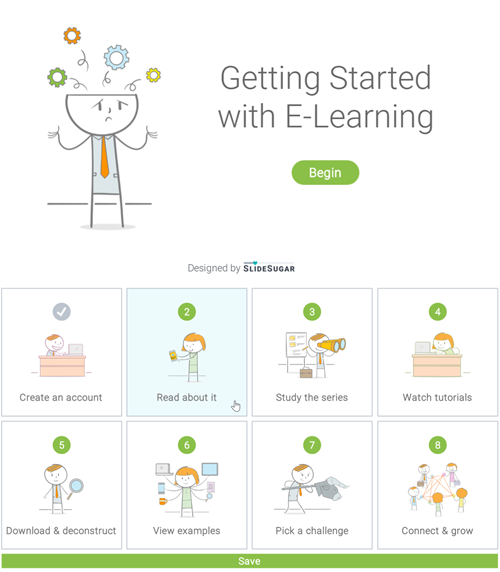
Sarah Hodge of SlideSugar recently shared a really great example of how to get started with e-learning. Not only is the content valuable, but it’s a demo worth deconstructing to glean ideas for your next e-learning course.

get started with e-learning

See e-learning example here.

Be sure to check out the articles and Sarah’s e-learning example above.

What tips would you give to those who are just getting started or want to improve their e-learning design skills?

Events

Free E-Learning Resources

Want to learn more? Check out these articles and free resources in the community.

Here’s a great job board for e-learning, instructional design, and training jobs

Participate in the weekly e-learning challenges to sharpen your skills

Get your free PowerPoint templates and free graphics & stock images.

Lots of cool e-learning examples to check out and find inspiration.

Getting Started? This e-learning 101 series and the free e-books will help.


As mentioned previously, I like to take part in the community’s e-learning challenges. They’re great to practice ideas and learn more about using the e-learning software.

In a recent e-learning challenge, we were asked to create a demo module and use the 2019 Pantone Color of the Year (which is Living Coral). This came at a good time, as I was pulling together some content for a workshop and wanted to show a few different ideas around color in a course’s visual design. The examples below go from subtle to “in your face.”

Visual Design Tip: Make Everything Greyscale & Use One Accent Color

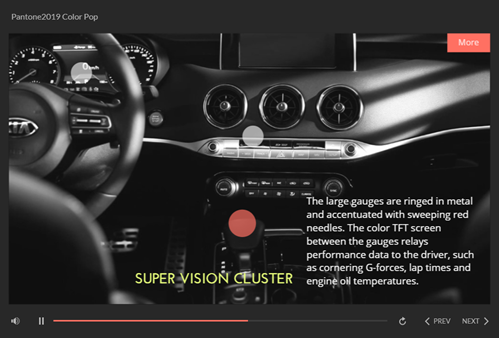
One tip we share often is to make everything greyscale. And then select a single accent color. One benefit is that it tends to make the screen content look a bit more elegant. And the accent color really pops. And it gets rid of a lot of conflicting colors and helps direct the eye.

e-learning example visual design

Click here to view the example.

In the example above:

  • Converted the car interior image to greyscale
  • Used the Pantone color for the label markers
  • Used a color schemer to create a second color to complement the Pantone accent color

Often less is more, and in this case getting rid of color in the image and working with one (or two accent) colors really makes them pop and it cleans up the visual design.

Visual Design Tip: Use Silhouettes and Bold Colors

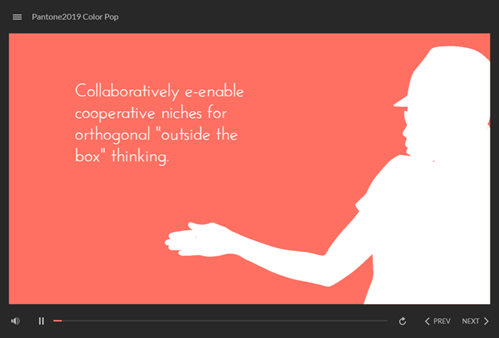
This other example is a bit more bold and in your face and it’s create to draw attention. I’d use it sparingly, but it’s great for making key points or title screens. And it’s easy to do.

e-learning example visual design tip 2

Click here to view the example.

Silhouettes are easy to create from people and objects. They work best with strong contrast. I like them because their ambiguous which comes in handy for people imagery.

  • Create a bold background color
  • Insert a character
  • Adjust the brightness and contrast settings to create either a white or black silhouette.

Check out some of the other Pantone 2019 challenge entries. If you don’t participate in the e-learning challenges, you should. You’ll learn new things and be amazed at what others create and how different everyone is in approaching the same challenge.

If you do participate, write a post and share what you learned or a technique you used to build it.

Events

Free E-Learning Resources

Want to learn more? Check out these articles and free resources in the community.

Here’s a great job board for e-learning, instructional design, and training jobs

Participate in the weekly e-learning challenges to sharpen your skills

Get your free PowerPoint templates and free graphics & stock images.

Lots of cool e-learning examples to check out and find inspiration.

Getting Started? This e-learning 101 series and the free e-books will help.


build e-learning skills

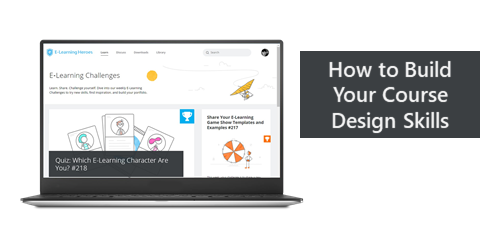
I’m a big fan of the e-learning challenges posted each week in the e-learning community. Here’s one on game show style templates and another on various drag-and-drop interactions. They offer good examples and creative ideas for building e-learning courses.

Compliance training drives a lot of the demand for e-learning content. Unfortunately, most of it is linear, click-and-read content. Which means you don’t get to try new things or develop your skills in new ways.

The initial goal of the e-learning challenges was to get e-learning course designers to play around with the software and try new things. They aren’t expected to be big (or complete courses) and they’re designed to learn new production techniques.

Here’s what’s real for many of you. You may build a hundred courses, but you’re not building a hundred different courses. You’re just building the same course one hundred times. That means your skills may not grow and you’re probably a bit bored doing the same thing over and over again.

The weekly challenges are a great way to move out of the same-course rut.

  • Commit to do at least one challenge per month. That’s my goal. I don’t always make it, but it’s still my goal. At a minimum, review the entries every week (posted on Thursday). There are some really good examples and creative ideas you can glean from others. Here’s a list of all previous challenges.
  • Use the challenges to pad your e-learning portfolio. It’s important to have a portfolio where you document your skills and show your growth. Most people can’t share their current work for various reasons, but the challenge demos are yours and work perfect for portfolios.  The challenges provide a way to show diverse course development skills and experience.
  • Build your professional brand. Start a blog or portfolio site. Show off your examples, share the sources files, and offer tips on how you created what you created. Many in the e-learning community can attest to the power of sharing your expertise. And you don’t need to be the best expert, just enough of an expert to share what you know. There’s always someone who can learn from you. And they don’t need to be revolutionary tips. Often the challenge entries remind me of things I already knew but just bring them back to the forefront.

As I stated, my goal is to participate at least once per month and from there I’ll share what I learned or some production tips that may help others.

Hope to see you in the e-learning challenges.

Events

Free E-Learning Resources

Want to learn more? Check out these articles and free resources in the community.

Here’s a great job board for e-learning, instructional design, and training jobs

Participate in the weekly e-learning challenges to sharpen your skills

Get your free PowerPoint templates and free graphics & stock images.

Lots of cool e-learning examples to check out and find inspiration.

Getting Started? This e-learning 101 series and the free e-books will help.


e-learning programmer

Do you need to be an e-learning programmer to build e-learning courses?

A lot has changed with e-learning over the past decade or so. As noted before, it used to require a team of people that usually included someone with some programming skills. However, as the rapid e-learning market emerged, the need for programming skills virtually disappeared. That’s great because it opened the industry to a lot of people and organizations.

The challenge though is that while you don’t need to be a programmer, it is still good to know a little about some basic programming. For example, one question we see quite a bit is how to use web objects in Storyline or embed content using the embed block in Rise. Often this involves using an iframe or some other simple web page. For the most part, it’s straightforward. But sometimes it means tweaking the embed codes provided by some services.

Because many people come to the industry without this type of experience or a background in programming, it’s a good idea to have access to some resources and tools. Today, we’ll look at a few places to go for quick help.

E-Learning Programmer: HTML Basics

W3 Schools: I recommend this site quite a bit. There’s a lot of good info, tutorials, and ways to test code on your own.

  • Learn to create a basic web page to use for local web objects in Storyline. Often, I create simple pages with resource links and then link to them locally. This allows the html page to become part of the published course.
  • Learn to work with iframes and embed codes in Rise. Embed codes can be tricky sometimes based on what the source site provides. Often there’s a lot of gibberish that needs to be removed. The more you know about the iframe basics, the better off you’ll be.
  • Here’s a good resource from David Tait on using iframes in Storyline.

Like many of you, I’m no programmer, so I lean on this site to learn to do basic tweaks to some of the code I need to modify for my courses.

E-Learning Programmer: JavaScript Basics

Some of you may think that JavaScript is some sort of note you write to pass to your local barista. That’s OK. Because this post is for you.

Again, you don’t need to be a programmer to build great e-learning. The authoring software does all of the heavy lifting. However, using JavaScript does extend what you can do with the software and adds a lot more customization and functionality. Thus, knowing a little can go a long way. This is especially true with Storyline because on the Storyline side it’s just a matter of adding a trigger to execute some code pasted in the trigger. But it does mean, you have some code and you know at least what to do with it to get the results you want.

e-learning programmer JavaScript examples

Here are some examples from the community to get ideas on how to leverage JavaScript in your e-learning courses.

Here are some good resources to learn JavaScript for free:

You don’t need to be a programmer but having some basic understanding of the code that can extend what you do in your e-learning courses is a good idea. Are there other free resources for learning code that you’ve used? If you do use JavaScript in your Storyline course, what are ways you’ve used it?

Events

Free E-Learning Resources

Want to learn more? Check out these articles and free resources in the community.

Here’s a great job board for e-learning, instructional design, and training jobs

Participate in the weekly e-learning challenges to sharpen your skills

Get your free PowerPoint templates and free graphics & stock images.

Lots of cool e-learning examples to check out and find inspiration.

Getting Started? This e-learning 101 series and the free e-books will help.


successful e-learning

Successful e-learning is measured in many ways. It’s important to provide measurable value. However, a large part of success revolves around how others view your contributions. Thus it’s important to manage how you work with customers and how they understand your contributions.

If you’re just getting started, here are some things to keep in mind:

Successful E-Learning Pleases the Customer

Your customer is why you have a job. Thus it’s important to ensure the customer’s needs are met.

Who is your customer? The obvious answer is the one who commissions the e-learning course. However, there’s also the dynamic between you and your manager (who may not be the customer) but is the person who influences your employment.

How to Please the Customer

There are many things you can do, but here are a few basics:

  • Establish clear expectations. Write them down and get affirmation. This way everyone is on the same page. I create a Service Level Agreement that documents the project details and expectations.
  • Find ways to make your customers look good. Often I’ll send encouraging emails and CC their managers. I try to deflect credit from myself and pass it to others. Give them the credit when possible.
  • Control your costs and resources. Everyone’s on a budget and has limited time.
  • Finish ahead of schedule. I try to pad extra time into the production, get agreement on the production schedule, and then work to be done early. Sometimes it doesn’t matter if you’re early because they may not be prepared for it, but it builds your reputation and how they perceive you.
  • Take care of details before they become issues. Be proactive and do this before the customer is aware. The more projects you do, the more you’re able to anticipate potential issues. I always make a list of things that may derail the process so that I can think through a work around before it happens.

Successful E-Learning Knows that the Business is the Business

Ultimately you’re hired to help meet specific organizational goals. Sometimes we lose sight of that. It’s easy to get stuck in the way things have always been done or on our own pet projects. Keep your focus on what the organization says is important and the metrics they use.

When working with customers, try to steer them towards measurable results and not just content. From there you set clear objectives that are tied to a metric which helps measure the course’s efficacy. If the client has no metrics (sometimes that happens with compliance training) measure cost and production time as well as a reduction in training time.

How to Report the Results of Successful E-Learning

It’s important to show the results of your work. The challenge is knowing what to report, getting the numbers, and how to report them. Here are a few thoughts:

  • Performance results. Create courses with measurable objectives. That gives you something to measure. How does the client know that they need training? What metrics are they using? Use the same process. Connect with the team that collects and curates results. Often training is a small part of the process thus you may not see significant results from training alone.
  • Measure before and after performance. Create a means to pre-assess the learners and then compare how they did after the training. You may not directly impact real-world performance but you can state that before the training they were at X and after they were at Y.
  • Measure what was saved. Some training is not performance-based. Thus it’s a challenge to report performance metrics. In those cases, track how much training costs before and how the e-learning courses saved time by reducing travel costs, etc. Another benefit is the flexibility training offers because it is time-shifted. Worst case, compare your production costs to that of an outside vendor.

Building engaging and relevant e-learning is the main measure of success. That happens in the context of supporting a customer and your organization. Develop some strategies to manage those relationships and the expectations. Help them focus on real results and do a good job reporting your success. And their success will be your success.

Events

Free E-Learning Resources

Want to learn more? Check out these articles and free resources in the community.

Here’s a great job board for e-learning, instructional design, and training jobs

Participate in the weekly e-learning challenges to sharpen your skills

Get your free PowerPoint templates and free graphics & stock images.

Lots of cool e-learning examples to check out and find inspiration.

Getting Started? This e-learning 101 series and the free e-books will help.


future of learning technologies

Here’s an excerpt from a recent presentation on the future of learning technology.

I went to school to be a video producer. Right after I graduated, the video industry changed from analog to digital. At the time digital video technology was cutting-edge and super expensive. And I was stuck in a job with an organization that had no money, so I felt that everything was was passing me by and I’d never catch up.

I see a lot of the same things in our industry today. So much is changing and it’s hard to keep up. It can be quite stressful.

We’ll look at some emerging technologies and how they impact our jobs and then how it really impacts you.

E-Learning Democratized

future of learning technologies e-learning democratized

A few years back, it was expensive to build e-learning courses. That changed with the PowerPoint-to-Flash tools like Articulate Studio. Those tools let all organizations into the e-learning world and made it possible to bring course content to the masses.

Over time, the tools evolved as we went from PowerPoint to Storyline.

E-Learning Made Easy

e-learning made easy future of learning technologies

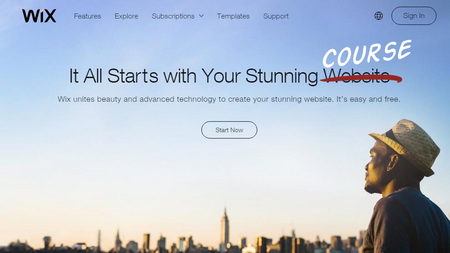
It took a lot to build web pages a few years back. Now you have sites like Wix where you can build a pretty sophisticated site in minutes. The same thing is happening with e-learning. Look at how easy it is to build a course in Rise.

There are the naysayers who complain about this. I actually had someone tell me that we should limit access to the software to only people with the training to build courses. That may have worked in the Soviet Union, but I prefer a less elitist approach. Give them the tools and then help them learn to use them better is a more charitable approach.

Besides, organizations will always opt for quicker, cheaper delivery (especially when most of their courses are explainer-type content).

Virtual Reality is Virtually Here

One emerging technology is virtual reality (VR). When done right it can create truly immersive experiences. I’ve seen some really cool demos and it’s definitely going to create opportunities for different ways to learn.

With that said, many of the virtual reality demos I see are simple 360° videos with clickable hotspots. They’re not much more than labeled graphics. There is a novelty to them, but it seems like a lot of work to create video labeled graphics. Not sure how much more valuable they are than static images once you get past the novelty of viewing them.

future of learning technologies virtual reality made real

The real value in virtual reality is being able to interact with the environment and not just move around and click for information, like in the images above where you work in a simulated dental office.

The reality (that’s not virtual) is that building an immersive virtual environment is cost prohibitive for most organizations. Until the costs to produce come way down, for most organizations virtual reality will be a pipe dream.

Augmented Reality is a More Affordable Reality

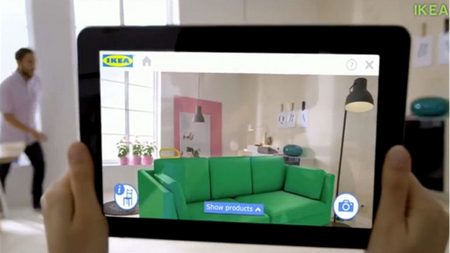
With augmented reality (AR) a lot of the cost of production is reduced. Instead of trying to create a virtual world, we augment the real world with additional content and experiences.

future of learning technologies augmented reality in the real world

Ikea and other sites allows us to put furniture in real rooms to see how it will fit.

future of learning technologies augmented reality to translate content

We can use our phones to translate content in real time or learn what’s around us.

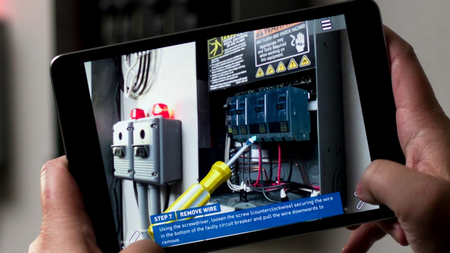
future of learning technologies augmented reality to train new skills

And we can learn new things, just in time at our point of need.

If you want to play around with augmented reality, check out HP Reveal and learn more about what some of the tech leaders are doing:

The Technology That Will Really Change Your Job

Virtual and augmented realities are cool and obviously have a role in our industry, but the technologies that will really change your jobs are artificial intelligence (AI) and big data.

future of learning technologies chatbots to deliver training

future of learning technologies automated response

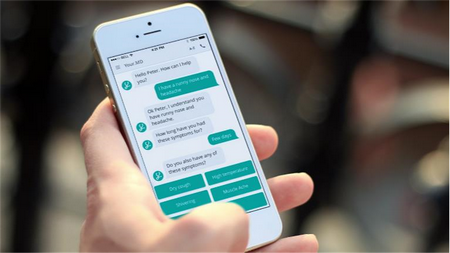
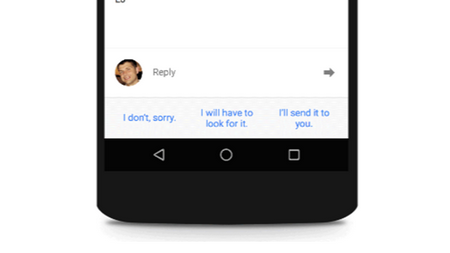
Most of what drives e-learning is compliance and regulatory training. Often, we’re just rehashing content that already exists someplace else. Soon, that’ll all be automated. Organizations will be able to pull custom content together to meet the needs of its learners. They’ll be able to create chatbots and other tools to push what you need when you need it. This emerging technology will create articles, documentation, guided instruction, and probably even videos. In that world there won’t be much need for instructional designers.

While it’s exciting to see and anticipate these emerging technologies, it does induce a bit of stress. Can we keep up? Will we be out of work?

I’ll leave you with this one thought.

Twenty-five years ago when I created custom presentations using Harvard Graphics (pre PowerPoint) I thought that one day people will know how easy this is and I’ll be out of work. Today, close to three decades later, not much has changed. Sure we’ve got a lot of cool technologies and all of that. But the presentations and the courses are still mostly the same quality (for good or bad).

So take heart in knowing that you’re part of an exciting industry with emerging technology, but don’t fear being out of work anytime soon.

Events

Free E-Learning Resources

Want to learn more? Check out these articles and free resources in the community.

Here’s a great job board for e-learning, instructional design, and training jobs

Participate in the weekly e-learning challenges to sharpen your skills

Get your free PowerPoint templates and free graphics & stock images.

Lots of cool e-learning examples to check out and find inspiration.

Getting Started? This e-learning 101 series and the free e-books will help.


role of today's trainer

The other day I was at Costco about to buy something. But before I made the purchase, I got online to do some research….right there in the store. I learned enough to make an informed decision. In fact, I was so “informed” that I was able to provide some assistance to another shopper. Despite all of that, I’m no expert on the product, but I am expert enough to meet my own needs.

And this is the world our learners live in, as well. As they have a learning need, they can access what they need when they need it because technology has changed the role of today’s trainer (or at least part of it).

At the start of my career in training, most of the content required to learn wasn’t always easily obtained. Thus it did require some research, meetings with subject matter experts, and a formal training plan to build and deliver training. Otherwise, those on the other end wouldn’t be able to access what they needed.

Today, a lot of that has changed. With the Internet, we have access to all sorts of information. And we can get it at the time we need it. Gone are the days for much of the formal training we used to build. They took too long to build and deliver. And often were hard to maintain.

Does it mean there’s no need for trainers? No! But it does mean the role is a bit different.

I like to think the new trainer has two areas of focus to ensure the training mission is complete:

  • Structured training
  • Convenient training

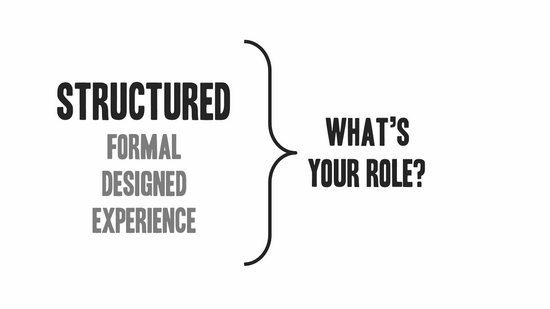
The Role of the Structured Trainer

the role of trainer structured

I see this as more of the traditional role of trainer where you meet with content owners, understand their needs, and put together a training plan. It’s designed to create a specific learning experience to meet a specific goal.

There’s a lot of value in a formal training process. A well-designed training plan can speed up the time to learn and mitigate potential issues. For example, many people have access to content, but it doesn’t mean the content is vetted or compliant with the organization’s needs.

On top of that, compliance and regulatory training often has to have specific content and be delivered a certain way. In those cases, the structure is important.

The Role of the Convenient Trainer

role of trainer convenient

This is where most people are. They have needs, they research them, and then do something with what they’ve learned. Does it means they’ve become experts? No. But it does mean they’ve gotten enough to do what they need to do.

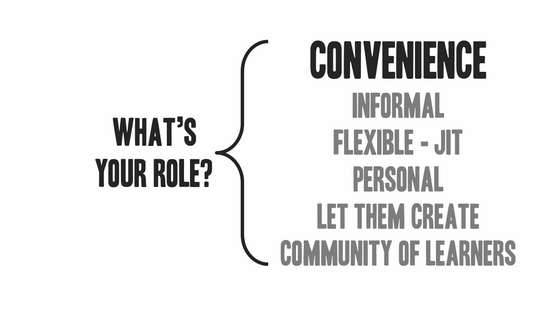
So what’s your role in this world?

  • Curate content. Just because we can find information doesn’t mean it’s always relevant. And it takes time to find it. The trainer is a conduit to the content expert. Curate important information and make it easily available to those who need it.
  • Build a network of learners. A community is built around a shared interest and desire to grow in expertise. Find ways to connect learners so they can communicate, share, and learn from each other.
  • Keep it informal. This is usually where it breaks down. Organizations (and trainers) want structure and control. Thus, it’s hard to let things flow without imposing a bunch of organizational mumbo jumbo.

There’s a place for formal, structured training (see above) and there’s a place to keep it more organic. Organic allows people to choose the content that best serves their needs.

The two roles aren’t an either-or proposition. It’s not one way over the other. It’s just the reality that formal training doesn’t always have to be the plan. And a good training initiative builds on the informal aspects of learning and sees its trainers as part community managers who bring content and people together.

Events

Free E-Learning Resources

Want to learn more? Check out these articles and free resources in the community.

Here’s a great job board for e-learning, instructional design, and training jobs

Participate in the weekly e-learning challenges to sharpen your skills

Get your free PowerPoint templates and free graphics & stock images.

Lots of cool e-learning examples to check out and find inspiration.

Getting Started? This e-learning 101 series and the free e-books will help.


training

Whenever an organization needs to re-organize or make cuts to its staff, the training people are usually the first on the chopping block. There are a lot of arguments as to why that’s the case but it’s a reality for anyone who’s been in the training industry for a while.

The good thing is that e-learning is still a hot part of the training industry, thus far many of us have been spared. But as the tools become more efficient and others are empowered to build their own training content, there will be a reckoning and we’ll have to continue to show our value.

Here are a few common reasons why training gets the boot and what you can do today to avoid being the one booted.

Training Creates Value

Training is supposed to create value. In an ideal world, training is aligned with the organization’s goals and all training efforts contribute to meeting those goals. But the reality is that not all courses (or what are called courses) focus on performance. And that’s probably why it’s easy to gut training departments when times get tough.

Training Aligns with Business Initiatives.

Often the training department lags behind everyone else and tends to react to what the business is doing. Because of this, plans are made without your input.

When you know that the organization is pushing an agenda, your first thought should be where can I contribute? Then figure out how to make it happen. Learn more about the projects and their objectives. Connect with decision-makers. You’ll be seen as a valuable partner when you’re proactive in helping the organization meet its goals.

Training Connects with Metrics

Training impact should be measurable. However, what’s being measured needs to be meaningful. Years ago I learned that lesson when I shared some metrics with one of our directors. While the metrics were great, they were completely irrelevant to what he needed to make decisions.

Get connected with the numbers people. There’s someone in the organization who tracks performance metrics. Find out who that is and learn more about how they track the metrics. You want to know that your courses are aligned with what’s measured. Often you’ll find that your training focuses on one area but the metrics and incentives tied to them focus on different areas. A financial specialist can help you see that.

Trainers Are Assertive

Training groups tend to be passive and react to the organization’s needs. Instead, the teams should be aligned with the organization’s goals and offer proactive solutions. Sometimes this is out of your hands because you don’t have a seat at the table. However, that can change.

Consider the two previous points above:

  • Understand the organization’s goals and push back to ensure your projects are aligned. Worst case you’ll get a better understanding of why you’re doing what you do. However, you may help steer your team towards more productive work.
  • Take the initiative to be part of the knowledge network. Most people don’t leverage this resource and kind of go with the flow. That flow may not go where you want it to.

Ideally, you want your work to be aligned with the organization’s critical path. The more you to do assert that goal, the more apt you are to be where you need to be and have your contributions valued.

Don’t remain an order taker. Connect to the organization’s goals and get involved to help influence when training needs to be created. This makes you a better partner focused on productive training courses that help move the organization forward.

Events

Free E-Learning Resources

Want to learn more? Check out these articles and free resources in the community.

Here’s a great job board for e-learning, instructional design, and training jobs

Participate in the weekly e-learning challenges to sharpen your skills

Get your free PowerPoint templates and free graphics & stock images.

Lots of cool e-learning examples to check out and find inspiration.

Getting Started? This e-learning 101 series and the free e-books will help.