The Rapid Elearning Blog

Archive for the ‘Professional Development’ Category


advanced e-learning courses

“I want to learn more advanced e-learning.”

As I conduct e-learning workshops around the world, this is probably one of the most frequent statements I hear. In many of the workshops, there’s a mix of people who are just getting started with e-learning and those who’ve been building courses for a while. So their expectations and experiences are very different.

On top of that, there’s a difference between advanced topics for using the Articulate software and advanced topics when it comes to instructional design and course construction outside of the software you’re using.

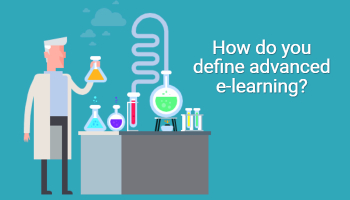
The challenge for me is discerning what “advanced” actually means. I’ll share some of my observations but I’m really more curious as to how you define advanced e-learning.

Here’s How I Define Advanced E-Learning

Since I work at Articulate, most of the workshops are focused on using the Articulate applications to build courses. And it’s a lot more interesting now that Articulate 360 gives you every application because it provides a lot of capability and options for how to approach the course content and construction.
basic or advanced e-learning courses

When it comes to software training, here’s how I look at e-learning skills:

  • Basic. Basic level training is learning to use the features as designed. For example, how triggers work is a basic task. You need a basic understanding of the feature so that you can use it to build interactions and functionality within the course.
  • Advanced. The next level of skills training is becoming competent with the advanced feature set like variables. In a sense, they’re just basic built-in features like the rest, but they are a bit more advanced in what they can offer because of the options and structure they provide. The key is you don’t need to know how to use them to build effective courses. However, when you do know how to use the variables features they make your courses more complex and efficient. You can build things like adaptive learning paths unique to each user.

Here is where I like to create a distinction between basic and advanced e-learning: it’s not about the features as much as becoming efficient and combining features to accomplish custom objectives.

  • Production efficiency. In most software applications, there are twenty ways to do the same thing. In that case, it doesn’t matter how you created the course as long as you get what you wanted. However, there are some production techniques that are more efficient than others. An advanced course developer is efficient and does the little things like adding titles to objects in the timeline. And she understands how to differentiate features and when to choose one over the other when they do similar things.
  • Compounding features. Features are created to do specific things and they usually have some constraints. Advanced course developers learn to accomplish their objectives by combining features and working around the constraints they may offer. In a sense, they create new features through production techniques. We usually call these best practices. And advanced developers have a tool chest full of best practices.

What’s missing?

advanced e-learning examples using JavaScript

  • Hacks. Building on the programming skills above, there are some people who have the programming skills to deconstruct the published output of the course and then hack it by adding their own code to modify how the published course functions. Again great skills to have, but they extend outside of the authoring software.

That’s just the software side of e-learning course production. It doesn’t cover what advanced skills are required to actually determine the appropriate content and activities to effectively teach new skills and concepts.

How Do You Define Advanced E-Learning?

So my question for you is two-fold. How do you define advanced e-learning skills when it comes to the software and then how would you define it when it comes to more general topics like instructional design?

Feel free to share your thoughts by adding them to the comments.

Events

Free E-Learning Resources

Want to learn more? Check out these articles and free resources in the community.

Here’s a great job board for e-learning, instructional design, and training jobs

Participate in the weekly e-learning challenges to sharpen your skills

Get your free PowerPoint templates and free graphics & stock images.

Lots of cool e-learning examples to check out and find inspiration.

Getting Started? This e-learning 101 series and the free e-books will help.


rapid e-learning

I’ve been reviewing some of my older blog posts to fix links and update some of the examples. After ten years, most of the posts are still relevant but some are obsolete like using clip art in PowerPoint. Going through ten years of blog posts brings up some interesting observations. For example, some of the media companies I referenced no longer exist. It’s a good reminder for us to not always jump on what’s hot until it’s really proven its worth.  In addition, the industry has changed quite a bit when I first started blogging.

In 2007, when Flash was king, I stated that the e-learning tools would evolve and become easier to use. You’d no longer need to learn specialized skills like Flash and ActionScript. This wasn’t a prediction of Flash’s demise. The key point was that it didn’t matter what underlying technology drove the content, the next generation course designer could build e-elearning with no programming skills required. This would be empowering and disruptive to our industry. And I think it’s fair to say, that is the case today.

Catching the Rapid E-Learning Bug

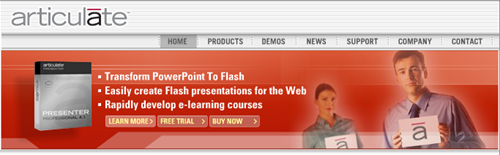
About 14 years ago, I saw the light. I consulted for a company that serviced non-profits. They needed help figuring out “this e-learning thing” and how to get their training online. One of their Flash programmers built a player that could dynamically load content. It worked but it was not easy to use. I was looking for something a lot easier that anyone could use, something more like PowerPoint. I searched for “PowerPoint and e-learning” and stumbled upon this Articulate company and Articulate Presenter. And it changed my life forever and my perspective on the industry.

articulate rapid e-learning PowerPoint

I couldn’t believe how easy it was to take what I built in PowerPoint and easily convert it to an e-learning course. Back then I even used a hidden notes panel to create a simple learning management system where a person searched their name and the courses they need to take showed up in the menu.

For me the big eye opener was that anyone could build courses. This was going to change the industry and take a lot of course construction away from programmers and put it in the hands of instructional designers. From that point on, anywhere I went I was touting this rapid e-learning stuff. Of course, most people immediately tuned out because they heard PowerPoint (which comes with its own baggage) or they were the Flash programmers (the equivalent to Swiss watch makers during the quartz revolution).

Eventually I prevailed and was able to bring the rapid e-elearning applications to a number of organizations. And at each, the teams that used those tools outperformed the Flash development teams.

Here’s one of my favorite stories. I won’t mention the e-learning company (because they’re really well known in our industry).

Shortly after getting hired at Articulate, I was at a big e-learning conference. Someone from one of the big well-known e-learning companies came by and asked if I knew someone who could take a bunch of courses off their hands. Some of their customers had PowerPoint slide decks and wanted to convert them into courses. Essentially she said that they built “real” e-learning and that this type of work was beneath them. None of their developers wanted to work on the courses.

I challenged her thinking and stated that the PowerPoint slides were just content and that any good course designer could convert the content into an effective and engaging course. Who cares how it’s built? And besides, this rapid e-elearning thing wasn’t a trend but the future of e-learning. She literally laughed at me and walked away. Today, they no longer employ Flash developers and the bulk of their courses are built using a rapid e-learning product.

How the E-Learning Industry Has Evolved

The industry is evolving and the tools are getting easier to use. And that’s not going to change. It started with simple PowerPoint-to-Flash conversions but today you can build some pretty complex interactions with no programming background. Here are a few things I see:

  • Most companies have some sort of investment in rapid e-learning. In fact, Articulate is in over 60,000 companies and most of those have replaced their Flash teams with Storyline developers.
  • Most of the Flash developers I know have shifted to Storyline. They do some customization using JavaScript and other hacks. But they’re still not doing a lot of custom programming because the software has made it easy to do.
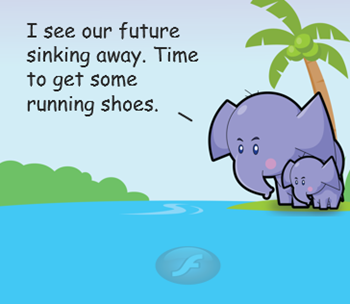
  • Most of the complainers of rapid e-learning are e-learning companies who charge a lot for custom development. It hurts them to see you empowered to build your own courses. You know who they are because all of their blog posts complain about what’s wrong with e-learning. I see them as the elephant companies that are big and slow. But the reality is that most companies are looking for cheetahs and not elephants. If you’re an elephant, you’ll have plenty of time to look at your gorgeous mechanical watch.
  • There’s always a need for sound instructional design (which should be part of any course, rapid or not) and custom development. In fact, I think the advent of rapid e-learning has helped our industry grow which has created more opportunity for the custom developers and those who can help organizations build better e-learning and do more than push out bullet point screens.
  • Today, rapid e-learning has progressed beyond simple PowerPoint conversions. Essentially you have a choice between tools like Storyline that allow for custom development or form-based tools like Rise, where you assemble content and drop it into specific forms. Both form and freeform authoring are viable options to meet different needs.

What You Need to Do in 2017

  • Templates are powerful. They get dismissed, but you can build a template for anything and they don’t need to be those simple bullet point templates. They can include all sorts of pre-built interactivity. One of my favorite features in Storyline is to save any interaction as a template. Here’s an example of a simple interaction that could be a template for quick knowledge checks. It’s one slide and no layers. Adding a new card is just a matter of copying and pasting. Super easy to build and make into a template. And it’s a big time saver when you need this type of interaction. Make an investment to build a few interactive templates or download some of the free ones and then you always have a tool chest of interactive templates.
  • Build the right course for the right project. Not every course requires elaborate decision-making interactions. And at the same time, instructional design is more than slapping some content on a screen. Figure out which requires what and then spend your resources wisely. And remember most learning doesn’t happen in the course. Here are a couple of posts to know if you’re building the right course and separating information from performance courses.
  • Smaller courses are easier to consume (and create). There’s a trend towards microlearning as if it’s something new, but it’s not. It’s just that creating the content in smaller chunks is now more viable and the reality is people can only take in so much content. It’s easier to build smaller modules and then deliver them over spaced intervals. You’ll most likely see more impact and you’ll definitely be able to maintain and update the smaller modules more efficiently.
  • Understand the tools. Generally you have a choice between form and freeform applications. Form-based tools allow you to copy and paste content into pre-determined forms; or you build your content in a freeform environment. Both are great options but they each have different requirements. If you use a form, you’re mostly constrained to the form. If you don’t want those constraints, then use a freeform application, but understand you need to determine how things will look and work as opposed to just adding them to forms.
  • Focus on your development. Commit to a few e-learning challenges this year to build your skills and your professional network. Read some e-learning books and then apply what you learn to your courses. Build a portfolio to document your skills.
  • Share what you know and do. I am a big proponent of community and I know that many course developers are either by themselves or on small teams. The community provides a place to interact with and learn from your peers. It’s also a place to trade files and show examples. If you need more help figuring this out, read Share Your Work.

What are your plans for the 2017? Do you have any e-learning goals? How has the industry changed for you? What are you looking forward to?

Events

Free E-Learning Resources

Want to learn more? Check out these articles and free resources in the community.

Here’s a great job board for e-learning, instructional design, and training jobs

Participate in the weekly e-learning challenges to sharpen your skills

Get your free PowerPoint templates and free graphics & stock images.

Lots of cool e-learning examples to check out and find inspiration.

Getting Started? This e-learning 101 series and the free e-books will help.


e-learning example

Reviewing elearning examples is a great way to learn. You find inspiration to prompt your own ideas and by deconstructing the courses, you learn to use your elearning software to create something similar.

Here are some really nice elearning examples that I’ve seen in the community recently. Check them out and then try to figure out how they were built.

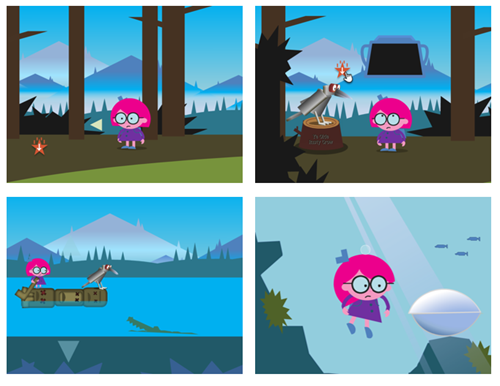
E-Learning Example: Hero Land

e-learning example heroland

Click to view the elearning example.

Here’s a great module built by Richard Lee Hill. This is one of the slickest demos I’ve seen in a while and an excellent example of what you can create with the authoring tools. He combines some great gaming mechanics with learning more about Storyline.

Deconstruction questions for you:

  • How to move the character freely about the screen?
  • How to collect items and rewards and use those throughout the module?
  • How to create just-in-time instructions?
  • How are animations used? Characters? Backgrounds?

There’s a lot to learn by deconstructing this module. What I really like is that as you collect the eBits you have links to video tutorials that explain parts of how this was created. There’s also a bonus high five because he was able to work Goudy Stout into the module.

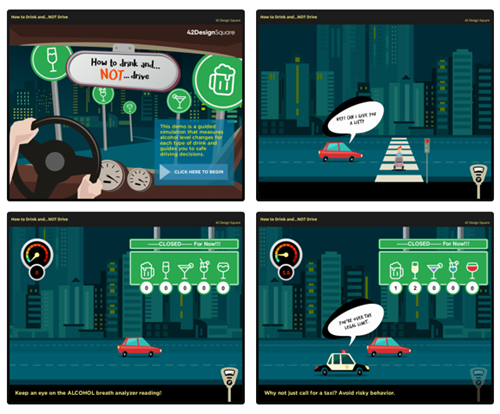
E-Learning Example: How to Drink and NOT Drive

e-learning example drink and drive

Click to view the elearning example.

The folks are 42 Design Square always do nice work. I’ve featured them a few times in the past. This course integrates some nice animations and audio effects. I also like the way they used the variable panel to select drinks and see the impact when driving.

Deconstruction questions for you:

  • How did they create the animation effects?
  • How would you create a similar panel in your courses?
  • How to integrate the drink dashboard with the breath analyzer meter?

Lots of good things happening in this demo. See if you can prototype some of what they’ve done.

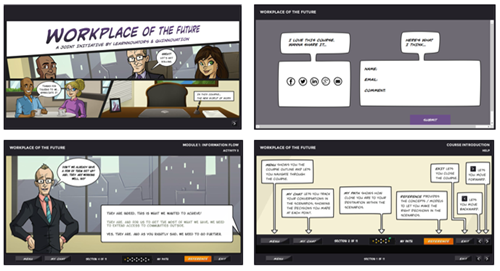
E-Learning Example: Workplace of the Future

e-learning example workplace future

Click here to view the elearning example.

This example looks at the workplace of the future and was done by Learnnovators in collaboration with Clark Quinn. This style of course is a bit closer to what you might build at work and includes some good scenario-like activities.

Deconstruction questions for you:

  • How did they create the custom player features?
  • How did they create the resource page?
  • Can I template this structure for easy re-use?

There you go, three good examples to whet your appetite. The trick is to explore the modules and consider how they were built. And then try to build quick prototypes to see if you can figure it out.

If you have any questions don’t hesitate to connect with the course creators or jump in the community and ask.

Events

Free E-Learning Resources

Want to learn more? Check out these articles and free resources in the community.

Here’s a great job board for e-learning, instructional design, and training jobs

Participate in the weekly e-learning challenges to sharpen your skills

Get your free PowerPoint templates and free graphics & stock images.

Lots of cool e-learning examples to check out and find inspiration.

Getting Started? This e-learning 101 series and the free e-books will help.


build better courses

At a recent conference I was on a panel that asked about how to get better at building elearning courses. I reflected on a few things that I did when I first started and some of those things carry forward to today. I discussed this a bit in this post on how to build your elearning skills.

Learning is an Iterative Process

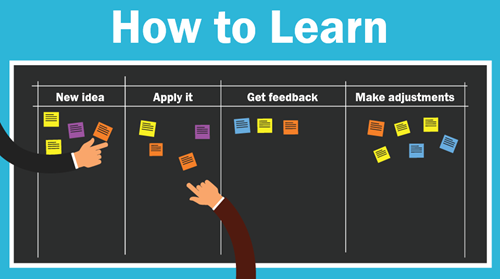
Essentially, we learn something new, apply what we learn, look at the results, and then make adjustments.

Your first project isn’t going to be your best. I look back at some of the stuff I did worked on earlier in my career and am surprised that I wasn’t tarred and feathered by those who had to take the courses.

I recall one where I taught people how to use this new thing called the Internet. Instead of having them open Netscape and doing searches for things that interested them, I spent a bunch of time explaining the interface features, and focused on a lot of unimportant information. What could have been a fun time searching for interesting things became the world’s most boring introduction to the Internet.  How lame was that?

If I were to build that course today, it would be much different.

how to learn

How to Build Better Courses

  • Focus on the learner. We tend to make our courses info-centric and because of this, we focus on how to structure and present content. We should focus on the learner and how they’ll use the content. Then build activities to help them practice doing that.
  • Ask for honest feedback and try to apply what you learn to the next project. This suggestion is a bit challenging because it requires some vulnerability, but it also requires access to an expert who can provide relevant feedback. This is why being connected in the community helps.
  • Keep an idea folder that you can review when starting new projects. I collect ideas from all sorts of sources. When I want some inspiration, I look over the ideas. I will add that it does help to make a note about what you found inspiring at the time you saved it. Often, I’ll review an idea from the folder and can’t recall why I liked it.
  • Set some time aside to practice. I usually find one or two cool multimedia interactions online each week. I try replicate them in Storyline. I don’t worry about how they look. I just focus on wiring it all together to see if I can get the multimedia interaction to work. One of the things I really like about Storyline is that I can quickly prototype my ideas. The other thing I like is that when I do build something from the idea, I can save it as a template and it becomes a reusable interaction.
  • Do one new thing. You’ve collected ideas and tried to prototype them. You’ve chatted with others and solicited feedback. Now it’s time to put it all into action. Take one idea and apply it to a real course. And every time you build a new course, try something new. I know that it’s not always easy to do that in the corporate environment so at a minimum participate in an occasional weekly challenge. At least then you can work on something real and try new things.
  • Keep on learning. Watch tutorials, take informal courses, get a formal degree or read some books.

What are some things you’d share with the person who wants to learn how to build their skills to build better courses? Feel free to share them in the comments section.

Events

Free E-Learning Resources

Want to learn more? Check out these articles and free resources in the community.

Here’s a great job board for e-learning, instructional design, and training jobs

Participate in the weekly e-learning challenges to sharpen your skills

Get your free PowerPoint templates and free graphics & stock images.

Lots of cool e-learning examples to check out and find inspiration.

Getting Started? This e-learning 101 series and the free e-books will help.


dropbox

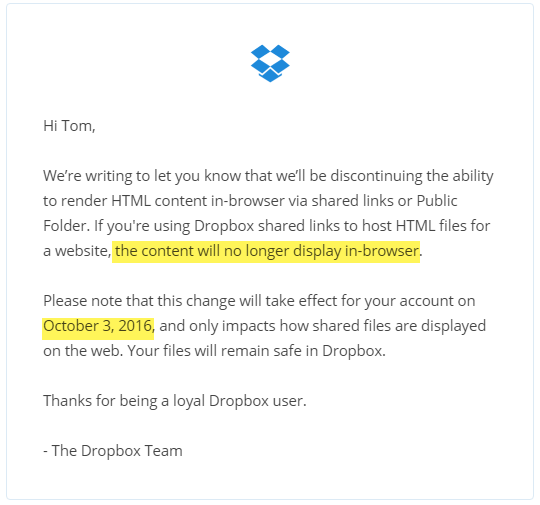
You need to stop sharing your elearning courses and portfolios using Dropbox’s public folder. Effective October 3, 2016, Dropbox is disabling the feature to render HTML pages. It’s one that many have been using to share their courses and elearning portfolios. This is similar to the action Google took last month to disable webpage sharing via the Google Docs service.

If you’re a Dropbox user you probably already received an email from Dropbox alerting you to this change. If not, I’m here to alert you today.

dropbox

Why Should I Care?

Many people in the elearning community currently share their courses via Dropbox. In fact, we have close to 4,000 weekly challenge entries in our weekly elearning challenges; and at least 20% are shared via Google Drive or Dropbox. Maybe more.

It’s a bummer that the service is being discontinued. But the bigger bummer is that all of that content shared by the community will no longer work. That means if you shared a demo in previous challenges (or if you were using Dropbox as a free way to feature your portfolio of courses) all of those links will be broken.

What Are The Alternatives?

In a previous post, I shared a few alternatives. I’ll share them here again.

  Click here to view the YouTube video.

  • Use Amazon S3 or a competing service. Here’s how to set up the Amazon S3 service. That’s what I use.
  • Buy your own domain and manage it yourself. A domain name and hosting may cost about $50/year. That’s not expensive at all.
  • Can you upload your course? A lot of people use Wix and Weebly type services for their portfolios. They are good services for websites, but sharing files isn’t easy. You need a place to host the courses files and create a link. Those website services often don’t have a file/folder upload feature. Something to keep in mind.
  • Be careful of free services. Odds are they’ll be gone or remove the free part of the service and you’ll be in the same place you are today.

Personally, I think it’s worthwhile to create a custom domain and manage the demos and courses that way. It doesn’t cost that much and then you have complete control over your brand and you’re not at the whim of those free services that may or may not be available at a future date.

What do you recommend?

Events

Free E-Learning Resources

Want to learn more? Check out these articles and free resources in the community.

Here’s a great job board for e-learning, instructional design, and training jobs

Participate in the weekly e-learning challenges to sharpen your skills

Get your free PowerPoint templates and free graphics & stock images.

Lots of cool e-learning examples to check out and find inspiration.

Getting Started? This e-learning 101 series and the free e-books will help.


cons of social media negative

Social media is what you make of it. For the most part it is valuable and offers a number of ways for you to succeed. We discussed this in the previous post on the pros of social media. Today we’ll look at the cons of social media and the potential impact they have on you, your job, and our industry.

Cons of Social Media: Too Much Noise

I have this routine where I read my elearning news feeds on a tablet (usually at night). I have a goofy process. The ones I like, I tag for later reference. The ones I think are really valuable, I’ll email to myself to make sure that I can spend more time on them when I get to my desk. But I never do because I end up occupied with more important things.

Eventually my inbox fills with a lot of those “important” links so to clean up my inbox, I created a filter to put all of the emailed links in one place. The other day I looked at all of the important content I’ve saved over the past few years. I have almost 11,000 links that I still haven’t read (but found to be really valuable). That’s about 916 hours of reading.

cons of social media full inbox

Here’s the deal: your social media connections deliver a lot of good content, but there’s just so much of it…and it doesn’t stop. I liken it to standing on a rock in the middle of a river. At best, you can put a net in to scoop something out, but the river continues to flow. And so it is with social media content, it just keeps coming with all of its alerts and beeps and constant notifications. Throw in the additional correspondence via Facebook, LinkedIn, and Twitter and that’s a ton to parse.

This stream of content is not only distracting it can also cause some anxiety as you see the world slipping past you. I experience it myself. There are many days I feel like I’m out of the loop and losing touch with what’s going on in our industry. I was just getting used to SCORM and now I need to learn about TinCan xAPI. Come on!

If only WUHPF was a reality; I could use the Dog Pack today.

Turn this into a positive:

  • Find a single solution to manage the content you value. There are all sorts of tools like Pocket, Feedly, Flipboard, Diigo, Evernote, OneNote, and even your browser via add-ons.
  • Set a specific time to review the important content. And then leave it at that. Don’t worry about missing anything. It’s not as important as you think anyway.

What do you use to manage the content from your social media stream? Do you have a way to stay on top of what you are most interested in?

Cons of Social Media: Where’s the Social?

Sharing with your social network is valuable, but how social is it really?

It seems that for something that begins with the word social, there’s not a lot that’s social about it. Instead it’s more like we’re conduits of pushing content to our connections. And a lot of that content is manipulated by advertisers, marketing teams, and social media services.

cons of social media negatives

While social media does give everyone a voice, I wonder how much real dialogue actually happens. It seems like we’re just taking turns standing on the soapbox?

Social media and the mobile devices that we use to consume it are changing how we interact with each other. Here’s an interesting article on how social media is making people less social and a thought-provoking photo essay by Eric Pinkersgill where he removed all of the mobile devices from his subjects. It really makes you think about how we connect today.

Turn this into a positive:

  • In addition to pushing content, actually connect with a person. Use social media to build relationships. Ask or answer questions. Participate in one of those social media chats.
  • Make time to unplug. It doesn’t hurt to step away for a bit.

Cons of Social Media: Professional Life Beware

There are all sorts of laws that protect you from discrimination during job interviews. There are things you can’t be asked and you aren’t required to disclose. However, if someone did want to learn more about you without violating the law all they need to do is an online search. Odds are they’d find more that you want to share.

Your online profile with its pictures, political memes, and comments creates a perspective on who you are and what you value. It may not be totally accurate, but people will draw conclusions based on what they see. And that may impact your professional relationships and potential business opportunities.

Which is another issue. The line between business and personal is getting a bit blurry.

Today, we’re connecting in ways that may not be appropriate or professional. Should I really be looking at your family vacation photos and what you had for Thanksgiving? Do I need to know your religious and political views?

Professional services like LinkedIn are good because they do separate your business social profile from the personal one. However, I will add that LinkedIn seems to be a source of some of the same nonsense you’ll find in less professional social networks. So I’m not sure how that will evolve.

Turn this into a positive:

  • Determine how you want to frame your online presence.
  • Create separate accounts for your professional and personal networks. Keep your personal accounts private (or recognize that it becomes part of your professional persona).
  • Create clear guidelines on what you post and how you respond.

Generally, social media is neutral and controlled by what you consume (and share) and how you’re connected. It can be positive or negative, or both. The main thing is that you see it as a tool that helps you learn more about the industry, your job, and build a network of peers. And then of course, be careful what you share as that does partially determine how you are perceived.

How are you using social media today? And how has it changed the way you work?

Events

Free E-Learning Resources

Want to learn more? Check out these articles and free resources in the community.

Here’s a great job board for e-learning, instructional design, and training jobs

Participate in the weekly e-learning challenges to sharpen your skills

Get your free PowerPoint templates and free graphics & stock images.

Lots of cool e-learning examples to check out and find inspiration.

Getting Started? This e-learning 101 series and the free e-books will help.


pros of social media positive

The training industry is changing rapidly and technology plays a big role in that change, especially social media. However, like any change, there are positives and negatives that come with it.  Today, I’d like to discuss a few pros of social media as it relates to our industry and then I’ll follow it up with a post on some of the cons.

What is Social Media?

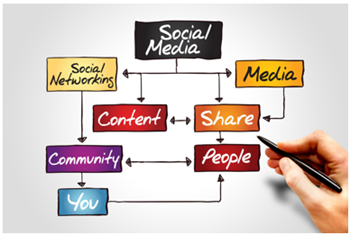
Wikipedia has a good detailed definition of social media. I see it as technology that allows people to connect and share information.  To be more specific, it’s about being connected to a community that shares interests and has a desire to share expertise around that interest. The social media technology just facilitates the connection.

The Growth of Social Media Technology

Most people in our industry probably see the following three services as their core social media tools: Twitter, Facebook, and LinkedIn. Many organization are also using internal social media services like Yammer and Slack .

However, everyday there seems to be a new tool and people in our industry willing to hype it up. Look at some of the recent raves about Pokemon Go by the same people who were peddling Second Life just a few years ago. New technology can be both positive and negative. New ways to connect and share are good. But if you use a service and no one’s there, what good is it? Remember Google Wave or even Google+?

Many of the new and novel social media tools will be gone soon enough or they’ll be consumed by larger organizations. Sticking with the three above is probably more than adequate for our needs today.

Does your organization use a social media service? What do you think about it? How have is it helped your job?

Pros of Social Media: Curated Content

One of the biggest values of social media is the content stream. There’s a lot of really good information being shared everyday by all sorts of people in our industry. The challenge is knowing what’s out there and then sorting it by what’s important.

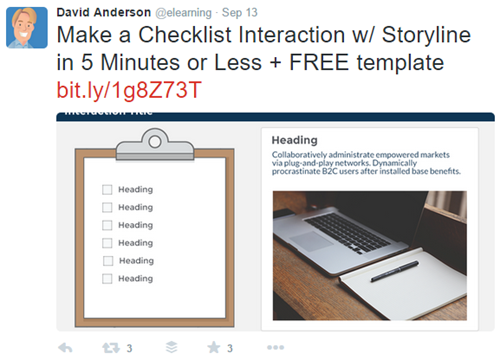
  • Find content curators. Some people are really good at curating and staying on top of things. They’re the curators and you’re the beneficiary. For example, David Anderson is one of the elearning people I follow on Twitter. Even though I work with him, I’m always amazed at how well he curates and posts a lot of relevant links and lots of cool elearning examples—just the sort of practical content our community needs. The same can be said for organizations. Articulate does a great job highlighting it’s customers, free downloads, templates, and cool elearning examples.

pros of social media connected to content

  • Follow topics not people. Another way to stay on top of the good content is to track topics is via hashtag. Instead of following a person, or everyone in an industry (which can be overwhelming), follow topic-specific hashtags like #elearning or #training. You will stay on top of all posts relevant to that topic.

I use Hootsuite to manage what I do, but there are other apps out there, too. Do you use a social media application? Which one?

Pros of Social Media: Connect with Experts

Quite a few years back I wrote to a well-known author in our industry. I actually had to write a real letter, mail it, and then hope for a response (which never came). Things are different today because we have access to experts (and what they know) via a few clicks. And I find most of them to be responsive.

pros of social media lrnchat

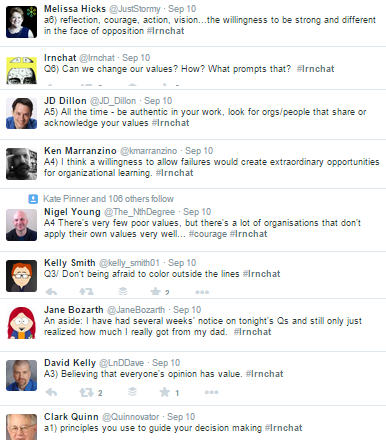
A good example of access to experts is something like #lrnchat where people post questions, answers, and discuss learning related topics. Not only can you share your thoughts, but you get to dialogue with well-known experts in our community. This can lead to building your professional network and often meeting them face-to-face at workshops and conferences where you can continue the dialogue.

And on the flip side, social media allows you to establish your own expertise by curating content and sharing what you know. In the past you had very few outlets to build your professional reputation. But today, you can easily connect and contribute to build your reputation and expertise.

Pros of Social Media: Get Help from Others

Social media is powerful in the connections it can foster and in turn the help those connections can provide. Just recently, I got to witness an excellent example of how broad our social media connections can be and the access we have that we didn’t a few years ago without it.

Justus is a young boy who was rushed to the hospital with a very serious medical condition. As people rallied around the family, they used social media to keep everyone up-to-date. To do so, they created #TeamJustus as a way to share what was happening but also to pass on encouragement and kind words. It was amazing to see how the network rallied to support the family. They even received encouragement from unlikely participants like former President, George Bush, and NFL quarterback, Andrew Luck.

pros of social media

We may not all have connections to celebrities and famous people, but you can be sure that your connections are broad; and odds are that if you need something, there’s someone in your network who can help. And if they can’t, they’re connected to someone who can.

The good news is that we are members in an overly generous industry where willfully helping other seems to be the default disposition. I see this all the time in the E-Learning Heroes community. In a sense, being connected to a community of peers is like an expansion of your cubicle and there’s all sorts of help for you. Your team of one can become a team of many. This is a point I made in this post on why the community brings real value.

There’s a lot more to say about the pros of social media. It provides practical value that will help you in your job today and in your future prospects. The key is to get connected and then to participate. If you’re not currently active in social media, perhaps these tips will help you reconsider your participation.

What do you see as some of the pros of social media?

Events

Free E-Learning Resources

Want to learn more? Check out these articles and free resources in the community.

Here’s a great job board for e-learning, instructional design, and training jobs

Participate in the weekly e-learning challenges to sharpen your skills

Get your free PowerPoint templates and free graphics & stock images.

Lots of cool e-learning examples to check out and find inspiration.

Getting Started? This e-learning 101 series and the free e-books will help.


select e-learning software

I get a lot of questions about buying elearning software. And with that I get to see some of the ridiculous checklists that some IT groups create to compare software. Usually they place more value on number of features (regardless of their real value) than on how those features are used to create the online courses.

When it comes to selecting software, it can be hard to know what to look for and what questions to ask. Here are some tips to help you find the right tools as you wade through reams of the vendor’s marketing information.

Select E-Learning Software by Understanding the Type of Tools

The first thing to know is what types of authoring tools exist and how they work. Generally speaking there are three types of authoring tools for online learning: form-based, freeform, and video.

Form-based authoring

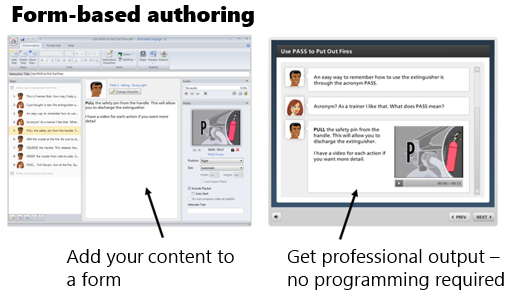
Form-based applications don’t require any programming because they use pre-built forms where you add your content. The software is designed to give you a very specific output. All you have to do is add your content. The software does the rest.

This is great because you don’t have to be a programmer or designer to use the tools. All you do is collect your content, choose your form, and hit publish. The programming and design is all done by the software.

Most quizzing applications are form-based. There are places where you add questions, choices, and answers. But you don’t have to make any design decisions.  Another good example of a form-based tool is Articulate Engage. You select an interaction type, add you content, and hit publish. Simple as that.

Form-based authoring is great because it’s easy and fast. The downside is that the form is a form and works as designed with limited customization. You’re kind of stuck with what you get. You usually have options in the number of forms, and some choices of colors and such, but for the most part the design is static.

Freeform authoring

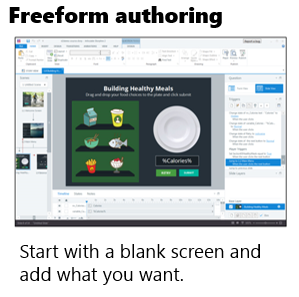
Freeform applications give you a lot more flexibility. Generally they start with a blank screen. You determine the layout, content placement, interactions, and visual design. While it’s not overly complicated to do this, it does require more expertise than just adding content to a form. You need to understand how to get something to look and work a certain way.

freeform authoring select e-learning software

Of course, the more you want to do with your course, the better you need to know the application. That means a greater time commitment and learning curve than just dropping content into a form and hitting publish.

A hybrid freeform solution is PowerPoint-based authoring. Essentially you use your PowerPoint skills to build your content and whatever you create in PowerPoint is converted to an elearning course. This is an easy entry point for the first time author, but because you’re starting with PowerPoint eventually you’ll hit a ceiling.

Personally, I love PowerPoint-based authoring, but if I had a choice, I’d just go with something like Storyline because it’s easy to learn and over the long haul it provides a lot more value. For example, you may not use variables when you first start creating courses, but it won’t be long before you’ll find the need. If you work with a PowerPoint-based solution, you can’t use variables. However, you can with Storyline.

Some authoring tools require additional programming skills like ActionScript, JavaScript, or HTML. Or they amend their offerings with widgets and add-ons. I have mixed feelings about this approach. It’s good for those who have the programming chops to extend what they can do with the software.

However, what I don’t like is that the widgets and extra programming required go outside of how the rest of the course is authored in the software and often you’re not able to effectively edit the widgets and add-ons. This creates a lot of extra work and can be frustrating. This is just something to keep in mind when you’re looking at tools.

In fact, this is one of the things I like best about Storyline. All of Storyline’s authoring centers around triggers which require no special programming. And they don’t require special add-ons for interactions. You can build what you need; and if you build an interaction, it’s going to be built like everything else in the software. And whatever you build can be saved as a template and shared (with all of the interactivity intact) which removes the need to have a bunch of add-on interactions in the first place.

When you’re reviewing tools, determine what type of tool it is and how the authoring process works. Form is easy and saves time. Freeform provides more flexibility but requires a little more to learn it. Don’t get enamored with features that look good on the surface, but frustrate the authoring process.

Video-based authoring

Video is the other type of authoring solution and it’s pretty straightforward. The videos can be simple lectures, but often are software tutorials or those new “explainer” style videos. Their production is relatively straightforward. You capture the video and process it.

When looking at video tools, you’ll want to understand what editing capabilities exist within the capturing tool. Probably the most important feature is splicing and being able to cut items out.

Select E-Learning Software by Avoiding the Feature Trap

Many organizations make the mistake of crafting feature lists and then comparing the different software based on the features. The ones with more features tend to get rated higher. This is a faulty approach because features aren’t equal and the lists are usually derived from marketing material anyway.

Here’s how I see it.

It’s less important to look at a list of features and more important to look at production workflow because it puts the features in perspective and in context. Each tool can probably build the course you want to build. It may just use different features to do so (which is why a list of features is less relevant). However, the difference in workflow may be substantial. And that’s what you want to discover.

To avoid the feature trap, I recommend that you test each application by building the same demo module. You’ll learn if the tool is easy to use and how long it takes to build what you need. The last thing you want to discover is that your feature-rich product has an inefficient workflow that actually costs you a lot more time.

Tabs interactions are a good test module. They’re usually quick to build and you get to test the general workflow of the software. You learn about layout, how to create the interactive tabs, and expose content.

Here’s a good starting checklist:

  • Create five tabs that when clicked exposed new content.
  • Make tabs interactive with hover and down states.
  • Add a visited state to indicate that the tab was clicked.
  • Make the tabs interdependent where one is on (selected) and the others are off (deselected).
  • Create conditional navigation where the screen can’t advance until all tabs are visited.
  • Change the type of interaction on the tabs from click to hover to see how easy it is to edit.

This simple tabs module lets you dig through the different software a bit and understand the general workflow. This is a better comparison than features that may or may not be important to your course authoring.

Select E-Learning Software by Testing What Happens After You Make the Purchase?

Buying software is easy. And sales people tend to be very accommodating. However, that all changes after the sale.

Keep in mind, once you install the software you’re probably mostly on your own, thus after-sales support is super important and may be worth more than the price of the software. You want to get a good feel for the software vendor and how they treat their customers because you’ll be leaning on them for help down the road.

During the trial phase connect with the vendors. Tell them what you want to build and ask how to go about it. You’ll learn how responsive the vendor is to your needs and what resources are available to help you succeed.

Here are the three things I recommend you research prior to choosing your course authoring software:

  • Support: what type of technical support exists? Does the vendor provide free resources to help you learn? What happens when you have an issue? How long does it take to get help?
  • Community: many online communities provide customer support and technical assistance. You typically find answers to questions, resources, and an assortment of tutorials. What does the vendor do to support your ongoing development? Many course authors are relatively new to online learning. Thus having an active and engaged community is important, especially one full of resources.
  • Connections: community resources are great. However, being connected to other users is key. Vendors build software with features. But users develop best practices and the types of tips and tricks you’ll need to be successful. Experienced community members also share a lot of what they do which is a source of inspiration for those just getting started.

The market is full of options for your online course authoring. So when you’re looking at them be sure to learn what types of tools they offer, what workflow is required, and how they’ll support your development after you’ve purchased the software. If you do those things, you’ll find the tools that provide the best solution to meet your needs.

And if you want to save time, just choose Articulate. We are committed to your success and will do everything we can do to help you build great elearning.

Events

Free E-Learning Resources

Want to learn more? Check out these articles and free resources in the community.

Here’s a great job board for e-learning, instructional design, and training jobs

Participate in the weekly e-learning challenges to sharpen your skills

Get your free PowerPoint templates and free graphics & stock images.

Lots of cool e-learning examples to check out and find inspiration.

Getting Started? This e-learning 101 series and the free e-books will help.


350-community e-learning community

I’m a big fan of community and how it helps us learn from each other. This is especially important for those of us in the elearning industry.

If you are a financial analyst, odds are that there are a number of seasoned financial analysts in your organization who could draw from their experience and offer you all sorts of tips. Often that’s not true for elearning. Many of us work on small teams and don’t have access to seasoned pros. And that’s why community is so important for us.

The Value of the E-Learning Community

Community isn’t content. Instead its about learning from each other while we exchange tips, best practices, and share resources. It’s a means to help you grow. You’ll expand your support network and build your expertise (and eventually your reputation among your peers).

Here’s one example of how this happens in the community.

I think one of the best ways to learn to build better courses is by reviewing and deconstructing what others do. When I facilitate elearning workshops I routinely show the examples created for the community’s weekly elearning challenges. They’re authentic and created by real community members.

What I like about the modules is that I often learn something new. There are a number of occasions where I spend time deconstructing the demo trying to figure out how it was created. Sometimes I can’t, which bugs me. But most of the times I learn some new production techniques or a new way to think about the software.

Today I’d like to feature one of the community members who does a great job representing what’s good about community and how to participate in a way that’s meaningful and useful to others.

The E-Learning Community Shares Out-of-the-Box Ideas

I met Joanna Kurpiewska a few years ago at a workshop in London. She shared a little about her trajectory in the industry, some of her ideas, and what she hoped to accomplish. It’s really exciting to see how well she’s done over that time and to know that we played a small role in that.

There were two recent challenges where the demos she submitted were pretty cool.

e-learning community example 1

Click here to view the slider demo.

The first challenge above was on using the slider feature in Storyline. The one Joanna did really stood out to me. First, it wasn’t a typical looking slider and second, it introduced a novel way to navigate the course, essentially removing the need for a previous and next button.

e-learning community example 2

Click here to view the player demo.

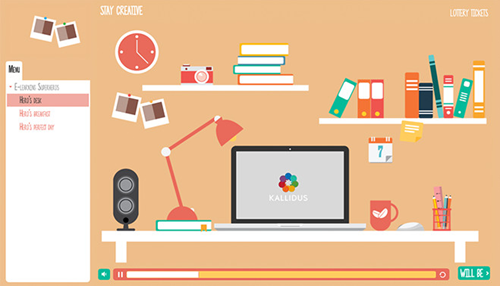
The second challenge above was on creating a customized player. Again, the submissions were pretty creative and introduced some neat ideas. Check them out.

There were a few things that I like about Joanna’s submission. I like the informality of it with the cluttered desktop, the informal font, the lottery ticket link, and the structure of the next button. I also like the way she colored the player and filled the presenter image area with the Polaroid graphics to push the player out a bit.

Joanna’s not the only one who submitted creative ideas, so be sure to look at some of the other demos.

The key point is that your peers who share their work in the elearning community will help you see things in a new light and expand your understanding of what you can do (and possibly do it in new ways).

The E-Learning Community Shares What They Learn

As you know, I’m a big fan of PowerPoint and using it to create your own custom illustrations. I’ve featured that capability in a number of posts, such as this one.

In the past Joanna’s done something similar where she’s shared how she creates some of her own illustrations:

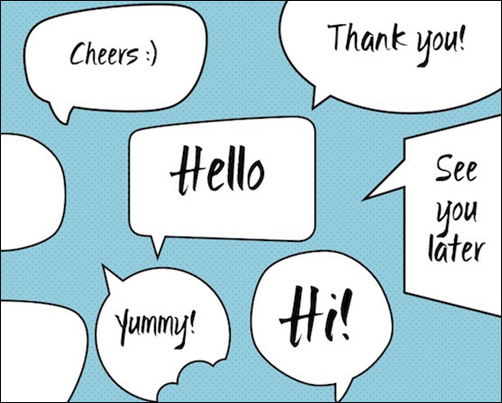
Recently she shared a great demo on how to create custom callouts and speech bubbles. You can read the article here and watch the tutorial video on YouTube. And of course, there’s a free download for those who want the files.

e-learning community free speech bubbles

The E-Learning Community Establishes Your Authority

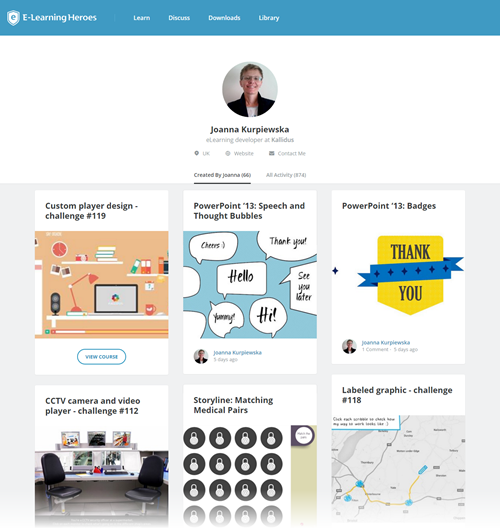
If you look at Joanna’s community profile you can see she regularly participates in the challenges and shows her work. She also freely shares her expertise by answering questions, doing tutorials, and making her source files and assets available for free. And she also maintains her own blog where she does even more of the same.

e-learning community example 3

All of this activity allows her to build her own brand and expertise outside of the community. This is important because it allows your community activity to bleed over into your elearning portfolio which may lead to a stronger network of peers, more professional contacts, and potential business opportunities.

I know many people in the community who do the same thing and it’s paid dividends as they get all sorts of inquiries for freelance work.

What’s in it for me?

Community is all about practitioners getting together and learning from each other. The ultimate goal is to build expertise in the given domain, which in this case is using the Articulate elearning software and becoming a better elearning course designer.

This sharing and learning from each other is authentic and not manipulative. It’s not a marketing vehicle to sell your services and templates (which unfortunately some of the community members don’t quite get yet).

That’s why I chose to focus on Joanna, because I met her and know her story. What she shares and how she engages in the community is based on acquiring and sharing expertise. The modules that show off her skills and the free assets that she shares are merely artifacts, a by-product of what’s happening as she’s engaged with the community.

Are you stuck in a cubicle building the same course over and over thinking that the elearning world is passing you by? Do you want do something different and be connected to people who can help you grow? Then think about participating in the community. Even if you can’t answer questions or participate in the elearning challenges, at least make it a point to see what’s going on. And it’s easy to stay on top of that by following the weekly recaps.

Come join us and let’s learn together.

Events

Free E-Learning Resources

Want to learn more? Check out these articles and free resources in the community.

Here’s a great job board for e-learning, instructional design, and training jobs

Participate in the weekly e-learning challenges to sharpen your skills

Get your free PowerPoint templates and free graphics & stock images.

Lots of cool e-learning examples to check out and find inspiration.

Getting Started? This e-learning 101 series and the free e-books will help.


share e-learning courses

[UPDATE March 1, 2022: The essence of the post is still accurate, but you can find an updated tutorial and instructions here.]

Today I am going to show you how to set up an Amazon S3 account to share e-learning courses and portfolios. You can also share your courses using Google Cloud which I cover in a different post.

However, this post provides more detail and it’s super important to those who use Google Drive to share their e-learning courses because Google is discontinuing that option on August 31, 2016. Now’s the time to come up with a better solution before all of your links no longer work.

Here’s what you’ll need to do:

  • Create an Amazon S3 account.
  • Download Cloudberry Explorer (free).
  • Create an account in Cloudberry to upload your courses.
  • Set the appropriate viewing permission.

I created a video that walks through the process. Below are the basic steps and the video provides a bit more detail.

Click here to view the YouTube Video.

How to Create an Amazon S3 Account to Share E-Learning Courses

Creating an Amazon S3 account is really easy. You’ll need to add your personal info and credit card for payment. Initially you get 5 GB free for the first year and then pay a fee after. For a personal account I wouldn’t expect to pay much, maybe just a couple dollars a year. It’s a very affordable option.

Once you have an account, you’ll need to locate the security settings and find your access keys.

  • Go to User Name
  • Security Credentials
  • Access Keys

This will expose your access key and secret access key. You’ll need them so that Cloudberry Explorer can access your S3 account.

Download Cloudberry Explorer to Share E-Learning Courses

Cloudberry Explorer is the application you use to access your S3 account. Once you have access, you can upload files and get the URL to share.

Create an Account in Cloudberry to Share E-Learning Courses

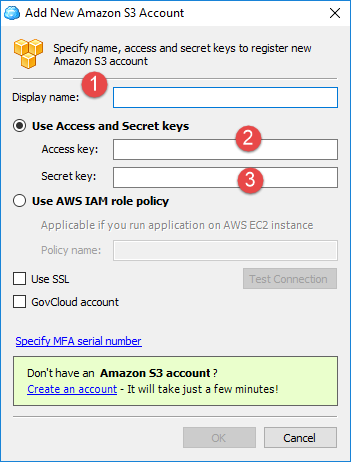
Once Cloudberry is installed you’ll need to create an account that’s connected to your Amazon S3 account.

  • Go to File>New Amazon S3 Account.
  • Create an Account Name
  • Go to Amazon S3, copy and paste the Access Key and Secret Access Key into the form.

cloudberry-explorer share e-learning courses

You should now be able to access the account using Cloudberry Explorer.

Create a Bucket and Set Permissions to Share E-Learning Courses

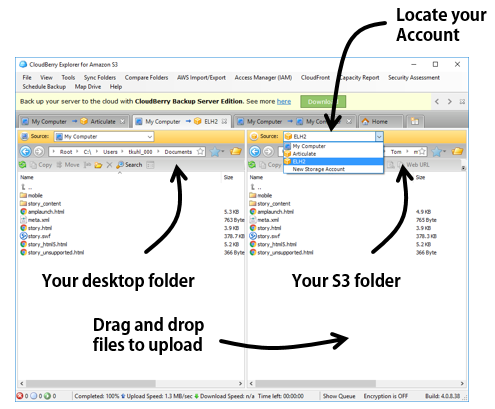
On the left side you can display your desktop folders. And on the right, you display the S3 account and folders.

cloudberry-explorer-1 share e-learning courses

Initially there will be nothing in the S3 account. The first thing you need to do is create a bucket. That’s where you’ll host your folders and save files. You can create more than one bucket. For example, you may have one bucket for your portfolio and another for personal files. And you can limit who has access to the files in your bucket.

  • Create a new bucket. It should have a unique name. All of your folders and files will go into the bucket.

bucket share e-learning courses

  • It’s a good idea…You can set the permissions for the bucket so that anything you add to it can be viewed when you share the link. Otherwise, you have to set permissions every time you upload a course.
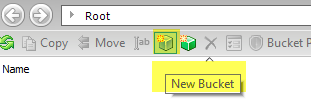
  • Click on the Bucket Policy icon and add your policy. This site explains it in more detail.
  • Once you’ve established the policy, you can start to add folders and files.
  • To share a file, click on the Web URL icon.

That’s about it. Of course, you should read more on what you get with both Amazon S3 and Cloudberry Explorer. But for the most part, what you see here and in the video is all you need to do.

Now’s a good time to set up an Amazon S3 account. The cost is nominal and the service works well for sharing your e-learning courses.

Events

Free E-Learning Resources

Want to learn more? Check out these articles and free resources in the community.

Here’s a great job board for e-learning, instructional design, and training jobs

Participate in the weekly e-learning challenges to sharpen your skills

Get your free PowerPoint templates and free graphics & stock images.

Lots of cool e-learning examples to check out and find inspiration.

Getting Started? This e-learning 101 series and the free e-books will help.


e-learning pain points

The other day someone asked what I thought the three top pain points were for online training or elearning. I hear lots of complaints and I’m sure that there are many pain points, however if we keep them in perspective, they’re really not as painful as being stabbed or thrown down a flight of stairs. Here are some of the issues I find most challenging with elearning.

E-Learning Pain Point #1: Courses are Boring

I review a lot of courses during the year. Many of them are very basic–consisting of mostly slides, simple graphics, and bullet points. I’ll assume that the people who do take the courses probably don’t find then all that exciting. A slide with bullet point content isn’t necessarily a bad thing. However, slide after slide of this type of content isn’t the most effective way to engage and teach people.

The bigger issue isn’t usually the content as much as it is that the content isn’t relevant to the person’s needs. Here are a few tips to help.

E-Learning Pain Point #2: Developers Have Limited Skills & Resources

Many of the people I meet are the only elearning person on staff. And the majority of them didn’t start in elearning. They started as trainers who moved to elearning as the organization needed to put courses online. They end up having to do everything from instructional design, graphic design, and course authoring.

In addition to having limited experience building elearning courses, they usually lack a breadth of technical knowledge and programming skills. On top of that, they don’t get adequate support for other things such as media assets and IT help.

Many of them do a great job given their limited resources, but to build courses that are engaging, interactive, and meet learning objectives requires more than a basic understanding of PowerPoint and learning to find free clip art. This means that the developers need time to learn the skills to build more than basic courses and they need more support from their organizations.

Without organizations making a bigger commitment to their elearning teams, most courses will probably be stuck in pain point #1.

Here are some solutions for those who want to learn more and do more:

  • Check out all of the free getting started resources we have in the community. There’s a lot of good generic content, free ebooks, and of course tutorials to learn the software.
  • Participate in the weekly challenges to practice new things. Even if you don’t participate, make it a point to see what others do as a source of inspiration.
  • Take classes where you can. You can go for a formal degree or certificate at most of the universities. There are informal options like the video tutorials, lots of free webinars, and a number of opensource learning opportunities. And of course, participate in your local ATD, ISPI, and STC chapters.
  • Read a book and apply what you learn to your courses (or the weekly challenges). Here’s a good starting list. Or better yet, create a mini module on what you learned in the book and share it with others. It’s a great way to practice building courses–solidifying the content in your own brain and sharing what you learn with others.

E-Learning Pain Point #3: [Insert pain point here]

I can add an assortment of additional pain points such as courses are too long, high dropout rates, etc. But I’d like to open it up to you. What is the single biggest pain point for you when it comes to elearning and online training? Add your thoughts in the comments section.

Events

Free E-Learning Resources

Want to learn more? Check out these articles and free resources in the community.

Here’s a great job board for e-learning, instructional design, and training jobs

Participate in the weekly e-learning challenges to sharpen your skills

Get your free PowerPoint templates and free graphics & stock images.

Lots of cool e-learning examples to check out and find inspiration.

Getting Started? This e-learning 101 series and the free e-books will help.


e-learning portfolio post

I had a couple of questions this week about elearning jobs. First, someone asked me what they should expect when hiring an elearning course developer. And on the flip side, someone I know was looking for work and wanted some tips on how to get a job.

Here’s my take and some things I’ve done in the past as a hiring manager and when looking for work. Also, I just updated a lot of the event info for this year. Be sure to check out if we’ll be in your area.

Expect an E-Learning Portfolio

For the manager:

Some people are good talkers and do great at interviews. They’re pros at answering your behavioral questions. They may also have a strong resume listing good work experience and education. All of those things are great and important to consider, but can they really do the work? How do you know?

I like to see a portfolio of projects. I want to see what they’ve worked on and know what exactly they did in those projects.

e-learning portfolio

For the job seeker:

If you don’t have a portfolio, how can I see the type of work you’ve done? Often people will tell me that they can’t share what they’ve done because it’s proprietary and they don’t have the rights to show it. While that may be true for some, I’ve found that to be mostly hogwash and an excuse to not show work.

Even if it’s true that you can’t show your real projects, it’s still not an excuse for not having a portfolio. If you can’t show real work, remove the proprietary content and use lorem ipsum text, if you have to. Or participate in the weekly elearning challenge. That’s an easy and quick way to build a portfolio.

This may sound harsh and it’s your prerogative to not have a portfolio. But the reality is that the job will attract other job seekers who do have a portfolio and are better prepared to get hired. Your education and experience don’t entitle you to anything. The only thing that matters is if you can use your skills to help the hiring organization meet its needs. And a portfolio is one of the best ways to demonstrate your work experience.

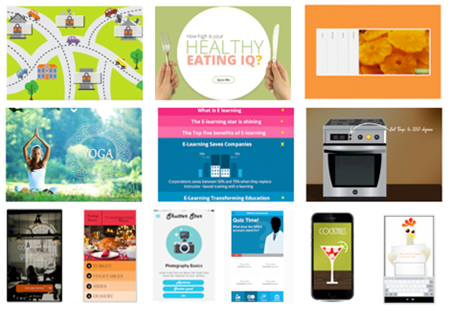
Look for Diverse E-Learning Examples.

For the hiring manager:

As you know, elearning is more than a bunch of bullet point screens. If that’s what you need, you can hire just about anyone. If you want a good elearning developer you should look for one who can do more than great looking bullet point slides. Some of what I look for:

  • How they got past bullet points with unique layouts or small interactions
  • Types of interactive content and learning activities
  • Scenario driven content
  • Software training: simulations or screencasts
  • Creativity

e-learning portfolio examples

For the job seeker:

When assembling a portfolio, pull together diverse elearning examples with different types of courses and interactions. Don’t expect the hiring manager to click through 30 slides to get to the one interesting interaction. Pull the interaction out and show just that.  Don’t show twenty click-and-read compliance courses that are all essentially the same. Also, don’t lock the navigation. That guarantees that the reviewer won’t click past the first slide.

One last point on this: looks matter. You may have the most instructionally sound course to show, but the ones that get the eyes are the ones that look good. Something to keep in mind.

Hire for Desired E-Learning Skills

For the hiring manager:

Understand what role you’re trying to fill and then craft questions to collect the information you need to assess whether the person can fill that role. It also allows you to be consistent in the process across candidates. I like to create a rubric so that I’ve consistent and can compare candidates based on the same question.

This appears to be an obvious point, but often the interviews get sidetracked. And sometimes the hiring staff gets enamored with the person’s personality or other things and never gets around to finding out if they’re really qualified.

skills e-learning portfolio

For the job seeker:

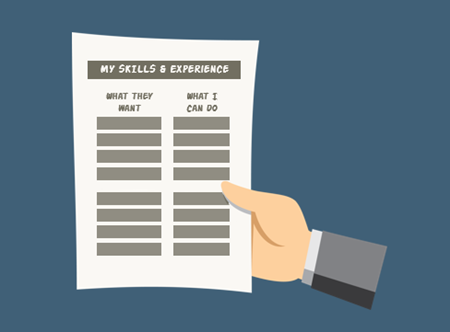
I used to make a two-column list. On one side I listed what the organization identified in the job announcement. And on the other, I listed my response and my experience. This helped me prepare custom resumes specific to the job application. It also helped me with practicing my interview answers.

Collect some job posting and make a list of what they want and then compare what they want to your skill set. Even if you’re not looking for work, this is a great way to identify areas for personal development.

Assign an E-Learning Project

For the hiring manager:

Some people are good talkers (our industry is filled with good talkers) and sometimes it can be hard to assess whether or not they actually have the skills you desire. When I get to the next round of interviews, I assign a simple project. I tell them I don’t expect a polished module. I just want to get a sense of what they can do and then walk through what they did. It’s a way to establish some context for talking together and for them to show off what they can do.

Here is what I like to know:

  • Why did they take the approach they did?
  • What part did they like best? Worst?
  • Where do they feel they best demonstrate their skills?
  • If they could do it again, what would they change?

Some people put in a lot of effort and some put in the bare minimum. Again, they can do what they want. But to me it says a lot when a person who’s competing for job does the bare minimum to impress you.

I’ve had people tell me that it’s ridiculous that I expect them to build a simple module for the interview. That’s fine because it helps weed out candidates. Again, this may seem harsh, but as a hiring manager I usually have more than enough qualified candidates, so if someone is kind enough to make the screening process easier on me, that’s great.

For the job seeker:

e-learning portfolio presentation

If you made it to this point in the process you have a great chance of getting the job. Now it’s time to impress the hiring manager. Here are a few key things to consider:

  • Do your best. You’re competing against other qualified people.
  • Looks matter. Even if it’s a simple project, make sure it looks tight.
  • Focus on activities and interactions.
  • You probably don’t have time to build a whole course, but be prepared to talk about what you’d do if you did have the time and resources.
  • Humor is good and can make you stand out. But it can also make you stand out for the wrong reasons in our hyper sensitive culture.

The key in all of this is to find the best person for the job. Hopefully these tips help. And for the person who’s looking for a job, you want to be the one who stands out.

If you’ve recently hired an elearning developer or gone through an interview for an elearning job, what tips to do you have? Feel free to share them in the comments.

Events

Free E-Learning Resources

Want to learn more? Check out these articles and free resources in the community.

Here’s a great job board for e-learning, instructional design, and training jobs

Participate in the weekly e-learning challenges to sharpen your skills

Get your free PowerPoint templates and free graphics & stock images.

Lots of cool e-learning examples to check out and find inspiration.

Getting Started? This e-learning 101 series and the free e-books will help.