The Rapid Elearning Blog

Archive for the ‘Professional Development’ Category


The Rapid E-Learning Blog - become a rapid elearning pro, fat wallet not needed

People are always asking me about how to get better at building elearning courses.  They want to know which books to read, which classes to take, which school to go to, etc.  It’s like they’re walking around with these big fat wallets wanting to spend money.

While all of the aforementioned options are valuable, there’s a way to learn that doesn’t cost you a dime.  All it requires is some time and willingness to share what you’re learning.

Here are three cool experiences that demonstrate a great way to learn and the value in sharing what you know.  You’ll even get some practical tips to boot.

Find Free Tips & Tricks

Stephanie Harnett of ICE shows a cool tip for creating a transparent tape effect in PowerPoint.  The effect is easy enough to learn and practice in a few minutes.
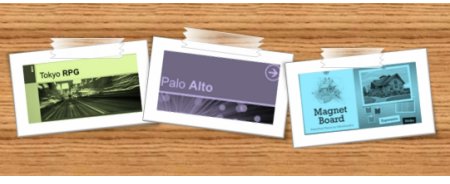
The Rapid E-Learning Blog - transparent tape effect in PowerPoint

There are also a lot of uses for the effect.  For example, you can combine it with the notebook template I shared a while back.  Or use David’s Polaroid idea and “tape” them to a wall on your elearning course screen.

Click here to view the tape effect tutorial.

There are a lot of free tips and tricks like this on the internet.  Probably the best place to start is the user community.  There you can connect with like-minded people.  So, become a member of your software’s user community.

If you’re a rapid elearning developer, you can find a bunch of great demos and examples on Screenr.  If that doesn’t work, look for a local user groups, connect with people via Twitter or follow personal blogs.  Here’s a great example from Sumeet Moghe where he walks through the process of creating a course on a limited budget.

If you’re an Articulate rapid elearning developer, we’ve got a lot of help in our community tutorial list (and there are new ones almost daily).  In either case, the first tip is to find and follow the people who can teach you new skills.

Practice, Practice, Practice

Watching tutorials and reading blog posts will only get you so far.  You have to practice the things you learn from them.  Otherwise, what’s the point?

If you practice what you learn, not only will you learn new techniques, odds are you’ll also become more efficient at what you do.
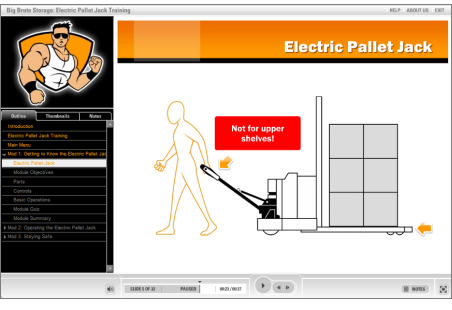
The Rapid E-Learning Blog - Pallet Jack elearning demo

Click here to view the Electric Pallet Jack demo.

Here’s an example from a recent conversation I had with David Anderson.  The other day someone in the community forums asked how Prometheus had built the Electric Pallet Jack demo above.  Specifically, they wanted to know how they built the animation effect on slide 19.
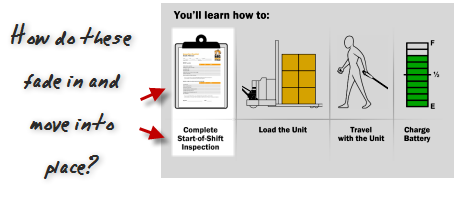
The Rapid E-Learning Blog - use ascend and descend animation

David wanted to do a quick screencast.  So he looked at the example, came up with an answer, and then proceeded to practice it.  Initially, he tried to combine the fade in and motion path animations.  However, they just didn’t look right.  So he tried a few things before he stumbled upon the often overlooked ascend and descent animations.

What David found was that his initial solution wasn’t the best approach.  But he only realized this after practicing the technique. Once he had a good solution, he built a quick prototype and created a screencast to share with the community.  You can see his solution right here and learn to build a similar effect for your own elearning courses.

The main point here is that when you see something (or have an idea) practice doing it.  You might not have it down the first time, but eventually you’ll come up with a solution that works.  And you’ll develop a production process that helps you become faster and more efficient.  That’s what happed with David. And it’s also what I advocate in posts like this where I discuss building templates and graphics to better learn PowerPoint.

Share What You Learn

You don’t have to be a recognized guru to share what you know.  Stephanie’s tape tutorial doesn’t require a Master’s in Graphic Design.  Yet it offers real practical uses.  And that’s more important than some abstract tip from an 80-year old elearning sage.

I’m sure that there are plenty of tips and tricks and things that you’re learning right now that can benefit others.  Why not do a quick tutorial?

Here’s an example of how sharing what you know makes the community stronger and contributes to you learning more and expanding your skills.

The other day, Tracy Hamilton shared a quick tip on how to nudge PowerPoint objects by pressing the ALT key and dragging with your mouse.  She used the technique while creating a mitered frame look.  Watching her demo, made me wonder about different ways you could build a picture frame.  So I played around with some ideas.

What’s cool about this is that Tracy shared what she knew.  It prompted some ideas to play with. And I created this screencast to share what I learned.  It’s a great example of how we learn by sharing and building off of each others’ ideas.  The same could be said of Sumeet’s post above.

Here’s one final example that really speaks to the power of community and offers some good tips for your next elearning course, too.  It combines the folder template I shared with Jeanette’s hands animation to create a completely new tutorial with additional tips that you can use for your next elearning course.

Click here to view the folder tutorial.

While going to school is good, there’s no reason why you can’t learn a lot of what you need to know from your community of peers.  All it takes is a commitment to learn, practice, and a willingness to share with others.  If you do that, you’ll probably learn a lot of stuff you wouldn’t have learned in school anyway.  And it’s all free!

What rapid elearning tips do you have to share?  They don’t have to be long and drawn out.  They could be real quick like Tracy’s and Stephanie’s.

Events

Free E-Learning Resources

Want to learn more? Check out these articles and free resources in the community.

Here’s a great job board for e-learning, instructional design, and training jobs

Participate in the weekly e-learning challenges to sharpen your skills

Get your free PowerPoint templates and free graphics & stock images.

Lots of cool e-learning examples to check out and find inspiration.

Getting Started? This e-learning 101 series and the free e-books will help.


I love to watch the TED videos.  I usually watch them on the plane when I travel.  What I like about them is that the subject matter is really interesting, the videos are just about the right length, and I always learn something.

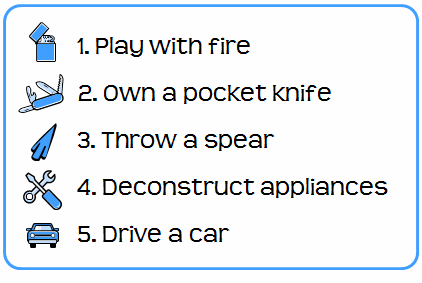
Recently I was watching Gever Tulley’s TED presentation, 5 Dangerous Things You Should Let Your Kids Do.  If you haven’t seen it I highly recommend it.  His five dangerous things are:

The Rapid E-Learning Blog - 5 Dangerous Things You Should Let Your Kids Do

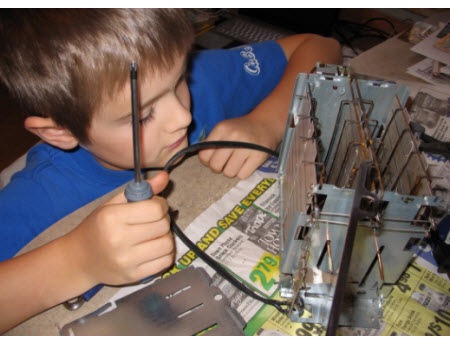
After watching the video, I decided to get my seven-year-old son a small tool kit for Christmas so that we can work on dangerous thing number four and take some stuff apart.  My wife’s not too keen on him throwing spears or driving a car…or worse yet, throwing a flaming spear (that he sharpened with his pocket knife) out of a moving car.  So deconstructing appliances is the family-approved danger for now.

This past weekend we took apart an old toaster.   As we were dismantling it, we discussed how the toaster worked and what the different parts did.  It’s really kind of cool taking apart old appliances.  I was amazed at the simple yet effective design of the toaster.  There are things I wouldn’t know about it had I not taken it apart.

The Rapid E-Learning Blog - future rapid elearning designer

There’s a lesson in here for us instructional designers.  Sometimes the best way to learn is by taking apart the stuff other people have built.  And if that’s not possible, at least try to replicate it.

When I was learning video production, I’d record TV commercials and then break them down frame by frame.  I wanted to know how the edits were made and try to figure out what motivated them.  It proved one of the best learning processes for me.

I do something similar with elearning courses.  If I see a really good course that I know required some programming skills to build, I’ll try to rebuild it using PowerPoint and the rapid elearning software.  I want to see what I am able to do within those constraints.  In fact, one of the best ways to enhance your creativity is to work with constraints.  It forces you to problem solve and think in new ways.

Not everything can be replicated but it’s a great way to learn new techniques and to think through what makes a good course good.  If you want to learn how to use your rapid elearning tools better or to build more engaging courses, I highly recommend that you deconstruct those courses you find to be really good.

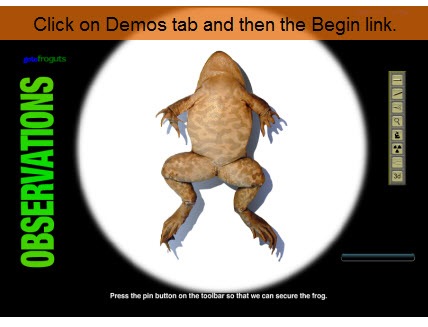
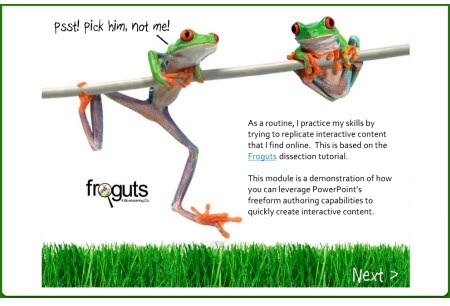
At a recent conference I was talking to someone who lamented that she was “stuck using PowerPoint” and didn’t have a Flash programmer.  I asked her for an example of what she’d like to do.  She pointed me to the Froguts.com demo

The Rapid E-Learning Blog - Froguts.com demo

Click here to view the demo*

If you haven’t seen it, check it out.  It’s really well done and a great way to avoid killing frogs for school experiments.

I told her that while she couldn’t replicate that type of course completely, she could definitely make a similar course with her rapid elearning software.  Not only that, it would probably be easier to make and take less time.

She didn’t buy that.  So I took up her challenge and built a quick mock up to show her how I’d approach this type of course.  Take a look at the demo I built below.  Once I had the assets, it took me about 5 hours to pull it all together.  It’s built entirely in PowerPoint.

*I did notice that the demo on the Froguts site has been updated, so the one I built is a little different.  However, it doesn’t change the essence of this post.

The Rapid E-Learning Blog - deconstructed frog demo

Click here to view demo.

While there are some limitations when you work in PowerPoint, I think you’ll agree that the version created in PowerPoint is a viable solution. There were some challenges trying to replicate the drag and drop functionality.  You’ll see what I did to overcome them. I also learned a few things while doing the demo that will make my next project go a little faster.

The main point here is that by trying to replicate good courses you’ll learn techniques that you can apply to your own elearning courses.  They’ll make your courses better and help you be more productive when building them.  You don’t even need to replicate the entire course.  For example, in this demo I could have just focused on the drag and drop functionality.

In next week’s post I’ll go through the version I built and discuss what I did and some of the things I learned that I can use the next time I work on a course.

Let me know what you think by clicking on the comments link.

Events

Free E-Learning Resources

Want to learn more? Check out these articles and free resources in the community.

Here’s a great job board for e-learning, instructional design, and training jobs

Participate in the weekly e-learning challenges to sharpen your skills

Get your free PowerPoint templates and free graphics & stock images.

Lots of cool e-learning examples to check out and find inspiration.

Getting Started? This e-learning 101 series and the free e-books will help.


Since 20,000+ people read this weekly blog, odds are you weren’t one of the 100 or so who attended my recent presentation at the Elearning Guild conference called, “Becoming a Rapid E-Learning Pro…Rapidly!”

I’ve recapped the session for everyone in the form of a snazzy blog post.  It’s a combination of how to think about rapid elearning and then how to get the most out of your tools. So, here they are.

    The Rapid E-Learning Blog - 10 sure-fire tips to becoming a rapid e-learning pro...rapidly!

1. Rapid = Smart

Rapid elearning is a misleading concept.  You’re not a rapid traveler because you use the Internet to book travel.  You’re just a person who uses technology to make booking travel easy.

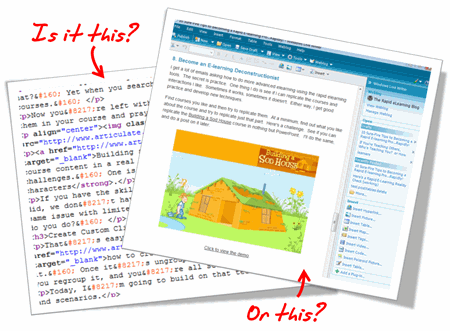
The same goes for me as I write my blog posts.  I’m sure that I could hand code my blog with HTML, but I don’t.  Instead, I use Windows Live Writer, a WYSIWYG editor.  Do you know why?  It saves a lot of time.

 The Rapid E-Learning Blog - Do you handcode HTML or us a tool to do it for you?

I shouldn’t have to be a programmer to write a blog post. Since the software takes care of the HTML code, I’m free to focus on creating the content.  This doesn’t make me a rapid blogger.  It makes me a smart blogger.

The same can be said for rapid elearning.  There’s no reason why you should have to be a programmer to build elearning, especially when there are tools to help you build your courses. Rapid elearning is less about being rapid, and more about being smart.

2. E-Learning is Just One Brick in a Very Big Wall

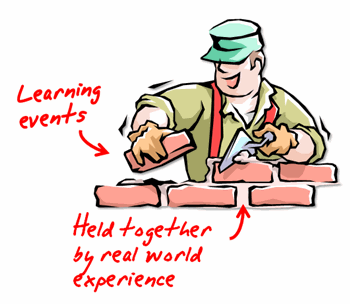
Learning is a complex process.  And, elearning is just one piece of that process.  Think of it like a brick in a wall.   As you go through life learning, you keep adding more bricks.

The Rapid E-Learning Blog - Become an elearning mason

Each experience in the real world provides context to what you learn and is like the mortar that holds all the bricks together.

3. Your Learners Don’t Care How You Authored Your Course

Your learners are staring at a blank computer screen and could care less how you authored the content to fill it. If that screen has text on it, they don’t care if the text was hand coded HTML, created in PowerPoint slide, or developed in Flash.  That goes for animation, as well.

The same goes with watching a video.  You think they care if it’s an .FLV, .SWF, .MPG, .AVI, or .MOV?  Heck, no!  All they care is that when they click the play button it plays.

In that sense, think less about how you’re authoring the course and more about how to build great content.  And then choose the tools that will help you build it.

The Rapid E-Learning Blog - The learners don't care how you authored your elearning course

4. Let’s Keep It Real

I used to come back from the training conferences and tell my Flash programmers about all of the cool courses I saw and how I wanted us to build ours like that.  Then reality set in.

To build some of those highly interactive courses requires a lot of money and time.  In fact, some of those courses cost well over $100,000.  I’ve worked on a lot of elearning projects and I can’t ever recall getting the budget for a $100,000 course.  I usually have to fight tooth and nail just to get $40 for some stock photos, let alone $100,000.

The only places I’ve seen with the resources to build elearning like that are vendors who build custom elearning.  So it makes sense that they go to conferences and show off what their talent and your bags of money can build.

The reality for a lot of those who build elearning courses is that they have to fend for themselves, and elearning is just one of their many responsibilities.  In fact, the last three places I’ve worked were multibillion dollar organizations and I was lucky if it was more than me doing the bulk of the work.

I’m glad I had access to rapid elearning tools to do my job effectively and save my organization time and money.

5. If You’re Just Getting Started, Don’t Listen to the Experts

Many of you are just getting started.  Your first task is to get used to using the tools.  Don’t worry about what the experts say about engaging elearning.  I’ll let you in on a secret.  Those same experts are the ones who created boring elearning to start with.  Only they charged a lot more money back then.

You just focus on the basics and then build from there.

  • Download one of those simple PowerPoint training templates and use that to get started.  Focus on clear objectives and finding a way to meet them in your course.
  • Create a consistent and clean look. Nice colors.  Same graphic style.
  • Don’t crowd the screen with text and graphics. Maximize the screen’s white space.
  • Use consistent fonts. No more than two styles.
  • Use the same animation effects.  Something subtle like Fade. Make it look professional.

You can create a nice looking and effective course that doesn’t need to be overly complicated with just a little practice.

6. Make the Content Human by Telling a Story

Once you get a handle on using the tools and building basic courses, start to present the content in a different manner.  For example, people always like a good story.  Find a way to relate it to the learner’s world.

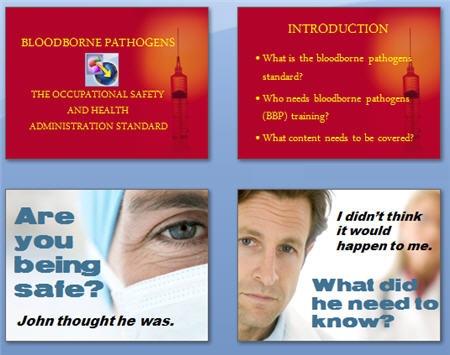
Here’s a quick example from a conversation I had with someone at a previous conference.  The first set of images is typical of a lot of elearning.  It’s just information and it looks like a PowerPoint slide.  The second set of images takes the essence of the course and starts to build a story.

The Rapid E-Learning Blog - Create stories for your elearning to make them more human

Which approach is more engaging?  Making this type of change isn’t difficult.  In this case, I changed the wording a little and used real people to make it seem less clinical.  Ask, “Why is this important to the learner?” and then build a story around it.

7. Make It Relevant

Here’s a common mistake.  When people complain about “boring” courses, by default we tend to think it needs to be more interactive.  However, the problem with a lot of courses isn’t the lack of interactivity.  Instead it’s that the course is meaningless and not very relevant to the learners.

The Rapid E-Learning Blog - Do people really want to play lame games?

I have yet to hear someone sit at the computer complaining that Google is “boring and there’s nothing on the screen but text.”  There are no complaints about the lack of interactivity because what they’re looking at is relevant to the person at that time.

The more you can put the course content into a context that is relevant, the less you have to create interactive bells and whistles.  People would rather have a simple line of text on a plain white screen that gives them meaningful information, than play yet one more long and drawn out Jeopardy game.

8. Become an E-learning Deconstructionist

I get a lot of emails asking how to do more advanced elearning using the rapid elearning tools.  The secret is practice.  One thing I do is see if I can replicate the courses and interactions I like.  Sometimes it works, sometimes it doesn’t.  Either way, I get good practice and develop new techniques.

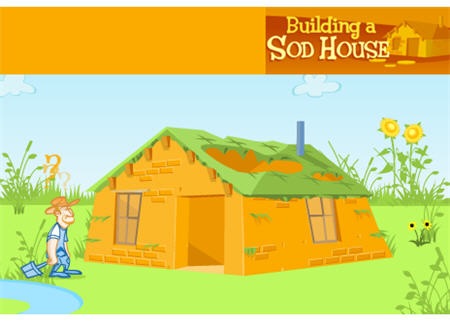
Find courses you like and then try to replicate them.  At a minimum, find out what you like about the course and try to replicate just that part.  Here’s a challenge.  See if you can replicate the Building a Sod House course in nothing but PowerPoint.   I’ll do the same, and do a post on it later.

The Rapid E-Learning Blog - Link to sodhouse demo

Click to view the demo.

The point is less about getting everything right and more about learning to use the tools in a new way.  You’ll come up with all types of ideas and get really fast at doing them.

9. PowerPoint is a Powerful Free-Form Authoring Tool

PowerPoint gets a bad rap.  You build a text-heavy bullet point elearning course and all the pundits will trash PowerPoint.  However, you do the same thing in Flash and the focus shifts to poor instructional design.  Don’t blame the tool for its misuse.

Repeat this three times: “PowerPoint as a presentation tool has nothing to do with elearning.  PowerPoint as a free-form authoring tool is great.”

Just like Flash, PowerPoint is free-form authoring tool.  You start with a blank screen and build from there. For example, you can bring in all sorts of graphics and objects, animate them, create interactivity, and easily build branched scenarios.

There are two secrets to getting the most out of PowerPoint as an authoring tool.

  • Drop the templates and start with a blank screen.
  • See the slides as layers that stack information rather than a way to keep the content linear.

Here’s a quick example of how you can use slides as layers.  This is a simple demo and only took me about 5 minutes to build and publish.

The Rapid E-Learning Blog - PowerPoint slides as layers

Click here to view layers demo.

When you look at PowerPoint from this perspective you can see the power of its free-form authoring.  You get a blank screen that has layers and on each layer you can add layered animations.  That’s pretty powerful!  On top of that, once you learn some tricks, you can build some of your content in a fraction of the time it takes to build the same thing in Flash.  That will save you time and money.

10. Get the Most out of Your Tools

Rapid elearning tools empower you to build courses that just a few years ago would have required a lot of time, money, and specialized skill.  You can combine all sorts of multimedia, learning interactions, and even some of the new collaborative web technologies like a wiki or forum.  That’s something even Flash won’t give you easily.

In fact, even if you didn’t want to use PowerPoint to create content, the tools will still give you a SCORM-compliant player with built-in navigation and controls.  At that point you can drop in custom Flash pieces, interactions, or web objects and just use the player.

To get the most out of your rapid elearning tools, you’ve got to step outside of the PowerPoint slide box and think of the tools in a new way.  Here are some tips and tricks that I’ve covered in previous posts.

As you can see, the tools empower you to do build effective and engaging courses.  It provides the right blend between meeting your elearning goals and still working with your time and money resources.

I look forward to your thoughts on this.  Feel free to post them in the comments section.

Events

Free E-Learning Resources

Want to learn more? Check out these articles and free resources in the community.

Here’s a great job board for e-learning, instructional design, and training jobs

Participate in the weekly e-learning challenges to sharpen your skills

Get your free PowerPoint templates and free graphics & stock images.

Lots of cool e-learning examples to check out and find inspiration.

Getting Started? This e-learning 101 series and the free e-books will help.


rapid e-learning blog for tips and tricks on PowerPoint and e-learning

We are at an exciting time in our industry. Just a few years ago, you needed to hire programmers to build your e-learning courses. Today, that is not the case. Rapid e-learning tools like Articulate 360 give you the power to create your own courses without the need for programming skills. This saves you time and money.

The challenge is to develop solid end-to-end skills where you know enough about instructional design and multimedia to build courses that are both inexpensive and effective.

This blog exists to help you meet that challenge. It will provide practical, real-world tips and tricks to help you get your job done.

I have been doing this rapid e-learning stuff for a while now and have been at both ends of the e-learning community. I have worked at places where I was a one-man shop with no money and had to virtually duct tape my projects together like MacGyver. On the other end, I have been part of large organizations that switched to rapid authoring tools like Articulate 360 to become more efficient and save money. Whatever the case, it’s important to develop the skills that help you build the best e-learning courses you can.

I will be sharing my experiences and best practices. I also look forward to hearing from you and learning what you have to offer. The ultimate goal is that we help each other become better at what we do.

If you have any questions or suggestions on what you’d like to see covered, feel free to send them my way.

Events

Free E-Learning Resources

Want to learn more? Check out these articles and free resources in the community.

Here’s a great job board for e-learning, instructional design, and training jobs

Participate in the weekly e-learning challenges to sharpen your skills

Get your free PowerPoint templates and free graphics & stock images.

Lots of cool e-learning examples to check out and find inspiration.

Getting Started? This e-learning 101 series and the free e-books will help.


e-learning tips

Have you been following our series, 5 Myths About Rapid E-learning? We’ve already covered a lot of ground.

  1. Myth 1: Rapid E-learning is Crapid E-learning!
  2. Myth 2: A Rapid E-learning is a Second-Class Product!
  3. Myth 3: A Rapid E-learning Tool in the Hands of a Subject Matter Expert is Not Good!

Let’s keep moving!

The world is changing and that’s not going to stop anytime soon. To remain competitive you need to change with the world around you. The trend with e-learning is towards rapid development because it meets a legitimate business need.

As more subject matter experts (SME) develop e-learning courses, they’ll look to your expertise. You might see your job shift from one of course developer to that of SME coach.

Although years ago when I was building PowerPoint slides for a living, I was worried that one day someone would realize how easy it was and I’d be out of work. This never happened. It’s possible that you’ll actually get more e-learning work than less.

I figure that as the tools are easier to use, that will spark more desire to build and deliver training information. Thus, the content owners like the SME will be pressed to share even more information, which might mean a greater need for rapid e-learning developers to lift the burden from the SME.

As the tools evolve, there will be less need for specialized skills like flash programming and more demand for people who can do end-to-end development. That means that if you are an instructional designer, you’ll need to broaden your skill set. You’ll need to know a little of everything: project management, performance consulting, marketing, communications, web technology, audio, video, graphics design, and so on.

The secret is to develop the skills now.

Quit complaining about the SME. Instead take the opportunity to broaden your skill set and become more valuable to your organization.

  1. Change the focus of what you do. Stay on top the training industry and become a resource to your organization. If you have subject matter experts who use rapid development tools help them do a better job using them. Look for ways to introduce people to the rapid development tools. Find the “go-to” experts in the organization. Help them save time and you’ll be a hero. The key is to use your expertise to empower others to do their jobs well. If you do this, you’ll always have a job.
  2. Leverage your community of users. One of the best resources for learning and enhancing your skills is to participate in community forums. There are forums for software users, as well as any of the other skills you need to develop. It is a great way to develop new skills, get help on projects, and network with your peers.
  3. Continue to learn. Make a list of the end-to-end skills you’ll need and then develop a plan to learn them. I like to look at what others do and see if I can replicate that. For example, when I want inspiration for the look of my course, I’ll go to a site like Template Monster. Reviewing their flash templates gives me ideas about interface design and color schemes. As a routine, I review award winning courses and find ways to incorporate what they did in my own work.

You cannot control this world, but you can control what you do. Become an expert who brings value to the organization or customers and you’ll always have a job.

In our final post, we’ll discuss the myth that your creativity is hindered by rapid elearning tools.

Events

Free E-Learning Resources

Want to learn more? Check out these articles and free resources in the community.

Here’s a great job board for e-learning, instructional design, and training jobs

Participate in the weekly e-learning challenges to sharpen your skills

Get your free PowerPoint templates and free graphics & stock images.

Lots of cool e-learning examples to check out and find inspiration.

Getting Started? This e-learning 101 series and the free e-books will help.


e-learning hero

Being an e-learning hero is all about perspective. You’d think it was about creating the best e-learning courses, but that’s not always the case. Let me explain.

I used to wake up worried that one day someone would realize that I didn’t know anything and I’d be out of a job. A while back I read a blog post where the writer expressed the same concern. After some discussion with others, he came to the conclusion that no one else knows anything either.

I say this because in your search to figure out how to do this thing we call rapid e-learning, I want you to feel comfortable knowing that what the pros tell you and what you need to do to be successful isn’t always the same. Instead of fretting over it, take what works and discard what doesn’t.

In this industry, there are many who complain about PowerPoint, yet most likely you’re using PowerPoint to build some of your training. In addition, you’re challenged to create engaging and interactive e-learning, yet you find that your organization is focused less on engagement and more on just getting information out. It’s not always easy balancing what the pundits tell you with what you actually have to do at work. The key is to maintain perspective and understand your needs.

Despite what people may say, there is no right or wrong way to build your e-learning courses. Of course, some of them will be more be more effective than others. However, effectiveness can be measured in different ways. For example, you might have one course that is a very engaging and interactive for the learners. Yet the customer could care less, or just wants a click and read course. In this case, the more effective course is the one that meets the customer’s goals and not the one that is a better learning environment. I know! I know! This is sacrilegious to some.

An E-Learning Hero Understands the Level of Effectiveness

If you want to be an e-learning hero, you need to learn what the level of effectiveness is for your projects. Your success depends on who says you’re effective and how they choose to evaluate that.

When you first get started, here are some things to keep in mind.

  1. Please your customer. The main goal is that you please your customer. Pleasing your customer has little to do with whether or not the training is effective. You can create great training but if the customer is not happy, your good job will go unnoticed.
  2. What are some ways to please your customer? Establish clear expectations and then meet or exceed them. Make your customer look good. Control your costs. Finish ahead of schedule. Be proactive and take care of details before they come to the attention of the customer.
  3. Serve the business. It’s important to align your work with the organization’s goals. Do your best to get your customer and courses focused on performance results. Set clear and measurable training objectives. Sometimes this is hard with training projects, especially if their goals are out of your hands. Make sure that your projects are cost effective and save time.
  4. Report the performance results. Believe it or not, many training developers fail to report their results. This is a lost opportunity, especially if you use rapid e-learning tools since they save so much time and money. The best way to get results is to link the training to real performance. Establish clear objectives and measure the results. Track improvements in performance. Report the difference the training makes.
  5. Focus on saving time & money. It’s not always possible to link your training to real performance results. In that case, your best bet is to focus on time and costs. Compare what it costs to outsource the training to what it cost for you to develop it. Then report the value you brought to the organization by not outsourcing. You can also report savings in time. For example, “instead of delivering the project in 3 months, you delivered it in 2 weeks!”

Shhhh….a Secret!

From my experience, customers are more apt to report the value by cost rather than performance improvements. It just looks better and is easier to explain. For example, I get more traction if I say that I delivered 100 e-learning courses that were valued at $1 million, then if I say my training improved performance by 30%. Even if the 100 modules are irrelevant to the performance goals, I have found that people are quick to use those cost numbers. That’s why a lot of your success is less about real numbers and more about perspective.

Ideally, what defines your success is that you are able to create great e-learning courses that are effective and engaging. However, you’re only great if your customer thinks you’re great. If you want to be an e-learning hero you have to manage the relationship you have with your customers. Help them focus on real results and do a good job reporting your success.

If your customer is happy, then you’re an e-learning hero.

In the next post, we’ll look at 5 Ways to Jumpstart Your Next Project. In the meantime, feel free to share how you manage your customer relationships.

Events

Free E-Learning Resources

Want to learn more? Check out these articles and free resources in the community.

Here’s a great job board for e-learning, instructional design, and training jobs

Participate in the weekly e-learning challenges to sharpen your skills

Get your free PowerPoint templates and free graphics & stock images.

Lots of cool e-learning examples to check out and find inspiration.

Getting Started? This e-learning 101 series and the free e-books will help.