 The other day I ran across the website of How It Works Media. They produce those clever marketing videos. What caught my eye was the way they used their vector character with the projection screen especially since I had just done a couple of posts on display graphics which included some some projection screens.
 The general layout of their site would make ...
Read the full article
 I get a lot of questions about number of slides or screen count per hour of instruction. My answer is that screen count is usually irrelevant. Let me explain.
First, to the elearner screen count means nothing. For example, I can make ten points on a single screen or have ten screens, each with a single point. The time it takes to get through each point may be the same. More screens don’t make it longer and fewer screens don’t make it ...
I get a lot of questions about number of slides or screen count per hour of instruction. My answer is that screen count is usually irrelevant. Let me explain.
First, to the elearner screen count means nothing. For example, I can make ten points on a single screen or have ten screens, each with a single point. The time it takes to get through each point may be the same. More screens don’t make it longer and fewer screens don’t make it ...
Read the full article
 PowerPoint’s designed as a presentation tool. While the application is versatile and great for elearning, many people still struggle to get past the PowerPoint look because the features are designed to encourage the use of the templates.
The key is to learn to see the features from a different perspective. When you can do this, you get more value out of the application.
They’re Just Tools That Build Multimedia
Vendors design tools with features. But if you can step away from what the ...
PowerPoint’s designed as a presentation tool. While the application is versatile and great for elearning, many people still struggle to get past the PowerPoint look because the features are designed to encourage the use of the templates.
The key is to learn to see the features from a different perspective. When you can do this, you get more value out of the application.
They’re Just Tools That Build Multimedia
Vendors design tools with features. But if you can step away from what the ...
Read the full article
 I’ve been on the road quite a bit this year. One of the most frequent questions I get is how to find an e-learning job. While the rest of the economy seems to be stuck in mud, this seems to be a good time to consider a career in e-learning. It’s still a relatively new industry and technology is making it easier than ever to get a foothold.
In a previous post I talked a bit on how to prepare for ...
I’ve been on the road quite a bit this year. One of the most frequent questions I get is how to find an e-learning job. While the rest of the economy seems to be stuck in mud, this seems to be a good time to consider a career in e-learning. It’s still a relatively new industry and technology is making it easier than ever to get a foothold.
In a previous post I talked a bit on how to prepare for ...
Read the full article
 In a previous post, I share 15 free display graphics that are commonly seen in elearning courses. In today’s post, I’m adding a few more.
The cool thing is that all of these are created in PowerPoint; so you can learn to build your own. The steps are simple. They’re generally just rectangles with some sort of fill. Then right-click on the graphic and save as an image.
Free Chalkboard and ...
In a previous post, I share 15 free display graphics that are commonly seen in elearning courses. In today’s post, I’m adding a few more.
The cool thing is that all of these are created in PowerPoint; so you can learn to build your own. The steps are simple. They’re generally just rectangles with some sort of fill. Then right-click on the graphic and save as an image.
Free Chalkboard and ...
Read the full article
 Recently I spent the day at the beach watching people learning to surf. One of the people learning to surf was a blind girl. It was very inspiring as she learned to balance on the board. She probably fell off of the surfboard a few dozen times before she successfully stood and balanced on it. And when she finally succeeded she let out a cry of joy.
Learning is a funny thing. It’s not something that can always be neatly packaged. ...
Recently I spent the day at the beach watching people learning to surf. One of the people learning to surf was a blind girl. It was very inspiring as she learned to balance on the board. She probably fell off of the surfboard a few dozen times before she successfully stood and balanced on it. And when she finally succeeded she let out a cry of joy.
Learning is a funny thing. It’s not something that can always be neatly packaged. ...
Read the full article
 Building elearning courses is hard enough. Most people are working with limited resources and time. So having to deal with anything that slows down the process is a hassle. Here are three common roadblocks and ways to avoid them.
Lack of Clear Objectives
I get to look at hundreds of courses during the year. One of the biggest issues I see is that the objectives of the course aren’t clear. They’re all wishy-washy with statements like you’ll “learn” or “understand.” They tell you what you should learn, but they ...
Building elearning courses is hard enough. Most people are working with limited resources and time. So having to deal with anything that slows down the process is a hassle. Here are three common roadblocks and ways to avoid them.
Lack of Clear Objectives
I get to look at hundreds of courses during the year. One of the biggest issues I see is that the objectives of the course aren’t clear. They’re all wishy-washy with statements like you’ll “learn” or “understand.” They tell you what you should learn, but they ...
Read the full article
 A lot of rapid elearning content finds its roots in repurposed classroom slides. The challenge is to rework the screens and get rid of the bullet points so they don’t always look like classroom slides.
A great way to get out of the PowerPoint look is to create screens that hold content in different ways. For example, if you put a TV monitor on the screen you’re less inclined to use bullet points. So a good way to rework the screens (and get ...
A lot of rapid elearning content finds its roots in repurposed classroom slides. The challenge is to rework the screens and get rid of the bullet points so they don’t always look like classroom slides.
A great way to get out of the PowerPoint look is to create screens that hold content in different ways. For example, if you put a TV monitor on the screen you’re less inclined to use bullet points. So a good way to rework the screens (and get ...
Read the full article
 We’re in the middle of beta testing a new product. It’s an interesting process because I get to see how people approach their projects and the steps they use to solve problems and find solutions.
I had a conversation with a beta tester who was struggling with doing something. One reason for his struggle was that he was applying production techniques he used for a different product to the beta software. So things weren’t working as he had planned.
His struggle was one common to many of us. He started with a solution and then tried to make ...
We’re in the middle of beta testing a new product. It’s an interesting process because I get to see how people approach their projects and the steps they use to solve problems and find solutions.
I had a conversation with a beta tester who was struggling with doing something. One reason for his struggle was that he was applying production techniques he used for a different product to the beta software. So things weren’t working as he had planned.
His struggle was one common to many of us. He started with a solution and then tried to make ...
Read the full article
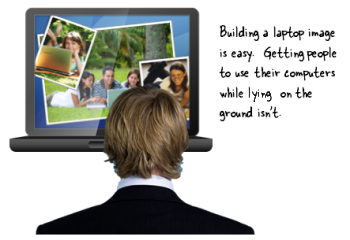 My guess is that some of the most common screen elements in elearning courses are computer monitors. They’re nice to use because contextually they fit elearning. And they’re great for holding the images and multimedia we use.
There are all sorts of computer monitors available through the office online site. But sometimes it’s just easier to build what you need. Plus, it’s a great way to learn more of PowerPoint’s illustration features.
In today’s post, I’ll show you how to build a ...
My guess is that some of the most common screen elements in elearning courses are computer monitors. They’re nice to use because contextually they fit elearning. And they’re great for holding the images and multimedia we use.
There are all sorts of computer monitors available through the office online site. But sometimes it’s just easier to build what you need. Plus, it’s a great way to learn more of PowerPoint’s illustration features.
In today’s post, I’ll show you how to build a ...
Read the full article
Many elearning developers are working with limited resources. So any time you can find a free solution, you’ve won. The other day I was playing around with Urtak. The site lets you build simple surveys. The value is its simplicity and how the questions engage people. It also lets you, the survey taker, to ask additional questions—another way to engage.
 Ask Questions to Engage Your Learners
Most elearning courses I see are info-centric and just push content out. Often there’s little concern about how ...
Ask Questions to Engage Your Learners
Most elearning courses I see are info-centric and just push content out. Often there’s little concern about how ...
Read the full article
 I had a great time in Atlanta last week. It’s always so much fun getting to meet the blog readers and learning more about what people do in the real world. Two things always stand out during these trips:
- There is no one way to do elearning. We use the same words, but we don’t always mean the same thing. Some people build courses, some create marketing material, and some use the rapid elearning software
...
Read the full article





0
comments