The Rapid Elearning Blog

Archive for the ‘Instructional Design’ Category


Articulate Rapid E-Learning Blog - first step when building interactive elearning courses

On past projects, many of my customers would ask for interactive elearning courses. When I asked them how they defined interactive elearning courses they’d usually list things like fancy mouseovers, drag-and-drop interactions, and a host of other ways to interact with the screen. They rarely described making decisions or using the content.

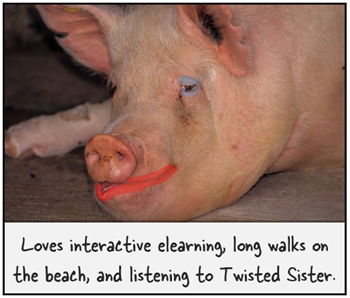
Many times we dismiss this type of interactivity as novel and superfluous. I’ve heard other presenters deride those things as a waste of time and not being much more than lipstick on a pig.

Hey, there’s nothing wrong with a good looking pig. What’s the alternative?

Seriously, I can understand their perspective but I don’t agree with their derision. In fact, that type of interactivity is an important part of building effective and interactive elearning courses.

Interactive E-Learning Courses: Create an Immersive Experience

A key component while building interactive elearning courses is to craft an immersive experience. You start by creating a visually engaging context. If I’m teaching you about the Hoh Rain Forest, I want to bring you INTO the Hoh Rain Forest.
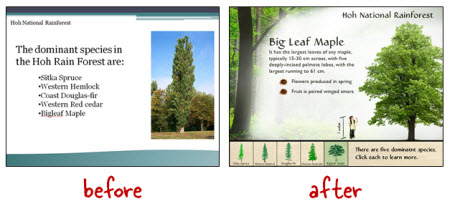
Articulate Rapid E-Learning Blog - before adn after example of visually immersive interactive elearning courses


We discussed that a bit when we looked at how to tap into your visual voice and planning your visual design. Learn to create a visually engaging and immersive look.

Interactive E-Learning Courses: Touch the Screen

The next step is getting the learners to touch the screen. A visually immersive course pulls them in a little. Touching the screen pulls them in a lot more. The reason is because you are engaging their senses and having them actively involved with the course.
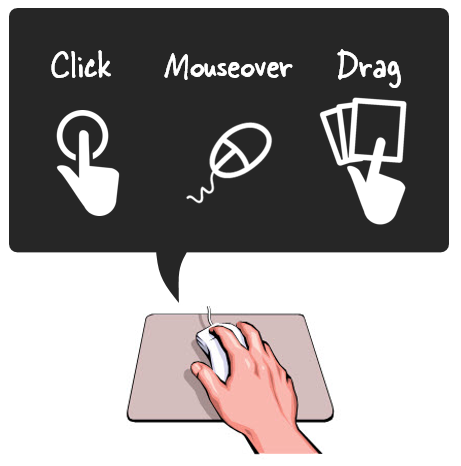
Articulate Rapid E-Learning Blog - three ways to touch the screen when building interactive elearning courses.

A lot of people deride onscreen interactions like dragging and clicking as novel and perhaps even distracting. However, it’s a key part of interactive elearning. A goal is to get the learners to interact with the screen. At this point, it’s not about the cognitive processing. Instead, it’s all about pulling them in. And a great way to do so, is by getting them to do something on the screen.

In a previous post we discussed the building blocks of interactivity and identified three key ways to “touch the screen.” They are clicking, mouseovers, and dragging. Here’s a simple example of the three types applied to the same interaction.
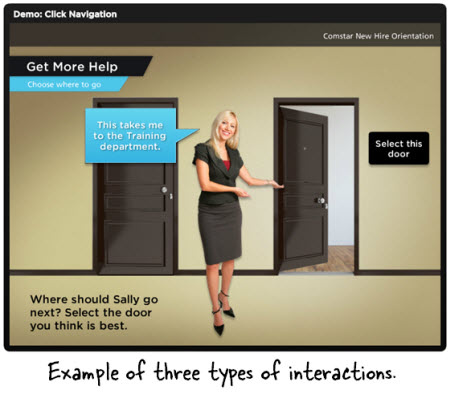
Articulate Rapid E-Learning Blog - examples of interactive elearning courses

  • Click version of the office selection scene.
  • Hover version of the office selection scene.
  • Drag version of the office selection scene.

As you can see in the demos above, the types of interactions are somewhat interchangeable. Some make more sense than others depending on the context. However, the main point is to figure out how you’ll get your learners to touch the screen. How can you get them to interact with the screen elements? The more you can do this, the more you keep them engaged as they go through the course.

Here’s a cool example I like to show at workshops. It’s an interaction from a travel website and not an elearning course. However, imagine if this site wasn’t interactive. The travel agency could have met its goal with a list of travel choices from which to choose and then compile recommendations for you.
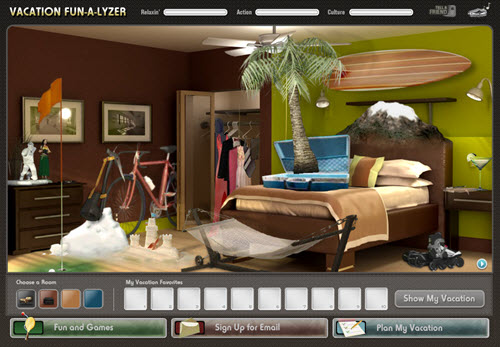
Articulate Rapid E-Learning Blog - travel site that is similar to many interactive elearning courses

Click here to view the interactive web site.

But they decided against that. Instead they get you to explore the site and “touch the screen” in various ways. There are places to click, mouseover, and drag. It’s fun and engaging, and definitely a lot more memorable than a dropdown list. And it helps the agency meet their objective of getting you to select a vacation.

Those who deride the superfluous interactions are correct if all you do is add novelty to your course. The interactions get old fast. And while visual design and onscreen interactivity plays a role in engaging the learners, it’s not the main way to engage the learners. All of those things need to be in concert with a great learning experience and coupled with the course’s content and learning objectives.

However, if you neglect crafting an immersive experience you miss the opportunity to really engage your learners and building effective and interactive elearning courses.

What are some ways you’ve used onscreen interactions to immerse learners in your elearning courses?

Events

Free E-Learning Resources

Want to learn more? Check out these articles and free resources in the community.

Here’s a great job board for e-learning, instructional design, and training jobs

Participate in the weekly e-learning challenges to sharpen your skills

Get your free PowerPoint templates and free graphics & stock images.

Lots of cool e-learning examples to check out and find inspiration.

Getting Started? This e-learning 101 series and the free e-books will help.


Articulate Rapid E-Learning Blog - offer bribe to avoid course because of bad course objectives

The key to success is having clear goals and then mapping out a way to meet those goals. Without the map, you’ll never know if you got where you intended to go. In a previous post we looked at how to build learning objectives. Today we’ll take it a step farther and look at a simple process that will help structure the objectives around measurable actions.

What’s the Purpose of the Course?

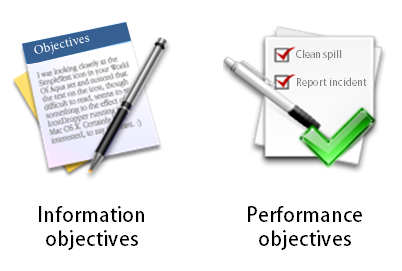
There are many courses that exist for reasons other than performance improvement. For example, a lot of annual compliance or things like sexual harassment training are usually more about the awareness of policies and less about actionable activities.

Articulate Rapid E-Learning Blog - course objectives come from understanding the type of course

On the other hand, there are many courses that do expect that upon completion the learner is able to do something specific. Perhaps they’ve learned a new procedure or how to apply a given policy in the work environment.

Understanding the type of course you build is important because it’ll help you craft the appropriate types of objectives, measure their success, and help you manage your resources.

Ask These Questions to Create Your Course Objectives

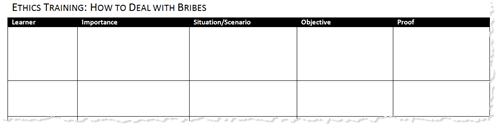
Once you understand why you’re building the course you can focus on who is going to take it, why, and what expectations exist after the course. One way to begin is by answering the questions below.

  • Who is the learner
  • Why is this important to him?
  • In what situation would he use this information?
  • What is the course objective?
  • How does he prove that he’s met the objective?

I create a simple table to look over the answers. Here’s an example based on my experience working for some large organizations.

Articulate Rapid E-Learning Blog - blank table to build course objectives

As part of our ethics training, there was a course on how to deal with bribes. This course was important because we had a number of international sites and many of our sales and procurement staff had to deal with bribery as part of the business culture. Even though we only had a handful of international staff, everyone who took the ethics training had to take the bribery course, regardless of getting bribed.

For the international staff the bribery course was performance-based. We had specific behavioral expectations. For all of our other staff, the objective wasn’t centered on their performance. Instead the objective was to build awareness of the company’s policies on bribery which fit into the larger context of being an ethical organization.

Here’s an example of how this I could have completed the table for this course and the tow different audiences.

Articulate Rapid E-Learning Blog - example of completed table to identify course objectives

Click on the image to see a larger version.

You’ll notice that I broke out the two types of learners and their course objectives. For those who encounter bribes, we focus on the performance aspect. As we build the course, we want to create the types of situations they encounter and have then make the decisions that are in line with the organization’s policies.

For the IT analyst who is never bribed, we create a scaled down course. There’s no need for them to go through time-wasting situations not relevant to their job expectations. In their case, the objective is general awareness of the policy. Presenting the content in an engaging manner and having them certify their understanding is all we need.

A few key thoughts:

  • Build the course appropriate to the performance expectations of the learner. If none exist, then don’t force them through the same type of course for those who do have performance expectations. Taking a course costs time which is equal to money. And pulling someone from their work to go through irrelevant scenarios is a time-waster.
  • Don’t overstate the importance of the course. Subject matter experts have the tendency to do this. In this example, the temptation is to suggest that everyone needs to be able to make the appropriate decisions so they should all go through the same training. While it’s technically true if presented with a situation everyone should make the right decisions, but forcing people to take certain types of training because of some remote chance that they’ll be bribed is a waste of time.
  • Focus on how the learners will prove their understanding. Are they able to make the right decisions in certain situations? How do you know? If the person needs to make certain types of decisions in certain situations then make that the burden of proof. Create situations like they’ll encounter in the real world and have them demonstrate their understanding through the decisions they make. If they don’t encounter those situations, then the level of understanding centers on general awareness. Instead of a decision-making situation, you can focus on the principles that drive the policies. Perhaps a simple case study would do the trick.

I know that some people say the non-performance courses shouldn’t even be built. They should be job aids. Perhaps. But they do get built and often you’re not in a position to force that change. By understanding what the organization expects from the learner you’ll be able to craft good course objectives and determine the appropriate proof to ensure they’ve been met. If they have performance expectations focus on what you want them to do. If it’s about policy awareness, certify their understanding with a simple quiz.

How do you determine the course objectives in your training programs?

Events

Free E-Learning Resources

Want to learn more? Check out these articles and free resources in the community.

Here’s a great job board for e-learning, instructional design, and training jobs

Participate in the weekly e-learning challenges to sharpen your skills

Get your free PowerPoint templates and free graphics & stock images.

Lots of cool e-learning examples to check out and find inspiration.

Getting Started? This e-learning 101 series and the free e-books will help.


Articulate Rapid E-Learning Blog - do you need an instructional design degree

September is the start of a new school year. So it’s a good time to revisit the ongoing debate about whether or not you need an instructional design degree to build good elearning courses.

Here’s my take.

There’s a difference between teaching and informing.

Because we’re using e-learning applications like Storyline 360 or Rise 360 the assumption is that what we’re building is always e-learning or the objective is some sort of performance improvement.

Instructional design implies instruction. But much of what’s created with the e-learning applications is less about learning and more about sharing information. It’s really more interactive multimedia content than it is interactive instructional design.

Perhaps, the question should be, “Do you need a marketing degree?” since a lot of what is created falls more into that bucket than performance improvement.

Not all course builders are instructional designers.

In an ideal world, the person building the course is also involved in the design of it. But I’ve been in the industry long enough to know that’s often not the case. There are many course builders who have little say in the design of the course they build.

They’re hired to take content as it is designed by someone else and then build out the multimedia part of it. Having instructional design awareness is great and allows that person to offer constructive feedback, but if that’s not what the person is hired to do, then there’s a good chance the feedback goes nowhere.

Articulate Rapid E-Learning Blog - not all course designers are instructional designers

If you’re hired to build courses, but not involved in the strategic design of them, then it may make sense to focus on multimedia design skills over instructional design. From my experience, a course developer with really good graphic and interaction design skills usually trumps a good instructional designer with limited visual design skills and multimedia experience.

College degrees may not build the skills you need in the real world.

There are lots of resources online and informal learning communities to help you learn more about instructional design. It doesn’t require a degree.

I have a master’s in educational technology, a degree in corporate media production, and a degree in organizational management that focused a lot on performance and training. Despite all of that education, most of what I know about e-learning came from the work world.

Quite a bit of what was covered in my academic education was not very relevant to the work I was doing and offered little practical application. On top of that many of my professors had limited experience in non-academic training environments and were so politically charged about education and learning that it made a lot of the academic experience a bit uncomfortable and completely incoherent to my needs in the corporate environment.

Articulate Rapid E-Learning Blog - college degrees may not build the skills you need in the work world

Learning about instructional design doesn’t necessarily require a formal program as much as the desire to learn and then apply what you learn to your course design.

An instructional design degree can help you get a job.

E-learning is hot and a great industry to be in. That hasn’t always been the case for training. In fact, when times are tough, it’s usually the training team that gets the boot. But for right now, e-learning is a growing industry with lots of opportunities.

I took a quick peek at 20 job listings, here’s what I found. All but one required at least a bachelor’s degree. Most preferred a Master’s. And many required a Master’s.

Is that fair? Probably not.

If I was the hiring manager I’d prefer looking at your portfolio and talking to you about how you design courses. However, in many cases the hiring manager isn’t involved in the initial screening of the job applicant. That’s done by an HR assistant who is using the minimum requirements to weed out applicants.

So you may be the most skilled instructional designer, but without a degree you probably won’t make it past the first round.

An instructional design degree can challenge your thinking.

Here’s where I find the most value in pursuing an instructional design degree. It forces you to look at and do things in a different way. It also helps build relationships and a network of peers that has lifelong value.

We tend to get stuck doing the same things the same way. In fact, many of you may have the experience of building courses, but you’ve basically built the same course a hundred times rather than a hundred different courses.

Articulate Rapid E-Learning Blog - college degrees promote thinking in a different way

In a degree program, you get experiences and opportunities that may not exist at work where you have to operate at the speed of business. You learn new things and hopefully get to apply them to projects to see how they work.

You also get to interact with people who are in different fields, with different organizations, and who many not think the way you do. Being challenged in this way is good.

From a purely pragmatic perspective, you don’t need an instructional design degree to build e-learning courses. But a formal education does provide a map towards success. Most of us aren’t disciplined enough to map out the same things and experiences we’d acquire in school.

But Tom, do I need an instructional design degree to build e-learning courses?

I’m going to say “No, you don’t need a degree.”

I’ve talked to plenty of people who told me what they learned in school wasn’t relevant to what they have to do at work. And with the resources available to you, there’s no reason why you need to pay a ton of money to get a piece of paper to confirm the skills you already have.

Articulate Rapid E-learning Blog - do I need an instructional design degree to build elearning courses?

But you do need to know how to build good instruction and that means if you don’t learn it via a formal degree program you’ll need to learn it elsewhere.

My advice is to keep reading about course design and practice building instructionally sound modules. Build good examples to add to your portfolio and stay connected to the e-learning community. That practical experience coupled with knowing someone can help you get past the HR filter when openings arise.

And if you can afford it, go to school because you’re at a competitive disadvantage when looking for work.

What do you think?

Do you need an instructional design degree? For those of you who don’t have a degree, what advice do you have for someone who wants to learn more?

And if you do have a degree, did it help you build good e-learning courses? Is it something you’d recommend to others?

I look forward to your comments.

Events

Free E-Learning Resources

Want to learn more? Check out these articles and free resources in the community.

Here’s a great job board for e-learning, instructional design, and training jobs

Participate in the weekly e-learning challenges to sharpen your skills

Get your free PowerPoint templates and free graphics & stock images.

Lots of cool e-learning examples to check out and find inspiration.

Getting Started? This e-learning 101 series and the free e-books will help.


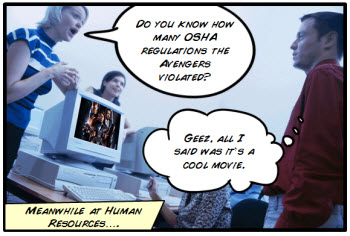
The Rapid E-Learning Blog - did the Avengers skip their safety compliance training?

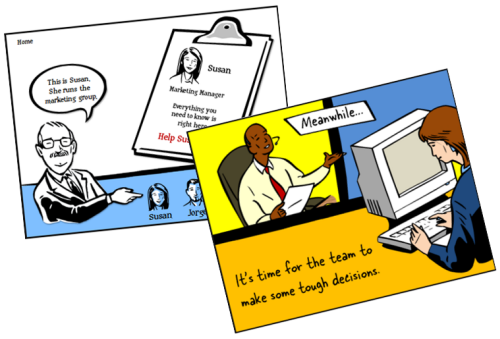
Comic book layouts are pretty popular. And they work well for elearning courses. For one, they look different. It’s that type of contrast that can hook your learners who might be bored with the standard-looking corporate elearning.

On top of that a comic-like layout breaks the content into panels which allows you to control the pacing and flow of information as each panel progressively reveals more. It’s a great way to still have the simplicity of a linear course, but make it seem more engaging.

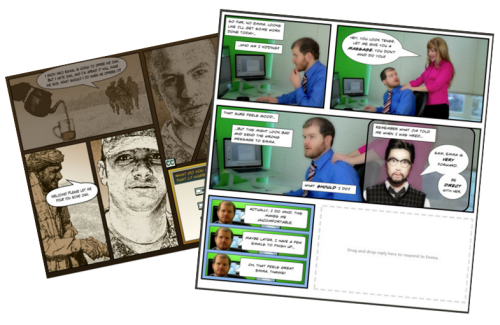
A while back I shared how to be inspired by others and included links to two comic-style elearning courses. Based on the feedback, the examples were a hit. I got quite a few emails asking how to build a similar type of course.

The Rapid E-Learning Blog - examples of comic book style elearning

In today’s post I’m going to show three ways to build a comic-style layout for your courses. To keep it simple we’ll use PowerPoint, but the ideas should work regardless of the tool you use.

Choose a Layout

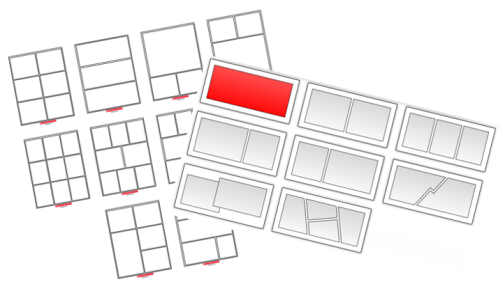
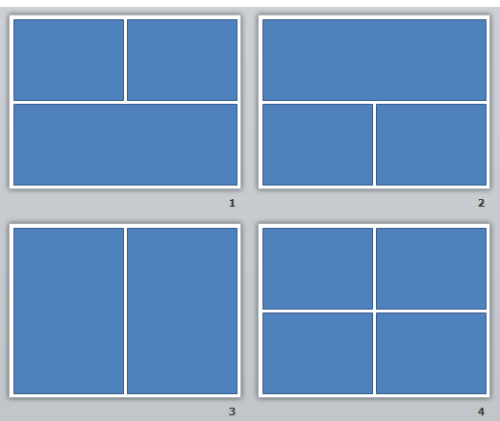
Layouts are the key distinguishing feature for the comic book look. Typically they follow some sort of grid. The good thing is that there’s really no right or wrong way to create the grid. Some comics use straight lines and even sized panels. And some use an assortment of panel sizes.

The Rapid E-Learning Blog - layouts for comic book style elearning

If you’re looking for layout ideas, the first place to look is at comic books. You could attend a comic book convention, but you’ll probably have to wear a goofy costume. A better solution is to go to one of those comic creation sites and see what types of layouts they offer. Here are a couple of good sites:

You can also create your own layouts with existing clip art. Here’s an example I shared in this blog post on using Clip Art to create your elearning template. This also lets you build a layout that has that hand-drawn look.

The Rapid E-Learning Blog - build your own comic style elearning using PowerPoint clip art

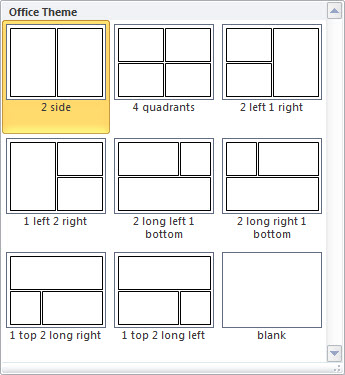
For this demo, we’ll use a few simple layouts. I created them as shapes in PowerPoint. As you can see below, creating the layout’s pretty simple. Feel free to create as many layouts as you want.

Keep in mind that too many choices can be overwhelming. Instead of building 200 possible layouts, stick with 5-10 common layouts.

The Rapid E-Learning Blog - comic style elearning layouts built in PowerPoint

Another consideration with layouts is determining how you’ll present the content. Review the two elearning examples above and notice how the layouts follow a consistent pattern. For example, you may have one type of layout for information, another for decision-making, and another for feedback.

Deciding how to use the layouts will help you best determine which types of layouts you need.

One last point, the more panels you add to the layouts, the less space you get. If you have too many panels the content make look cluttered and seem confusing. I’d err on the side of fewer panels.

Option 1: Create Master Slide Panels & Layouts

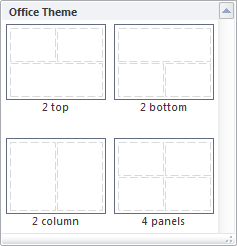
Use PowerPoint’s master slides to create the layouts. You can have as many masters as you like so the best bet is to create all of the possible layouts that you’d use in a single file. And then when you’re ready to go, select a layout for the slide and add your content.

The Rapid E-Learning Blog - build as many layouts in PowerPoint master template as you like

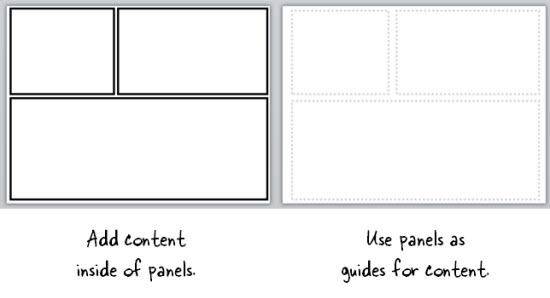
Two ways to work with the master layouts:

  • Create the entire panel look on the slide master. Then apply it to a slide and add content within the panel.
  • Create watermarked panels on the master slide and use them as guides to control placement of your content. The benefit to this is that you have the general layout mapped, but you’re not confined by the panels if your content doesn’t fit perfectly.

The Rapid E-Learning Blog - create two types of layouts

A few tips when working with these types of layouts:

  • Use thick lines and determine how colorful you want the panels to be. Think loud and in your face.
  • Not all of your content will fit perfectly in the panels. That’s OK. Build your content on the panel and get it to fit the best you can. Then copy and paste it as an image. Use the crop feature to perfectly crop it to the panel.
  • Tutorial: this tutorial walks through the template and shows a few production tips.

Option 2: Create Custom-Sized Slides for Each Panel

Instead of building the layouts on the master template, build them on the slides. This gives you more control over the panels because you have direct access to them since they’re not buried in the masters.

Build a master PowerPoint file that has all of the layouts you’d use. Then start with that file when you want to build a comic-inspired course. Make sure to save it with a different name. Duplicate the layouts you want and then add your content.

How to add content to the panels:

  • Instead of creating your panel shapes on the master slide, create them on the slide. This lets you manipulate the shape at the slide level. Add content on top of the panel shape.
  • Create panel shapes with thick lines and no fill color. Then place them on top of the content. The thick lines will cover up anything that doesn’t fit perfectly.
  • Fill the panel shapes with an image. I like this approach because the panels and content will always align perfectly. The only thing that changes is the fill image for the shape.

Bonus tips:

Option 3: Create a Master Panel Image

This is probably the easiest way to create a comic layout. Instead of messing with a bunch of images and trying to get everything laid out perfectly, just create a series of layout images that you place on top of your content.

Essentially, you have one image of the entire page. Then you cut a hole out of the page for each panel. All of the content sits underneath the page image and can only peak through the holes. This guarantees that everything is perfectly aligned inside the panel.

I like this approach because you can move each object in the panel and the overlaid master image masks any overflow to create the illusion of panels.

Extra tips:

  • Add your page images to the master slides so that you have a layout. This will act as a general guide. Your slide for each layout you provide should consist of a master slide with the same page layout and the page layout image on the actual slide that acts as the cover.
  • Be sure to use the selection pane in PowerPoint (starting with PowerPoint 2007). Hide the page image and add your content using the master as a guide. Then unhide the page layout on the slide when you’re ready to publish. Make sure the cover image is always on top in the selection pane.
  • Tutorial: How to create layout mask images to use as panel covers.

To help you out, I created a starter PowerPoint template pack. You can download it in the elearning community. It includes folders for each type of template. You can use them as they are or build your own.

The Rapid E-Learning Blog - example of the free PowerPoint template demo

Comic strip layouts are popular and a nice way to make your courses look a bit different. The trick is to determine the type of layout you want and how to get the content into the panels with the least amount of work.

There are many ways to layout the comic panels. Once you decide the type of layout you want, then you need to determine how you will get the content into the panels.

Events

Free E-Learning Resources

Want to learn more? Check out these articles and free resources in the community.

Here’s a great job board for e-learning, instructional design, and training jobs

Participate in the weekly e-learning challenges to sharpen your skills

Get your free PowerPoint templates and free graphics & stock images.

Lots of cool e-learning examples to check out and find inspiration.

Getting Started? This e-learning 101 series and the free e-books will help.


The Rapid E-Learning Blog - be intentional about your elearning design

Typically elearning courses start from existing content. And often that content dictates how the course is structured and how it looks. And that may not always be best.

The guiding principle for rapid elearning design is to be intentional. Everything you do while developing your course should be planned and exist for a reason. You don’t want existing content to dictate the design of your course. This seems obvious but often isn’t the case.

Getting to Intentional Design

Many elearning courses start as classroom content that needs to be converted and put online. Or subject matter experts hand you a bunch of PowerPoint slides that they want to turn into elearning courses.

This type of content already has some instructional consideration, albeit for a classroom. And it has some visual design that usually comes from a template with specific colors, schemes, and fonts.

Instead of being intentional about the instructional and visual design of the course we allow the existing content to determine how we build it. What we should do is take a step back, think about general course design, and then map our content to the design that’s appropriate to the course objectives.

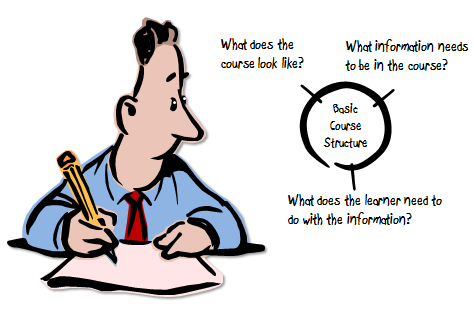
The Rapid E-Learning Blog - three parts to an elearning course

As I’ve mentioned in the past, elearning courses have three essential elements. I like to frame them as questions.

  • What will the course look like?
  • What content needs to be in the course?
  • What will the learner do with this content?

These three questions help to drive the intentionality of your course design.

Put Your Hands Up & Step Away from that PowerPoint File

Here’s a typical scenario. You’re handed a PowerPoint file and some other documents. The subject matter expert has been using that content for years in a successful classroom setting and now wants that converted to elearning.

Easy enough.

The Rapid E-Learning Blog - step away from the PowerPoint slide

In this scenario, we typically open up the existing PowerPoint file and make decision on a slide-by-slide basis. We start on slide one, make some adjustments, and then move on to slide 2. Make a few more adjustments, and then move on to the next slide.

The challenge with this approach is that you’re letting the existing content and instructional structure drive how you build the course. That may work on some occasions but for the most part it’s not ideal.

Be Intentional about the Course Design

Even if the existing content looks right, don’t start there. Take a step back and start with a blank screen. Then determine how the course needs to be built and what content you need.

If the existing content you have works, great. If not, then you’re not letting it dictate your course design. In either case, you want to be intentional in how the course is designed. This will ensure that you’re moving in the right direction.

Let’s revisit the three essential questions.

What will the course look like?

The course is going to look like something. Even if you are in a hurry and decide to do nothing but a simple conversion, the course is still going to look like something.

Most likely the look that isn’t right for the course is the one that comes from the existing content. But, there is a look that is right for the course. It’s just a matter of finding it.

Be intentional about the visual design of your elearning course.

What content needs to be in the course?

Subject matter experts tend to think everything’s important. And it probably is in the proper context. But “important” content is not the same as the “right” content that is appropriate to the goals of the elearning course.

Not all of the information about a given topic needs to be in an elearning course. I prefer a backwards design approach. At the end of the course, what change should I expect from the learner? What does it look like if I see it? Then build the course so the learner can practice and demonstrate that desired change.

Be intentional about the aligning the course content to the course objectives.

What will the learner do with this content?

This question builds off of the second one. The content in the course is structured to meet specific objectives. As the learner goes through the course, what is she supposed to do? This question helps focus on the interactive component of the course.

Do you want her reading and reflecting on content? Is there a place for her to do something, to make some decisions? Once she’s exposed to the course content, what s she supposed to do?

Sometimes the course content is simple refresher material and doesn’t require a lot if interactivity. But often the content is new and is tied to some sort of performance expectation. What can you do to get the learner to practice using the information in a setting similar to what they’d do in the real world?

Be intentional about aligning the course’s interactivity to meeting the course’s objectives.

As I mentioned earlier, the capabilities of the authoring software has evolved. This has opened the doors to do more with elearning. But easy course creation is not going to replace being intentional about how you design your courses. It just makes it easier to build what you intend to build.

The trick is to intend to build the right type of course. It requires that you answer those three essential questions: What will the course look like? What content needs to be part of it? And what is the learner supposed to do with this course?

If you can answer those questions you’re on your way to building effective elearning.

Events

Free E-Learning Resources

Want to learn more? Check out these articles and free resources in the community.

Here’s a great job board for e-learning, instructional design, and training jobs

Participate in the weekly e-learning challenges to sharpen your skills

Get your free PowerPoint templates and free graphics & stock images.

Lots of cool e-learning examples to check out and find inspiration.

Getting Started? This e-learning 101 series and the free e-books will help.


The Rapid E-Learning Blog - do you need an instructional design degree

Just finished back-to-back conferences in San Jose and San Diego.  As always, it’s fun getting to meet the blog readers and Articulate customers.  Many of them are working with limited resources and it’s interesting to see how they approach their work.  I also get lots of good questions.

One of the most frequent questions asked is whether or not they need instructional design degrees.  I get this question quite a bit and it seems I’m getting it more frequently.

If I hire someone, I put less emphasis on the formal education they have and focus more on their tangible skills.  I’m interested in seeing a portfolio of work that represents their technical skills as well as their instructional design skills.  I don’t care if they acquired the skills in a formal or informal setting. I’m just concerned with them having the skills.

However, I do appreciate what it takes to get a degree in instructional design and know that what’s learned is valuable and can only enhance a person’s base of knowledge.  Because of this, I usually tell people “No, they don’t,” and “Yes, they do.”

You DON’T Need an Instructional Design Degree

You don’t need a formal degree to learn the skills required to build good elearning courses.  There are many books and resources available that will provide the same information you’d get in any formal program.  Combine that with the easy authoring tools and rich informal learning networks available today and you’re all set. Besides many people with degrees tell me they didn’t learn how to apply what they learned in their programs.

If you do want to forego a formal education, here are a few tips to help you get started:

  • Read books and apply what you learn to your projects. If you can’t apply them to real projects, create little mini modules where you practice different techniques.  Add them to your portfolio with an explanation of what you did and why.
  • Connect with others so you’re always exposed to new ideas and challenged in your thinking.  One of the great things about social media is the access you have to all sorts of expertise.  Be prepared to connect in a genuine way.  People will tune you out if all you do is take.
  • Develop a portfolio that demonstrates your understanding of instructional design.  I also recommend combining your portfolio with a blog.  The portfolio could be the formal environment to display your work.  Whereas the blog is like the sandbox where you can flesh out ideas.

The key to success if you go this route is to continually practice your craft.  It’s not easy staying on top of your learning.  I recommend looking over the descriptions of some instructional design programs and then mapping out a plan of your own.  Expose yourself to the same books and topics and just do them at your own pace.

You DO Need an Instructional Design Degree

The reality is that many employers require an advance instructional design degree.  If all things are equal, the person with the degree will probably always be considered first.

Whether you like it or not, you’re competing in the marketplace with other qualified instructional designers.  So you want to make sure that your skills and qualifications are equitable.  That means if you don’t have a degree you might never be considered for different jobs.

The Rapid E-Learning Blog - you do need an instructional design degree

Keep in mind, that many applications aren’t screened by the hiring managers.  There’s usually some HR assistant who quickly skims resumes and the one who doesn’t meet the minimum requirements goes to the bottom of the pile.

That’s the pragmatic reason for getting a degree.  Here are some other reasons:

  • Broaden your horizon.  You’ll be exposed to resources you may never ever consider or bother reading.  It’s easy to say that you can read the book on your own, but HAVING to read and think through a book is completely different.  The degree programs will force you to think, write, and apply what you’re learning.
  • Challenge your thinking.  You’ll connect with others who probably don’t think like you (and they may even be people you don’t like).  You may not agree with others but wrestling with their ideas and debating different instructional concepts will help solidify what you know and give you a broader perspective on things.  Besides, you may meet some lifelong friends through the program.  Either way, it’s important to test what you think you know.
  • Do new things.  You can be an elearning developer with ten year’s experience who basically does the same type of course over and over again.  Or you can be an elearning developer with three years, who’s worked on 10 diverse projects.  Which one has the deeper understanding?  In a formal program you’ll get to work on diverse projects and you never know where they’ll take you.  One of the reasons for my employment with Articulate is because I was working on a communities of practice research project.  That forced me to be more intentional about my involvement with the Articulate community, and eventually led to my job.

Getting Started.

If you are asking this question about instructional design degrees here’s what I‘d do:

The Rapid E-Learning Blog - comparing desirable skills to current skill set

  • Look at current job listings.  Go to industry job boards or sites like monster.com and look for instructional design positions.  What are they looking for?
  • Make a line item list of skills and qualifications.  Next to each item, add details based on your current skills and experience.  Compare what’s desired and how well you meet those needs.  You’ll see where you have skills and where you have gaps.
  • Make a plan to fill the gaps.  This can be a formal approach like an instructional design program or something informal.  Either way determines what you need to learn and work towards learning it.
  • Connect with others.  Jump into an elearning user community and ask what others have done.  Find out what they’re reading.  Ask questions and exchange ideas.  Whether you choose a formal education or not, much of your future success depends on your network.

There are a lot more reasons why you may or may not need a formal instructional design degree.  Whatever you do, you have to continue to push your development to stay competitive and to continue building effective elearning courses.

I’d love to hear your thoughts.  Feel free to share them in the comments section.  If you do an instructional design degree or certificate, tell us where you went and what you see as the most valuable reason to do what you did.

Events

Free E-Learning Resources

Want to learn more? Check out these articles and free resources in the community.

Here’s a great job board for e-learning, instructional design, and training jobs

Participate in the weekly e-learning challenges to sharpen your skills

Get your free PowerPoint templates and free graphics & stock images.

Lots of cool e-learning examples to check out and find inspiration.

Getting Started? This e-learning 101 series and the free e-books will help.


create e-learning learning objectives

All courses begin with an overarching goal.  Assuming that the goal is clear, you build learning objectives to meet the goal.  In today’s post we’ll explore a simple way to create objectives for your course.

Learning Objectives Start with Clear Goals

Make sure that when you work with your clients you have very clear goals.  What do they hope the course will accomplish?  From that conversation, you’ll be able to discern what the learning needs are.  This helps you build your objectives.

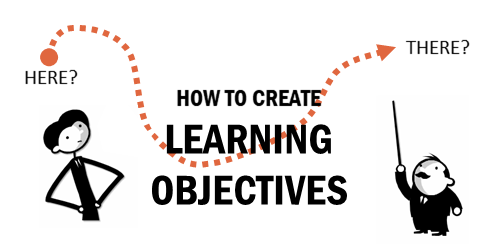
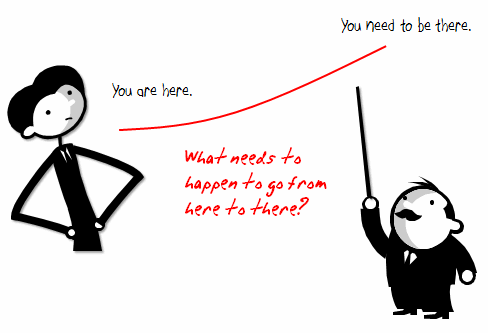
The main area of focus is to understand where you currently are and where you need to be.  Then map out the activities and learning experience to get from one point to the next.

learning objectives start here

What is the Core Learning Objective?

Start by creating your main objective and then use that to drill down to the additional content you need to meet it.  Basically, your objectives are built on three critical questions.

  • What needs to be learned?
  • Who needs to learn it?
  • What do they need to know before they can start?

What needs to be learned?  What you teach should be linked to real performance.  Essentially it’s all about what the learner is going to be able to DO with what they learn from the course.  Avoid using words like “understand.”  That’s not clear.  Find the basis for understanding and then build your objective around that.

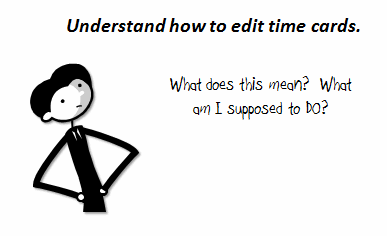
Here’s a common type of objective: Understand how to edit time cards. 

This is vague because it is not aligned to a real measure.  What does “understand” mean?  A better objective is to state what the learner will be able to DO with the new information.  If they understand something, how would you know it?  Build a measurement around that.

explaining learning objectives

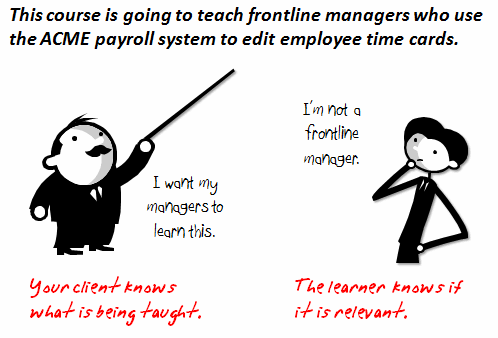
Who needs to learn it?    Who are your learners?  Who is going to take the course?  By including this in your objective you are able to qualify potential learners and tell your client who is being taught.  Are they new employees?  Managers?  At this point you don’t need to do a full analysis of the learner.  You only want to identify the audience for the course and what they’ll be able to do after completing it.

The Rapid E-Learning Blog: clear learning objectives help your client and learner know what's going on

What do they need to know before they can start to learn?  All elearning courses require some prerequisite understanding or experience. By identifying what that is, you avoid some assumptions about the learner. You can either require it prior to starting the course or you need to create the additional content to get the learner to the prerequisite level.

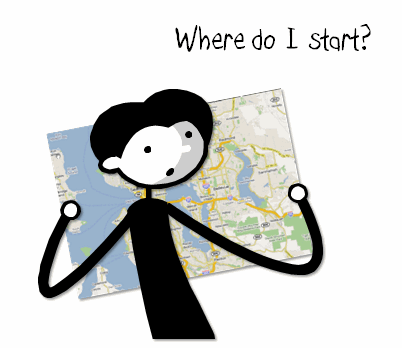
Think of it this way.  I give you a map and tell you to go to Seattle.  First you locate Seattle (your goal) and then you figure out where you’re at (prerequisite) so that you can chart your course.  You can’t reach your goal, if you don’t know the starting point. In the same sense, it’s difficult to teach your learners without knowing where they’re at.

The Rapid E-Learning Blog: learning objectives help tell you here does the learner start?


Once you have your main objective, you can start to drill down.  What assumptions does your objective require you to make?  Those assumptions become the foundation for your sub-objectives.  Let’s look at the example below.

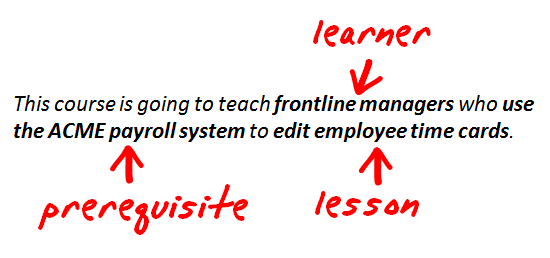
The Rapid E-Learning Blog: learning objectives defined; who's the learner, what's being taught, and what do I need to know before I start?

You know who is going to learn (front line managers), what they’ll learn (edit time cards), and what they need to know to learn it (ACME payroll system).

Editing time cards assumes that the learner knows how to use the ACME payroll system. Thus, if you want your learners to be successful at editing time cards, they need to know how to use the payroll system.  So you can create another objective that includes learning to use the ACME payroll system.  From there, the prerequisite might be that the person knows how to collect the time card data.  Or perhaps they need to understand the company’s time card policies.

The key is to continue to drill down and ask what the learner needs to know prior to learning this new information.  At that point, you determine if you make it a requirement to take the course or if you’ll teach the additional content in your course.  Once you have your objectives, you can begin to collect and sort your content to meet them.

You have a lot of latitude in how you write your objectives.  You’re not stuck in any particular model.  What’s critical is that the objective is performance-based and that who the learner is and what she needs to know prior to starting is clear.

By following the approach above, you’ll align your course objectives with the overarching goals.  You’ll also communicate to your client what the course accomplishes.  And your learners understand what’s in it for them.  Once you have your learning objectives, you can begin to build the course.

When you build you courses, what do you do to determine your learning objectives?

Events

Free E-Learning Resources

Want to learn more? Check out these articles and free resources in the community.

Here’s a great job board for e-learning, instructional design, and training jobs

Participate in the weekly e-learning challenges to sharpen your skills

Get your free PowerPoint templates and free graphics & stock images.

Lots of cool e-learning examples to check out and find inspiration.

Getting Started? This e-learning 101 series and the free e-books will help.


The Rapid E-Learning Blog

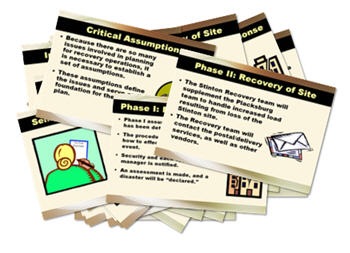
“Help! My client just dumped a 200-slide PowerPoint file on my desk and wants me to turn it into an elearning course.  What do I do?”

Do you feel his pain?  If you’ve been building elearning courses for any length of time, then you know exactly what he’s going through.  In fact, this is one of the questions I’m asked the most.  Everyone wants to know how to weed through all of the text and data that the client wants to throw into the course and still make it a good course.

In this post, I’ll go through a few considerations when you’re reviewing the course content and give you some ideas on how to weed out the unnecessary data.

Define the Objectives

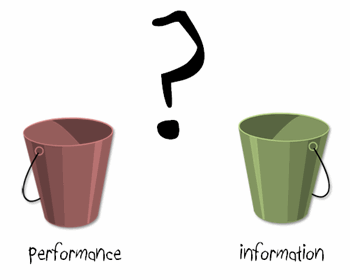
Your client wants an elearning course for a reason and your job is to figure out what that is.  I put courses in one of two buckets.  The course objective is to change behaviors for performance improvement or the objective is to share information.

The Rapid E-Learning Blog - Is it performance or information-based?

Performance-based courses have some sort of measurable goal that lets you know if behaviors have changed and what impact it had on performance.  Information-based courses are a little trickier.  Typically, the objective is to share the information without explicit behavioral change and the measure of success is a report of completion.  This is typical of compulsory training.

By identifying the objectives of the course, you’re able to figure out what content you need to meet them.

If It Doesn’t Help Meet the Objective, Take it Out of the Course

Your subject matter experts will always give you more information than you need.  But, you don’t need every piece of information they have to share.  As an instructional designer, your job is to determine what to keep and what to leave out?  These three questions help you make that determination.

1. What’s the learner supposed to do?

Design the course from the learners’ perspective.  What are they supposed to do at the end of the course?  Typically the learners are expected to accomplish a specific task or be able to solve certain problems.

Training focused on just sharing information gets tricky because the focus is less on doing so the measurable expectations are not as evident.  In those cases you need to ask how the learner is expected to use the information in the course.  This helps you shift the compliance content out of the information bucket and into the performance bucket to make it relevant to the learner’s performance expectations.

2. What course content will help the learner meet the course objectives? 

Once you understand the objectives and performance expectations, sort the the course content and identify what information the learner needs to meet the course goals?

For example, I once did an elearning project for a financial institution where the learners were trained on completing a financial form.  However the training not only covered the process of completing the form, it also covered the whole history of the financial industry through a series of Congressional reforms and various regulations.

While the background information was important, it wasn’t critical when it came to the performance expectations of completing the form accurately.  And that’s the key point.  You’re trying to find the content that is critical to meeting the objectives.  The rest of it is just extra information.  There’s a place for it, just not as the essential course content.

3. How will the learner use this in the real world?

Effective elearning connects the course’s information to the learner’s world.  Knowing what that connection is will help you build the right course and sort through the pages of subject matter information.

Why does the learner need to know this information?  Which situations does the learner experience in the real world that requires knowing the course content?  How will the learner use the information?

Going back to the lending course, unless Alex Trebek shows up to get a loan, most likely the learner only needs to know how to collect the right information from the borrowers to accurately complete the form.  And, that’s what the course content should focus on.  All of the contextual information about the industry and the various regulations can be added as resource data to augment the course, but it’s not critical to completing the form.  So in that case, you’d build an elearning course that mirrors the lending process so that the learner understands why the course is relevant to meeting performance expectations.

Put the Course Content into the Learner’s World

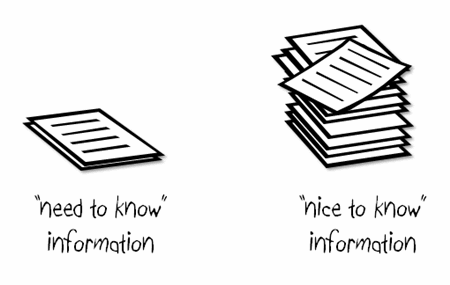
As you sort the content, you’ll end up with two piles.  One pile has “need to know” information and the other pile has “nice to know.”  The “need to know” is used to build learning activities to help change the learner’s behaviors.  The “nice to know” is resource data to provide additional information if the learner wants or needs it.

 needtoknow

Have the learner use the “need to know” information in a real world context.  Instead of doing an information dump with multiple slides of bullet points and text, create a situation where the learner needs to use the new information.  Generally, you’d do something like this to share the information with the learners:

  • Set up the real-world scenario and then provide critical background information.
  • The learner will go through a decision-making process.  At that point you can provide additional information.
  • After the learner makes a decision, you can provide even more information as feedback.

As you can see, this simple approach gives you three ways to pump information into the course that you might have previously just put on a few screens with bullet points.

Use the “nice to know” information as a way to augment the course content.  Some learners like to know more before they make decisions.  They’ll want some of the information you pulled out of the course.

There are a number of ways you can provide access to the additional content without dragging down the course or interfering with the learning process.  Here are a few ideas.

  • Link to a help line.  This could be a link to an intranet site or if you want to get creative you can create a virtual helper like an HR assistant who can provide more information.  It could be as simple as a clip art image of “Sally the HR Manager” that links to a screen with additional information.
  • Compress the data into resource tabs.  For example, using an Engage interaction you can build FAQs or a Glossary that can easily hold all of the contextual information that you weeded out of the main course content.  They sit on the top of the player as drop down tabs and whenever you need more information, you can click on them without losing your place in the course.
  • Create additional documentation that the user can access.  You can put it online as a simple web page or publish a PDF that the learner can download a
    nd use as a resource later.

You’re always going to have more information than you need for the course.  Clear learning objectives (tied to performance expectations) provide a framework for filtering out the critical information from all of the extra information.  Keep focused on how the learners use the course content and build activities that let them get the information in a way that’s real to their world.  In this way, you’ll streamline your course content and build courses that have a positive impact on your organization.

I look forward to your thoughts and feedback.  Feel free to add them by clicking on the comments link.

Events

Free E-Learning Resources

Want to learn more? Check out these articles and free resources in the community.

Here’s a great job board for e-learning, instructional design, and training jobs

Participate in the weekly e-learning challenges to sharpen your skills

Get your free PowerPoint templates and free graphics & stock images.

Lots of cool e-learning examples to check out and find inspiration.

Getting Started? This e-learning 101 series and the free e-books will help.


 The Rapid E-Learning Blog - motivation

There’s a good chance that if you neglect the information in this post you’ll lose your job.  Want to know why?

You can present a lot of good information in your e-learning courses, but you can’t really control whether a person learns from them.  The learners own what they learn and much of it is determined by their level of motivation.

The good news is that while you can’t make a person learn, you can create an environment that is more conducive to learning.  You do this by tapping into the learner’s motivation.  Your job is to figure out what will motivate your learners and then use that angle to lure them into the course.

Typically, people are motivated when their learning has meaning.  For example, if I know that passing a course will equate to an increase in my income, I am motivated to pass the course.  The same can be said for being motivated by personal safety.

When I was in basic training at the beginning of my military service, I was given one opportunity to throw a live grenade.  I was in Finance and normally they didn’t trust us with much more than a pencil.  Before I got to throw the live grenade, I had to go through a series of practice sessions and safety procedures.  Considering the implications of making a mistake while throwing the grenade, you can be sure that I paid real close attention to what I was being taught.

The odds are that most of your e-learning content doesn’t have life or death implications, so you must be a little more creative at tapping into what will motivate those who take your e-learning courses.

5 Ways to Motivate Your Learners

Reward Your Learners.  People are motivated by rewards.  Figure out what type of reward you can give the learners and then build that into the course.  Sometimes the rewards can be timed challenges or reaching a certain level of achievement.  Other rewards could be actual merchandise, like winning an iPod.  It all depends on the course.

Rewards don’t have to be tangible items.  They can be simple things like affirmation and encouragement.  The main point is to connect with the learners and find a way to have them feel good about some sort of achievement in your course.  The reward is something as simple as being able to test out of the course.

Make Sure Your Course Has Real Value.  Before your learners click on that first button, they want to know if the course has any value or benefit.  The truth is that most people who take e-learning courses don’t see the real benefit and because of that they either aren’t engaged with the course, or they don’t complete it.  If it happens to be a mandatory course, then they’re just trying to figure out how to click through it as fast as possible.  That doesn’t have to be the case.

I used to work at an organization where any time we met with a certain executive, he’d ask about our company’s performance metrics or last quarter’s earnings report.  He wanted to make sure we knew why we were working for him.  Because he had this knack for putting you on the spot, you were more motivated to pay attention to the organization’s goals and performance.

In that case, each e-learning course had meaning and implications to my job.  This also had an additional benefit.  Not only did I have a heighten sense of awareness to previously “boring” information, but I also always felt good (see the first point) when he called me out and I knew the answer.

Help Your Learners Perform Better.  This ties into the previous point.  Your course needs to have value and it needs to be relevant to what your learners do.  People will be motivated to take your course and pay attention as they know it will help them perform better.

Your job is to connect the learner to the course content.  If I’m taking a site safety course, I’m less motivated by clicking a button on a simple assessment than if I’m thrown into a real-life scenario where I am challenged to work through some issues like what I’ll face at work.  This type of approach connects me to the content, more so than screen after screen of bullet point information.

Set Clear Expectations for the Course.  I’m amazed to see my children just click around on the computer screen to get what they want.  On the other hand, I’ve watched adults fearful of clicking a next arrow not sure what will happen.

People tend to be leery of things they don’t understand, or if they’re not sure where they’re going.  However, once they get a sense of what’s going on, they’re more apt to be responsive to the course.

If you want your learners motivated, then an effective way to get them there is to let them know what to expect from the course that you want them to take. This all ties into the points above.  You’re asking the learners to spend some of their valuable time going through your course.  They expect clarity on what they’ll do, why, and what type of outcome to expect.

Along with clear expectations is to make sure that the learner knows how to navigate your course.  I’m not saying that you must create an addendum course on how to click the “next” button.  Instead, what I’m saying is that you don’t want to create a frustrating learning experience because the learner doesn’t know what to do with the course or how to get through it.  One of the best ways to de-motivate your learners is to make your course navigation so confusing that they just leave and never come back.

Tell Them They’re Wrong.  Controversy gets our attention and is a good way to motivate.  Challenge what a person believes, or even tell him he’s wrong, and you’ll see a person motivated to prove you wrong.  Of course, this approach needs to be tempered with common sense.

However, there is a lot of value in challenging people and what they know.  It’s just a matter of knowing how to do it in a manner that is appropriate.  When a person is challenged it puts them at risk and they tend to pay more attention.

Create an environment where they can safely fail or make mistakes and you’ll challenge them and keep them engaged.

These are some basic tips and things to consider when building your courses.  What you can do in your e-learning courses to motivate your learners is dependent on the course and your resources.  However, the main point is that you find the angle that works for your learners and the course you build, and then use it to engage your learner’s motivation.  A motivated learner will learn.

Events

Free E-Learning Resources

Want to learn more? Check out these articles and free resources in the community.

Here’s a great job board for e-learning, instructional design, and training jobs

Participate in the weekly e-learning challenges to sharpen your skills

Get your free PowerPoint templates and free graphics & stock images.

Lots of cool e-learning examples to check out and find inspiration.

Getting Started? This e-learning 101 series and the free e-books will help.


The Rapid E-Learning Blog - Needs Analysis Paralysis

We all know that doing a needs analysis is a good idea.  The problem is that we can become so focused on the analysis that we never get anything done.

I’ve worked on projects where I spent more time analyzing and filling out project forms than I did on actually creating courses.  On the other hand, I’ve also worked on projects where we did no analysis at all.  You can waste time and money using either approach.  So, where’s the balance?

Keep this goal in mind: create courses where the content is real to the learners.  That is the essence of all of the analysis.

If you have the resources, I’m sure that you can go through a very structured process to collect data and then put together some nice charts to show your client a bunch of bell curves and talk about statistical standard deviations.

What about those who don’t have time or money to do an exhaustive analysis?  Today, I’m going to give you some quick tips on how to collect the information you need to create relevant elearning courses.

Leave your cubicle.

I’m sure you work a lot of hours and you’re under pressure to get your work done.  Because of this, you get stuck at your desk and lose sight of the world around you.  This is especially true if you design elearning away from the world of your learners.

You have a computer at your desk, but your learners might share a computer in a lab.  Or, some of them don’t have sound cards or fast network connections.  You use a computer every day, but some of your learners don’t even know how to use a mouse, let alone click a “next” button.

Schedule some time to investigate the physical environment of those who’ll take your elearning course.  It’ll help put the course in the proper context.

Meet your learners.

In the same way you want to know the learner’s world, you also want to know the learner.  Who are the people that are taking your course?  Why do they need that information?  How will they use it?

Sit with your learners and get a feel for the work they do and how they’d apply the course content to their work.  The better you know your learners, the more relevant you can make the course.  If you’re pressed for time, only meet with two people.  Sometimes, just spending a couple of hours watching them work can be enough.

Assemble a pilot team.

If you don’t have the luxury of scheduling time to meet learners or visiting their work locations, a good alternative is to assemble a pilot team of people who represent your learners.  In fact, I’d assemble a pilot team either way.

These are people who can help you navigate the content and give you insight into how to make it relevant.  While you want experience and expertise on the team, make sure you don’t get stuck with the “know-it-all” expert.  Some of your best insight will come from recent learners.

Rapid prototype your courses.

I’ve worked on projects where we followed formal ADDIE steps and it would take months to roll out the courses.  Not anymore.  Why wait for it to be “perfect” if it means a delay in getting critical content to the right people?  With today’s tools, you can quickly build a course, test it out, get feedback, and then make adjustments.

While the tools let you build the course structure rapidly, a nice way to get the right context for the course is to get your users or pilot group to brainstorm scenarios where’d they use the content.  You get the benefit of learning more about their jobs and you get to rapidly prototype scenarios for use in your courses.

Create a survey.

So you work at one location and you don’t have access to your learners.  You won’t get to meet them.  In that case, create a survey.  It’s not as dynamic as spending real time with people, but you can still collect good information.  In addition, you can probably touch more people with a survey than you can with face-to-face contact.

There are a lot of good survey tools.  If you’re an Articulate user, you can leverage the surveys in Quizmaker.  If not, try one of the services like Zoomerang or Survey Monkey.  The trick with the survey is to collect the right information and to avoid collecting so much that you can’t process it.

Don’t bother doing an analysis.

Sometimes you don’t need an analysis.  There’s a good chance that your customer can give you what you need or you’re resourceful enough to trust your intuition.

I know I’ll get some flack for this advice, but from my experience that’s what’s happening anyway.  The last three organizations that I’ve worked for have been multibillion dollar companies with tens of thousands of employees.  At one, we actually were named the #1 training company.  I can tell you now, that doing any sort of analysis was in the minority.  And it wasn’t just at those companies.  It’s been that way everywhere I’ve worked.

Don’t feel bad if you don’t do an analysis.  There are just some projects that don’t require a lot.  Collect the information you need and do what you think is best.  Worst case, you learn what projects to spend time analyzing.

The goal in all of this isn’t to avoid doing a proper analysis of your course and determining how to best meet your objectives.  Instead, it’s to find the right balance between collecting the relevant information and getting your courses delivered in a timely manner.

I know that the blog readers come from diverse industries and what’s true from a corporate perspective might not be for those who design curriculum for the academic world or K12.  I’m interested in hearing your thoughts and tips on quickly doing a needs analysis. Feel free to share them with us in the comments section.


Events

Free E-Learning Resources

Want to learn more? Check out these articles and free resources in the community.

Here’s a great job board for e-learning, instructional design, and training jobs

Participate in the weekly e-learning challenges to sharpen your skills

Get your free PowerPoint templates and free graphics & stock images.

Lots of cool e-learning examples to check out and find inspiration.

Getting Started? This e-learning 101 series and the free e-books will help.


time_money

Unless you work for the Count of Monte Cristo, you most likely have limited resources to build your e-learning courses.  Here are three techniques I’ve used that will make your e-learning development go faster and cost less.

Don’t Create an E-Learning Course

Clients typically think every problem can be solved through training.  Sometimes the best value you bring is that of a gatekeeper.  If you can avoid creating a course, do so.

Your job is to help your clients make the right decisions by assessing their needs and advising them on the best course of action.  By avoiding unnecessary e-learning projects, you free your resources to work on those that bring real value.

Use Kuhlmann’s E-Learning Hierarchy

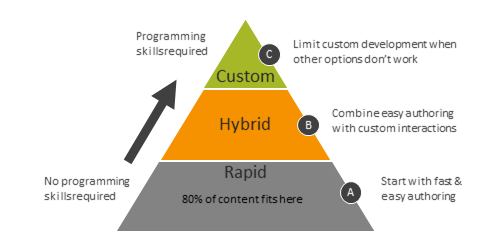
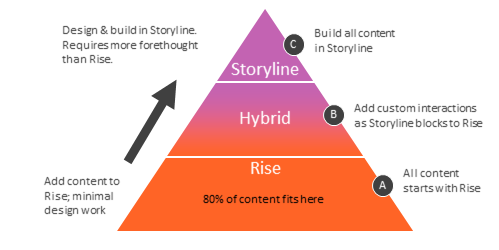
I use a three-tiered approach for e-learning design.  I start by automating as much of the production process as I can and freeing up my more expensive developers to work on projects that best utilize their skills.

  1. Make rapid e-learning the default approach unless you need more. This allows you to meet your objectives without committing more expensive resources to the project.
  2. Build custom e-learning pieces that you can drop into your rapid e-learning course.  Rapid e-learning software is very flexible and allows you to add custom content such as web objects or iframes.  This hybrid approach allows you to build the pieces you need and still leverage the benefits of quicker production using the rapid e-learning software.
  3. Commit your multimedia resources to custom development.  If you follow the first two steps, then you can free up your resources to build custom content.  It doesn’t make sense to pay a skilled multimedia programmer to build something that you can do with a rapid e-learning tool.  Instead, push as much work to the rapid development side as you can and get your expensive developers to work on those projects that require custom development and best utilize their skills.

Incorporate External Content Resources

Most of the e-learning is focused on delivery of information.  And most of these courses use content that is already available elsewhere, like the organization’s intranet.  Instead of just regurgitating content, do this.  Build your course to teach the learner how to find the content outside of the course.

If you do this, you won’t need to cover everything in the course.  This allows you to create learner independence and means you must build less content.  It also helps with maintaining the course as the content changes.

In addition, many step-by-step courses only require a brief overview and then some cheat sheets or simple tips that the learners can use at their workplaces.  Why build a time-consuming course, when you might be able to provide a less expensive document that serves the same purpose?

The key to your success is investing your time and resources where you get the most value.  Following these tips helps you do that.

Events

Free E-Learning Resources

Want to learn more? Check out these articles and free resources in the community.

Here’s a great job board for e-learning, instructional design, and training jobs

Participate in the weekly e-learning challenges to sharpen your skills

Get your free PowerPoint templates and free graphics & stock images.

Lots of cool e-learning examples to check out and find inspiration.

Getting Started? This e-learning 101 series and the free e-books will help.


performance vs information

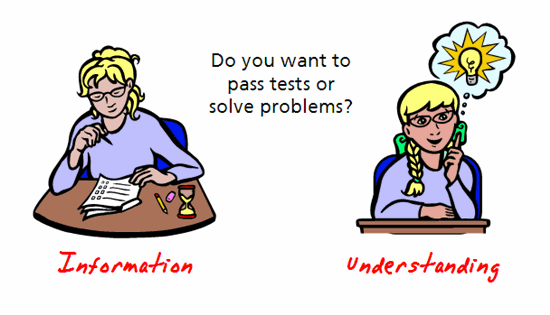
Information isn’t the same as understanding. Many e-learning courses are designed to just share information. In some cases, that’s fine. But, there are many e-learning courses that are performance-based and in those cases we need to change how the learner thinks and acts rather than just regurgitate facts.

One evening I was working late and we had a fire drill. Everyone did what we learned to do in our safety course and we made our way to the exit. However, the exit was a sliding door that shut down during the drill.

Since the training didn’t provide information on how to open the sliding door once power was lost, we just sat there waiting for someone to come by and open the door for us. What struck me was that no one really knew what to do once we were presented with a challenge that wasn’t part of our training.

This was a reminder that there’s a difference between passing a site safety course (information) and really knowing what to do in the event of an emergency (understanding).

tests1.gif

The safety course was typical of many e-learning courses. They’re designed to share information, but don’t usually go beyond that. Information sharing doesn’t work for courses where the learner is expected to take action or complete tasks. In those cases, the e-learning course needs to be designed to go beyond the facts and move towards creating new levels of understanding.

How Do I Create Understanding?

When we teach others we’re not looking for them to just know information. Instead, we want them to use information in context to make good decisions.

The challenge when creating e-learning courses is knowing how to build an environment where the learner can process the information and place it in the appropriate context and through that demonstrate greater levels of understanding. This all starts with some fundamental ideas around course design.

1. Establish clear learning objectives.

For the e-learning course to be successful, you need to establish clear learning objectives. This seems obvious. However, I’ve been involved in enough training programs to know that that’s not always the case.

Without clear objectives, you’ll have problems reaching your goals and you’ll probably not engage the learner. Like the old saying goes, “If you don’t know where you’re going, most likely you’ll have no problems getting there.”

2. Determine what evidence proves understanding.

Once you establish the learning objectives, you need to determine how you’ll know they’ve been met. What evidence proves that the learner is able to meet the goals?

This goes beyond just creating a multiple choice quiz. What you really need to shoot for is evidence that demonstrates understanding not just how to do something but why.

3. Build the course to provide information AND create a learning experience.

Once I determine the right type of evidence to prove the learner’s understanding, I can build the experiences into my course that helps the learner get to the desired level of understanding.

I want to measure the learner’s grasp of the facts and I want to put the learner in a situation where she can use the facts and apply them to the nuances of real life decisions. This helps me see that not only does she get the information but that she is able to use the facts in an appropriate manner to make performance-based decisions.

4. Create the ability for learners to reflect on the information.

E-learning courses are good at sharing facts and information. The goal is to help the learner pull all of the information together and make good decisions. A step in the direction of creating real understanding is to help the learner reflect on the new information.

So often we share information and then move on assuming that the learner understands why the information is important. By reflecting on the information, you put the learner in a position to take abstract and disconnected facts and place them in an appropriate context. Here are some ideas on how to build reflection as part of the learning process:

  • Ask questions to hook the learners and get them to think about the information in a context that is important to them.
  • Have the learner’s review scenarios or case studies so that they can take the information out of the course and put it into the real world.
  • Create some sort of learning journal where the learners have to think about the course’s information and write out their thoughts. This helps them personalize the information and make it more than just a bunch of facts.

5. Create a way for learners to explore.

The other day I was out walking and I saw a skateboarder practice jumping in the air with the board. In the time I observed him, he must have jumped unsuccessfully at least twenty times. What intrigued me was that each time he jumped, somewhere in his brain he was making minor adjustments to his technique that will allow him to eventually become proficient at jumping.

How does this translate to e-learning? To get a learner beyond rote facts means that you have to create a place where the learner can make those “minor adjustments.” Learners need the ability to explore, to have a place of “what if’s” to see cause and effect.

  • Take a cue from Google. Free up the course navigation and give the learners the ability to click around and explore like they would online or if using a search engine. Present a challenge and have them look for an answer rather than just giving them the information.
  • Create scenario-based branches that allow the learner to make a choice and get feedback specific to the choice made.
  • Build an environment where the learners can modify variables to see the cause and effect of their decisions. Create interactive visual models where the learner can play around with “what if” scenarios.

To create an e-learning course that empowers the learner to make good decisions means that you have to create an environment where the learner gets important information and has time to reflect on its meaning and where it fits in the learner’s world.

Events

Free E-Learning Resources

Want to learn more? Check out these articles and free resources in the community.

Here’s a great job board for e-learning, instructional design, and training jobs

Participate in the weekly e-learning challenges to sharpen your skills

Get your free PowerPoint templates and free graphics & stock images.

Lots of cool e-learning examples to check out and find inspiration.

Getting Started? This e-learning 101 series and the free e-books will help.